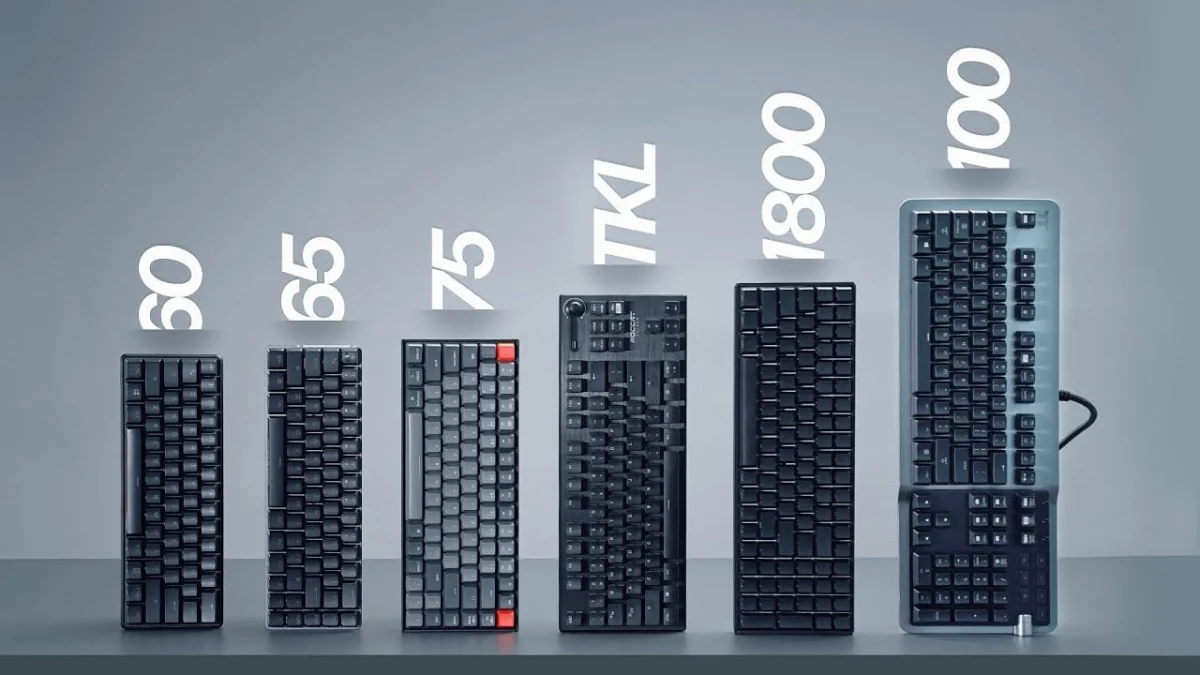
The modern keyboard market presents a bewildering array of sizes and layouts, a significant departure from the monolithic full-size keyboards that once dominated desks worldwide. Understanding the nuances of each form factor, from the expansive 100% layout to the minimalist 40%, is crucial for consumers seeking optimal ergonomics, functionality, and aesthetic appeal. This comprehensive guide delves into the characteristics, advantages, disadvantages, and target demographics for each prominent keyboard size, offering a detailed analysis to inform purchasing decisions.
The Evolution of Keyboard Form Factors
Historically, the full-size keyboard, complete with a dedicated numeric keypad, function row, and navigation cluster, was the de facto standard, largely driven by its utility in data entry and business applications. As personal computing evolved and gaming emerged as a significant segment, coupled with a growing emphasis on ergonomics and desk space optimization, manufacturers began experimenting with more compact designs. This diversification accelerated with the resurgence of mechanical keyboards in the 2010s, which fostered a vibrant enthusiast community keen on customization and unique layouts. Today, the choice of keyboard size is a deliberate one, reflecting individual priorities regarding workflow, gaming performance, portability, and personal comfort. Market research indicates a gradual but consistent shift in consumer preference towards smaller form factors, particularly within the gaming and professional creative sectors, where desk real estate and mouse movement are paramount.
Full Size (100%) Keyboards: The Traditional Workhorse
The 100% or full-size keyboard represents the traditional benchmark, featuring approximately 104 to 108 keys. This layout includes a full number pad, a dedicated navigation cluster (home, end, page up/down, delete, insert), arrow keys, and a complete F-key row at the top.
Advantages: The primary benefit of a full-size keyboard is its comprehensive key set, making it ideal for roles involving extensive data entry, accounting, or any task that frequently utilizes the numeric keypad. Its ubiquity also means a vast selection of designs, switch types, and features are available, often at competitive price points. Many full-size models are early adopters of innovative technologies, such as advanced polling rates, integrated USB and audio passthroughs, or proximity sensors for dynamic backlighting. For gamers, some full-size keyboards incorporate dedicated macro columns on the left side, offering additional programmable functionality. Furthermore, they frequently come bundled with wrist rests, addressing ergonomic concerns for prolonged use.
Disadvantages: The sheer size of a 100% keyboard can be a significant drawback. It occupies considerable desk space, potentially limiting mouse movement, especially in first-person shooter (FPS) gaming where wide, sweeping mouse actions are common. Ergonomically, the width of the keyboard often forces the mouse arm further away from the body’s midline, which can lead to discomfort or repetitive strain injuries over time. This layout also rarely features detachable cables, a common convenience in smaller, more portable designs. While a staple for many, the full-size form factor is increasingly viewed as excessive by users who do not regularly utilize the numpad.
1800 Compact Keyboards: Space-Saving Full Functionality
The 1800 compact layout is a clever reimagining of the full-size keyboard, retaining all 104 keys but significantly reducing the overall footprint by eliminating the spaces between key clusters. The numeric keypad is brought closer to the main alphanumeric block, and the navigation keys are often integrated more tightly.
Advantages: This form factor offers the full functionality of a 100% keyboard—crucial for data entry and productivity—while occupying less desk space. It presents a unique aesthetic with its tightly packed keys, appealing to users who appreciate a minimalist look without sacrificing any keys. The compact nature can also slightly improve ergonomics compared to a traditional full-size board, as the mouse can be positioned marginally closer.
Disadvantages: Despite its advantages, the 1800 compact layout is less common, leading to fewer options in the market. The unconventional key spacing can initially be challenging for touch typists accustomed to standard layouts. Moreover, finding aftermarket keycap sets that perfectly accommodate the non-standard key sizes (e.g., smaller right Shift or Ctrl keys on some variants) can be difficult, limiting customization. Its niche appeal means it doesn’t offer the same variety or price competition as full-size or TKL boards.
Tenkeyless (TKL) Keyboards: The Gamer’s and Ergonomist’s Choice
The Tenkeyless (TKL) keyboard, as its name suggests, removes the dedicated numeric keypad, typically resulting in 87 to 88 keys. It retains the F-key row, arrow keys, and the navigation cluster above the arrow keys.
Advantages: TKL keyboards strike an excellent balance between functionality and compactness, making them exceptionally popular among gamers and users prioritizing ergonomics. By removing the numpad, the keyboard becomes significantly narrower, allowing the mouse to be positioned closer to the body’s centerline. This reduces shoulder abduction and wrist deviation, contributing to a more comfortable and ergonomic typing and mousing experience. For gamers, the increased desk space directly translates to more freedom for mouse movement, a critical factor in competitive gaming. The TKL market is robust, offering a wide array of options from mainstream gaming brands to entry-level enthusiast models, often with premium features and detachable cables.
Disadvantages: The primary drawback is the absence of the numeric keypad, which can impede workflow for users heavily reliant on data entry. While many custom keycap sets are designed for TKL layouts, those originally intended for full-size keyboards may leave several keycaps unused. Despite their popularity, TKL keyboards can sometimes be priced similarly to, or even higher than, full-size alternatives, depending on brand and features.
75% Keyboards: The Enthusiast’s Compact Solution
Moving further down the size spectrum, 75% keyboards condense the TKL layout even more. They typically feature 84 keys and achieve their compactness by removing the spaces between the F-row, the alphanumeric block, and the navigation/arrow key clusters. Often, the right Shift key is smaller, and some keys in the bottom row (e.g., Ctrl, Alt) might have non-standard sizes to accommodate the tighter layout.
Advantages: 75% keyboards offer nearly all the functionality of a TKL board—including the F-row, arrow keys, and essential navigation keys—in a significantly smaller footprint. This makes them ideal for users who want maximum desk space and portability without sacrificing critical keys. Their compact nature and often unique aesthetics have made them a favorite within the custom keyboard community, exemplified by the popularity of models like the Glorious GMMK Pro. They are excellent for travel and space-conscious setups.
Disadvantages: The tight key clustering can take some getting used to, and the non-standard key sizes (particularly the right Shift and bottom row keys) make finding compatible aftermarket keycap sets more challenging and expensive. While gaining popularity, 75% layouts still offer less mainstream variety compared to TKL or full-size options. The visual density of keys can also be off-putting for some users.
80% Keyboards: A Hybrid Approach
The 80% layout is a less common but distinctive form factor, often described as a hybrid between a TKL and a 75%. It retains all the keys of a 75% layout but reintroduces a separation between the function row and the number row, similar to a TKL. The navigation cluster typically remains tightly integrated.
Advantages: This layout provides the compact benefits of a 75% while offering a more traditional separation for the F-row, which some users find more comfortable for muscle memory. 80% keyboards often feature unique designs and colorways, appealing to those seeking a keyboard that stands out visually. They can serve as an excellent main desktop keyboard for productivity users who find other sizes either too generic or too condensed.
Disadvantages: As a niche layout, 80% keyboards are not widely available, limiting consumer choice. Keycap compatibility can also be an issue due to potentially non-standard bottom row keys or specific layouts. Their distinct aesthetic might not appeal to everyone.
65% Keyboards: Portable Powerhouses with Dedicated Arrows
A 65% keyboard typically features 66-68 keys, removing the F-row and often condensing the navigation cluster into a single column on the right. Critically, it retains dedicated arrow keys, which is a significant differentiator from smaller layouts. The F-row functions are accessed via an FN (function) layer, usually by pressing FN + the corresponding number key.
Advantages: This size represents a sweet spot for many users, offering excellent portability and maximum desk space for mouse movement, especially in gaming. The retention of dedicated arrow keys is a major benefit for programming, navigation, and editing tasks, making it a viable option for productivity. It serves as an ideal companion for laptops, providing a superior typing experience on the go. The small footprint is also highly advantageous in competitive FPS gaming environments.
Disadvantages: The reliance on an FN layer for F-key functions, tilde (~), and other navigation keys (like home, end, page up/down) requires an adjustment period and can slow down workflows for users who frequently use these keys. Keycap compatibility can be problematic, as the bottom row often features non-standard key sizes, and secondary legends for FN functions vary between manufacturers. The learning curve for accessing layered functions can be steep for new users.
60% Keyboards: The Minimalist Gamer’s Dream
The 60% keyboard, typically with 61-62 keys, is a highly compact layout that removes the F-row, navigation cluster, and dedicated arrow keys. All these functions, along with others like Delete, are accessed via an FN layer. The alphanumeric block forms the core of this layout.
Advantages: 60% keyboards offer the absolute maximum desk space for mouse movement, making them extremely popular among competitive FPS gamers who prioritize an unobstructed mousing area. Their compact size also makes them highly portable. The keycap layout for the primary alphanumeric block is largely standardized across models, meaning a vast array of aftermarket keycap sets are available for customization. For users who primarily interact with the alphanumeric keys and are comfortable with layered functions, the 60% can be incredibly efficient.
Disadvantages: The steep learning curve is the most significant hurdle. Relying on the FN key for basic functions like arrows, Delete, and the F-row can be frustrating and inefficient for productivity tasks, programming, or general computing. The absence of dedicated arrow keys is a dealbreaker for many. While excellent for specific use cases like gaming, its versatility for general productivity is limited. Compared to a 65% keyboard, the space saving is minimal (often just one column of keys), yet the functional compromise is substantial, leading many to recommend 65% as the smallest practical size for most users.
40% Keyboards and Niche Alternatives: Extreme Specialization
At the extreme end of the spectrum are 40% keyboards, which typically feature only the alphanumeric keys and essential modifiers, completely omitting the F-row, number row, and arrow keys. These are highly niche products, almost exclusively found within the custom keyboard community.
Advantages: The 40% layout offers unparalleled compactness and a unique aesthetic. Its primary appeal lies in extreme programmability and the ability to create highly personalized, multi-layered layouts. For users willing to invest time in configuration and adaptation, it can offer an incredibly efficient and ergonomic typing experience, as all essential keys are within easy reach.
Disadvantages: The learning curve is immense, requiring extensive muscle memory retraining and deep familiarity with keyboard programming. It is entirely impractical for most mainstream users and workflows, serving almost exclusively as a highly specialized tool or a hobbyist’s project.
Beyond these standard layouts, gaming keypads from manufacturers like Razer or Logitech offer another alternative, providing a highly specialized, ergonomic cluster of keys optimized solely for gaming. While effective for their specific purpose, they are generally expensive and require a significant learning investment, making them unsuitable for general use.
Market Trends, Ergonomics, and User Preferences
The keyboard market reflects a dynamic interplay of tradition, innovation, and user demand. While full-size keyboards continue to hold a significant share, particularly in enterprise and budget-conscious segments, there is an undeniable trend towards smaller, more ergonomic, and specialized layouts. Industry analysts point to the rise of competitive gaming and the increasing emphasis on workspace optimization as key drivers for the growth of TKL, 75%, and 65% form factors.
Ergonomic studies consistently suggest that narrower keyboards can reduce the distance a user needs to reach for their mouse, thereby decreasing strain on the shoulder and wrist. This scientific backing reinforces the appeal of TKL and smaller layouts for health-conscious users and those engaged in prolonged computer work. The custom keyboard community, a significant force in driving innovation, has further popularized compact and unique layouts, offering highly customizable options that cater to specific aesthetic and functional preferences.
For professionals, the choice often boils down to a trade-off between full functionality (100%, 1800 compact) and ergonomic benefits (TKL, 75%). Gamers, particularly those in competitive e-sports, frequently prioritize unhindered mouse movement above all else, leading to widespread adoption of TKL, 65%, and 60% keyboards. Casual users and those new to mechanical keyboards often start with full-size or TKL due to their familiarity and broad availability.
Conclusion: The Power of Choice
The diverse landscape of keyboard sizes underscores a mature market that caters to a wide spectrum of user needs and preferences. No single size is universally superior; the "best" keyboard is ultimately a subjective choice dictated by individual workflow, gaming habits, desk setup, and ergonomic considerations. While full-size keyboards remain a popular choice for their comprehensive feature set, the growing appeal of TKL and smaller form factors highlights a collective shift towards optimized desk space, enhanced ergonomics, and specialized functionality. The 65% layout, in particular, has emerged as a strong contender for its balance of dedicated arrow keys and compact design, while 60% layouts dominate the ultra-minimalist gaming segment. As technology advances and user demands evolve, the keyboard market will undoubtedly continue to innovate, offering even more tailored solutions for the discerning consumer. Understanding these nuances empowers users to make an informed decision, selecting a keyboard that not only performs its primary function but also enhances their overall computing experience.