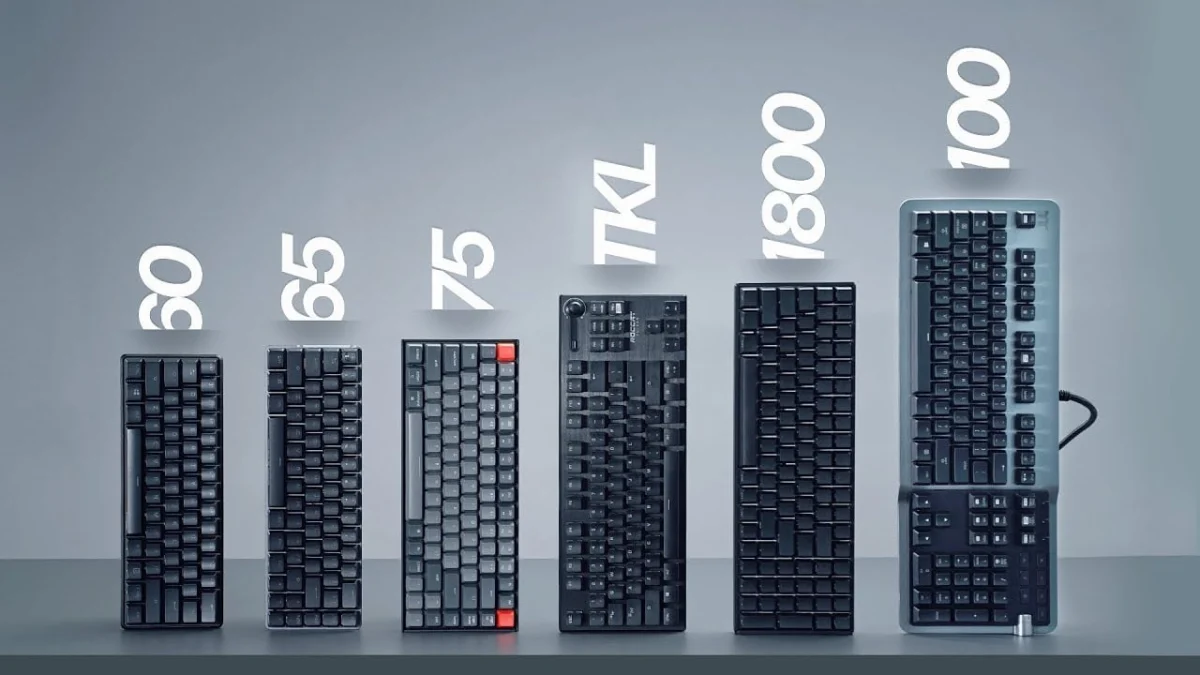
The modern keyboard market presents a bewildering array of choices, extending far beyond switch types and aesthetic preferences to encompass a crucial, yet often overlooked, factor: size. From the sprawling traditional full-size models to the minimalist 40% layouts, each form factor caters to distinct user needs, ergonomic considerations, and desk space constraints. Understanding the nuances of these dimensions is paramount for consumers seeking to optimize their typing experience, whether for professional productivity, competitive gaming, or casual use. This comprehensive guide delves into the various keyboard sizes, their historical context, functional advantages, and potential drawbacks, providing a factual analysis of their implications in today’s diverse computing landscape.
The Evolution of Keyboard Form Factors
Keyboards have undergone significant transformations since their inception as electro-mechanical typewriters. Early computer keyboards, such as the iconic IBM Model M, established the full-size layout as the de facto standard, incorporating a dedicated alphanumeric section, a function row, a navigation cluster, and a numeric keypad (numpad). This comprehensive design facilitated data entry and command execution in business environments where efficiency and accessibility of all keys were prioritized.
However, the advent of graphical user interfaces (GUIs) and the increasing popularity of gaming gradually shifted user requirements. The full-size layout, while comprehensive, often consumed considerable desk space, potentially leading to ergonomic issues for users who needed to frequently switch between typing and mouse manipulation. This evolving landscape spurred innovation in keyboard design, leading to the development of more compact alternatives that selectively omitted certain key clusters to achieve smaller footprints without sacrificing core functionality for specific use cases. The rise of mechanical keyboards and the custom keyboard community in the 21st century further accelerated this diversification, introducing a plethora of niche sizes and layouts tailored to highly specific preferences.
Full Size (100%): The Traditional Workhorse
The 100% or full-size keyboard remains the most ubiquitous form factor, characterized by its complete set of approximately 104 to 108 keys (for ANSI and ISO layouts, respectively). This includes a full alphanumeric block, a dedicated function (F) row, a navigation cluster (Insert, Home, Page Up, Delete, End, Page Down), dedicated arrow keys, and crucially, a full numeric keypad.
Advantages: The primary benefit of a full-size keyboard lies in its comprehensive functionality. For professionals engaged in data entry, accounting, or extensive spreadsheet work, the dedicated numpad is indispensable, significantly accelerating numerical input. The full complement of F keys and navigation keys provides direct access to various software functions and shortcuts without the need for modifier keys, streamlining workflows. Furthermore, due to its historical dominance, the full-size market offers the widest array of designs, features, and switch options. Many advanced features, such as integrated USB/audio passthroughs, high polling rates, proximity sensors for illumination, and customizable macro columns (often on the left side for gaming), frequently debut on full-size models. This extensive variety ensures that users can find a model perfectly suited to their specific needs and aesthetic preferences.
Disadvantages: The main drawback of a full-size keyboard is its physical footprint. Its substantial width can occupy a significant portion of a desk, potentially limiting space for mouse movement, particularly for gamers who prefer low mouse sensitivities. Ergonomically, the width can also be a concern. Studies on computer workstation ergonomics suggest that a narrower keyboard can help reduce shoulder abduction, leading to a more neutral posture and potentially mitigating the risk of repetitive strain injuries (RSIs). For many users, particularly those who rarely use the numpad, the additional keys are superfluous and contribute to unnecessary desk clutter and reach.
1800 Compact: The Space-Saving Full Layout
The 1800 compact layout represents a clever optimization of the full-size keyboard. While retaining all 104/108 keys, it achieves a smaller footprint by eliminating the empty spaces between key clusters. The numpad is integrated more closely with the main alphanumeric block, and the navigation keys are often positioned directly above the numpad or in a tighter arrangement.
Advantages: The 1800 compact offers the best of both worlds for users who require a dedicated numpad but desire a more compact design. It preserves the full functionality of a 100% keyboard while reducing its overall width by approximately 15-20%. This makes it an attractive option for professionals who cannot forgo the numpad but are conscious of desk space or seek a cleaner aesthetic. The condensed layout also provides a unique visual appeal that deviates from the standard full-size design.
Disadvantages: Despite its advantages, the 1800 compact remains a niche category. Its non-standard key spacing can sometimes lead to a slightly steeper learning curve for touch typists accustomed to traditional layouts. The limited availability compared to full-size or TKL keyboards can also restrict options for customization and specific features.
Tenkeyless (TKL): The Gamer’s Choice and Ergonomic Compromise
The Tenkeyless (TKL) layout, often referred to as 87% (ANSI) or 88% (ISO), removes the numeric keypad entirely, resulting in a keyboard that is significantly narrower than a full-size model. It retains the alphanumeric block, the function row, the navigation cluster, and dedicated arrow keys.
Advantages: TKL keyboards have gained immense popularity, particularly among gamers and users prioritizing ergonomics. By eliminating the numpad, the keyboard becomes substantially narrower, allowing the mouse to be positioned closer to the user’s right hand. This reduces the need for the right arm to extend outwards, promoting a more natural and comfortable posture. For competitive gamers, the increased desk space for mouse movement is a critical advantage, facilitating wider and more fluid aiming motions without hitting the keyboard. Ergonomically, the more centered position of the alphanumeric cluster also reduces shoulder abduction during typing, contributing to a healthier posture. The TKL form factor strikes an excellent balance between compactness and functionality, retaining all essential keys for most general computing tasks and gaming.
Disadvantages: The primary disadvantage of a TKL keyboard is the absence of the numpad, which can be a significant productivity hindrance for users who frequently input numerical data. While some users might find TKL models to be unexpectedly expensive compared to their full-size counterparts, this is often due to specialized manufacturing processes or premium components targeting the enthusiast market. Additionally, when purchasing custom keycap sets, which are typically designed to cover a full-size layout, TKL users may find themselves with several unused numpad keycaps.
75% and 80%: The Enthusiast’s Compact Solution
Moving further down the size spectrum, the 75% and 80% layouts offer even greater space efficiency while generally retaining the function row and dedicated arrow keys.
75% Keyboards: These are essentially a more compact version of the TKL, characterized by minimal to no spacing between the F-row, the alphanumeric block, and the navigation/arrow key cluster. Keys like the right Shift and the bottom row right of the spacebar may be slightly smaller or rearranged to accommodate the condensed layout.
Advantages: 75% keyboards provide a highly compact form factor without sacrificing the dedicated F-row or arrow keys, making them popular among enthusiasts and users who value both space-saving and direct access to these functions. Their unique, tightly packed aesthetic also appeals to a specific design sensibility. The rise of popular models like the Glorious GMMK Pro has democratized this layout, making it more accessible to a broader audience.
Disadvantages: The non-standard key sizes (e.g., smaller right Shift, altered bottom row) can make finding compatible keycap sets challenging. Users accustomed to standard layouts may also experience a brief adjustment period due to the close proximity of keys.
80% Keyboards: While the name might suggest a larger size than 75%, the 80% layout often refers to a design that shares a similar compact footprint to the 75% but distinguishes itself by separating the function row from the number row with a small gap, akin to a TKL. This hybrid design attempts to marry the aesthetics of a TKL with the compactness of a 75%.
Advantages: 80% keyboards offer a unique visual appeal and a slightly more conventional feel for those who prefer the separation between the F-row and number row. They are often found in special colorways or limited-edition designs, catering to users looking for something distinctive.
Disadvantages: Similar to 75% keyboards, 80% layouts can present challenges with keycap compatibility due to their non-standard bottom rows or unique key sizes. Their niche status means fewer options are available compared to more common sizes.
65%: The Balanced Minimalist
The 65% keyboard takes compactness a step further by removing the dedicated function row entirely, along with most of the navigation cluster (Insert, Home, Page Up, etc.). It retains the alphanumeric block, dedicated arrow keys, and usually a single column of navigation keys (often Delete, Page Up, Page Down) on the right side. The function keys are accessed via an FN (Function) modifier key combined with the number row.
Advantages: The 65% layout is a strong contender for users seeking a highly compact keyboard that still provides dedicated arrow keys – a crucial feature for navigation, coding, and many games. Its reduced depth makes it an excellent companion for laptops, fitting easily into backpacks, and maximizing desk space for mouse movement in FPS gaming environments. It strikes a balance between extreme minimalism and everyday usability, making it a popular choice for both portable setups and space-conscious desktop users.
Disadvantages: The primary trade-off is the reliance on the FN key for accessing the F-row, tilde key, and certain navigation functions. This can introduce a learning curve and slightly slow down workflows that heavily depend on these keys. Keycap compatibility can also be an issue, as the bottom row is often non-standard, especially to the right of the spacebar. While some manufacturers, like ROG with their Falchion, have attempted to standardize the bottom row, this remains a common challenge across many 65% models.
60%: The Ultra-Compact Gaming and Aesthetics Powerhouse
The 60% keyboard represents an even more aggressive reduction in size. It eliminates the dedicated function row, navigation cluster, and crucially, the dedicated arrow keys. All these functions, including arrow keys, are accessed via the FN modifier key, typically combined with the WASD keys or other keys in the alphanumeric block. The layout of the main alphanumeric block is largely standardized, making it highly attractive for keycap customization.
Advantages: The most significant benefit of a 60% keyboard is its incredibly small footprint, offering maximum desk space for mouse movement, which is highly advantageous for competitive FPS gaming. The standardized main keycap layout across most 60% models means a vast array of custom keycap sets are compatible, allowing for extensive aesthetic personalization. For users who primarily use the WASD cluster and desire a minimalist setup, the 60% is an ideal choice.
Disadvantages: The heavy reliance on the FN key for almost all non-alphanumeric functions presents a steep learning curve and can severely hinder productivity in professional environments. Basic functions like "Delete" often require FN + Backspace, and the absence of dedicated arrow keys can be particularly cumbersome for tasks requiring precise cursor navigation or text editing. While users can adapt over time, the constant need for modifier keys can introduce friction and reduce typing efficiency for many. The practical difference in desk space between a 60% and 65% keyboard, often just one column of keys, leads many to recommend the 65% as the minimum for a better balance of functionality and compactness.
40% and Niche Alternatives: The Experimental Frontier
At the extreme end of the spectrum are 40% keyboards, which are highly specialized and niche. These layouts typically include only the alphanumeric keys, often omitting even the number row, and entirely foregoing dedicated function keys, arrow keys, and navigation clusters. Every non-alphanumeric function is accessed through multiple layers, activated by highly programmable modifier keys.
Advantages: 40% keyboards are the epitome of minimalism and extreme customization. Their tiny footprint is unmatched, and they offer an unparalleled level of programmability, allowing users to define multiple layers of functionality to suit their precise needs. They appeal to enthusiasts who enjoy experimenting with unique layouts and are willing to invest time in configuring their keyboard to perfection.
Disadvantages: The learning curve for a 40% keyboard is exceptionally steep, making it impractical for most users, especially in productivity contexts. It requires significant muscle memory retraining and a deep understanding of keyboard programming. Keycap compatibility is also a major challenge due to the highly non-standard key sizes and layouts. These are generally not recommended for mainstream users but rather for dedicated hobbyists.
Beyond these percentage-based layouts, specialized gaming keypads (e.g., from Razer, Logitech) offer another alternative. These devices typically feature a small cluster of programmable keys designed exclusively for gaming, providing a highly ergonomic and customizable input method for one hand, freeing up the other for mouse control. However, they serve a very specific purpose, are often expensive, and require a dedicated learning period.
Trends, Preferences, and Broader Implications
The keyboard market is a dynamic ecosystem, reflecting evolving user needs and technological advancements. While full-size keyboards continue to dominate sales volumes due to their established presence in office environments and general consumer familiarity, the trend towards smaller form factors is undeniable.
Gaming: The esports and streaming phenomena have significantly influenced keyboard design. Professional gamers frequently opt for TKL, 75%, 65%, or even 60% keyboards to maximize mouse movement space and achieve optimal ergonomic positioning. The competitive advantage offered by an uncluttered desk and a centrally aligned typing position cannot be overstated in high-stakes gaming scenarios.
Productivity and Ergonomics: For many general users and knowledge workers, the ergonomic benefits of smaller keyboards are becoming increasingly apparent. Reducing the reach to the mouse and promoting a more neutral shoulder and wrist posture can contribute to long-term comfort and potentially reduce the risk of work-related musculoskeletal disorders. While the full functionality of a 100% keyboard is essential for specific roles (e.g., accounting), a TKL or 75% often provides a superior ergonomic experience for general office tasks and coding.
Customization and Community: The burgeoning custom mechanical keyboard community has been a major driver of innovation and adoption for smaller, less conventional layouts. Enthusiasts often build their keyboards from scratch, selecting specific cases, PCBs (Printed Circuit Boards), switches, and keycaps. This community thrives on unique designs, rare form factors, and the ability to personalize every aspect of their input device. This has led to a greater variety of options for smaller keyboards, making them more accessible to a broader audience than ever before.
Challenges and the Future: Despite the advantages, the proliferation of non-standard layouts presents challenges, particularly regarding keycap compatibility and the learning curve for new users. As manufacturers continue to innovate, striking the right balance between compactness, functionality, and user-friendliness will remain a key objective. The future may see further refinements in adaptable layouts, perhaps through more advanced software remapping capabilities or modular designs that allow users to add or remove key clusters as needed.
In conclusion, the choice of keyboard size is a deeply personal one, influenced by a complex interplay of functional requirements, ergonomic preferences, aesthetic desires, and desk space limitations. While the full-size keyboard remains a staple for its comprehensive utility, the increasing popularity of TKL, 75%, and 65% layouts underscores a growing demand for more compact, ergonomically conscious, and aesthetically refined input devices. As the computing landscape continues to evolve, so too will the keyboards that serve as our primary interface, offering an ever-expanding array of choices to suit every user’s unique needs.