







Apple’s Safari web browser commands an extraordinary domestic footprint, serving as the default portal to the internet for a staggering 2.5 billion active Apple devices worldwide. Despite this massive ecosystem dominance, the browser has historically lagged behind competitors like Google Chrome and Microsoft Edge in adopting certain power-user features. However, with the rollout of the developer preview builds for iOS 27.3, iPadOS 27.3, and macOS 27.3, Apple is addressing some of the most persistent requests from its user base. The new software upgrade introduces a suite of productivity-focused enhancements, chief among them being the long-awaited arrival of vertical tabs, alongside an intelligent, context-aware Dark Mode and deep Apple Intelligence integration via Siri.
The release of these developer betas marks a significant shift in Apple’s approach to browser ergonomics. While Safari has long championed a minimalist aesthetic centered around horizontal tab management, power users operating across complex workflows have increasingly gravitated toward vertical layouts. These layouts maximize screen real estate on modern widescreen monitors and prevent the visual clutter that occurs when dozens of tabs are compressed into narrow horizontal spaces.

The Evolution of Tab Management in Modern Browsers
The concept of vertical tab organization is not entirely novel within the broader technology sector. Microsoft’s Edge browser pioneered widespread mainstream adoption of vertical tabs years ago, demonstrating how a sidebar layout drastically improves tab management for research-heavy tasks. Google eventually followed suit by integrating similar capabilities into Chrome, leaving Safari as the primary major browser holdout.
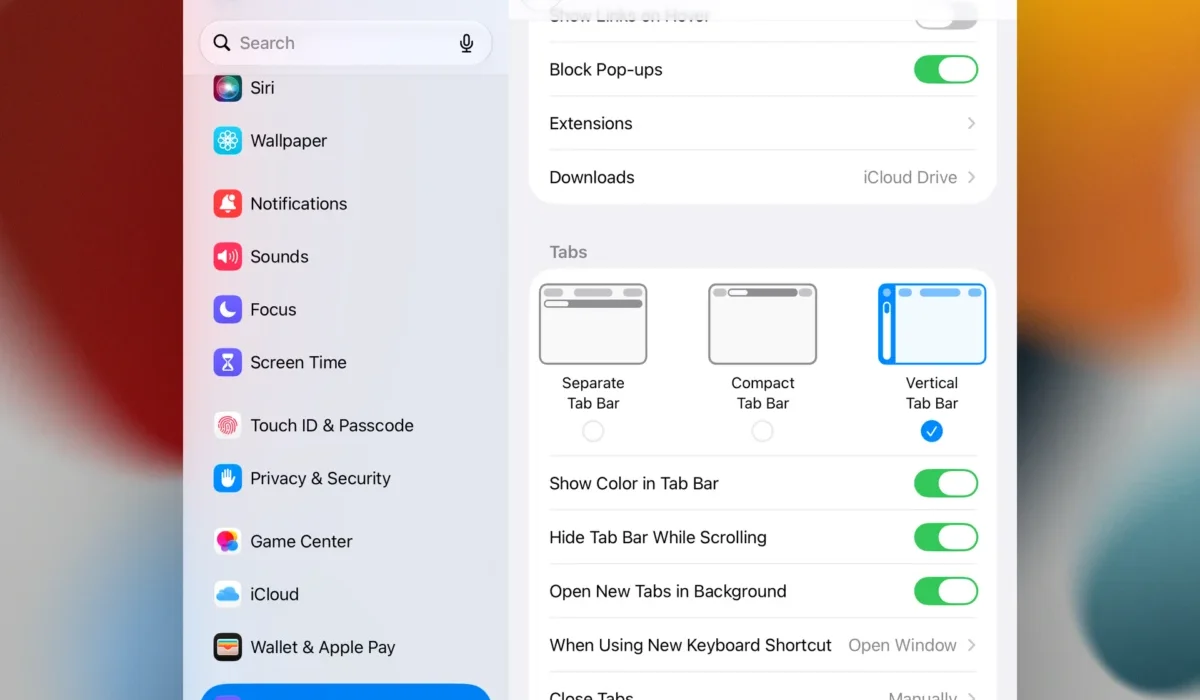
With the 27.3 platform updates, Apple bridges this feature gap. Users can now enable vertical tabs by navigating either to the Safari View Menu or directly through system settings. By default, the interface is optimized for space efficiency: tabs on iPadOS, macOS, and the newly designated iPhone Duo appear strictly as minimalist icons along the left margin of the browser window. Users can hover their cursor or touch the icons to reveal a live preview of the hidden browser window.
Beyond simple placement, Apple has incorporated robust management tools into the vertical tab framework. Users can effortlessly organize their workspaces by dragging and dropping tabs to pin them to the top of the sidebar, or by categorizing them into dedicated tab groups that sync seamlessly across Apple hardware. Notably, this functionality scales dynamically, supporting both portrait and landscape orientations on compatible iPads and the iPhone Duo line.

Adaptive Dark Mode Expands Web Consistency
Another notable addition in the 27.3 software cycle is a redesigned, system-wide approach to dark-themed browsing. Previously, Dark Mode in Safari relied heavily on native support from individual web pages. If a website lacked built-in dark styling, users were forced to view glaring white backgrounds, disrupting visual continuity during nighttime usage.
The new Adaptive Dark Mode alters this dynamic by intelligently parsing unsupported web pages. Apple promises that the system will modify light backgrounds, invert logos and graphics, dynamically recolor vector artwork, elevate raised visual surfaces, and detect and adjust embedded shadows. Crucially, the algorithm is programmed to leave sites that already feature native dark designs completely untouched. For web developers concerned about brand integrity, Apple has introduced new HyperText Markup Language (HTML) and Cascading Style Sheets (CSS) tags that allow creators to explicitly opt out of Adaptive Dark Mode modifications for their properties.
Deep Apple Intelligence and Siri Integration
The integration of Apple Intelligence hardware requirements brings a profound cognitive layer to Safari’s browsing experience. While Siri has previously possessed on-screen awareness capabilities with user permission, the 27.3 updates dramatically expand this functionality. Siri can now analyze entire web pages—including content extending beyond the immediate viewport—as well as index and evaluate hidden background tabs.

This expansive contextual awareness powers sophisticated new Custom Actions designed to streamline digital organization. For instance, a user conducting extensive travel research can instruct Siri to automatically sort and group all open tabs regarding a trip to Malta by specific activities. Similarly, automotive shoppers can command the assistant to aggregate and order car-shopping tabs by vehicle pricing metrics.
Furthermore, the updated AI framework enables targeted history management. Users can execute natural-language commands to clean up their browsing history based on specific topics, individual websites, or designated time periods. While this capability offers clear organizational benefits, industry analysts note that granular, intent-based history scrubbing will also serve privacy-conscious consumers seeking to manage their digital footprints more proactively.
Chronology and Development Roadmap
The introduction of these features follows Apple’s traditional software release cadence. The company typically initiates platform iteration testing through exclusive developer previews before expanding access to broader public beta cohorts.

- Internal Prototyping and Engineering Phase: Apple’s Safari engineering team develops structural frameworks for vertical rendering and AI parsing engines.
- Developer Beta 1 Release: The current milestone brings iOS 27.3, iPadOS 27.3, and macOS 27.3 to registered developers, enabling early bug reporting and developer tool integration.
- Public Beta Expansion: Expected in the coming weeks, this phase invites general consumers enrolled in the Apple Beta Software Program to test the software stability.
- General Availability: A finalized public rollout is anticipated later in the deployment cycle, though Apple has not yet announced a definitive release date for the stable versions.
Industry Implications and Expert Caution
The inclusion of vertical tabs and advanced AI tab management reflects an ongoing industry trend toward productivity-centric browser design. As web applications grow increasingly complex, operating systems and browsers must evolve to handle heavy multitasking loads without sacrificing system performance or user experience.
However, industry experts and software engineers strongly caution against installing early-stage developer betas on primary, daily-driver hardware. Developer Beta 1 builds frequently contain software bugs, memory leaks, third-party application incompatibilities, and battery drain issues that can disrupt daily device reliability. Consumers eager to experience vertical tabs and Adaptive Dark Mode are advised to wait for the more stable public beta releases or the official software deployment later this year.