








The continuous evolution of desktop operating systems has largely focused on efficiency, minimalism, and speed. Whether through Apple’s macOS or Microsoft’s Windows, the mechanisms governing daily software interactions have converged on hidden submenus, keyboard shortcuts, and streamlined interface elements designed to get out of the user’s way. Yet, a subculture of independent software developers continues to find inspiration in the exact opposite direction: injecting tactile joy, nostalgia, and physical realism into the digital environment. The latest entry in this burgeoning software design philosophy is Pumpkin Lights, a free macOS menu bar utility developed by Boyu Cheng that reimagines the traditionally pedestrian act of toggling between light and dark display modes.
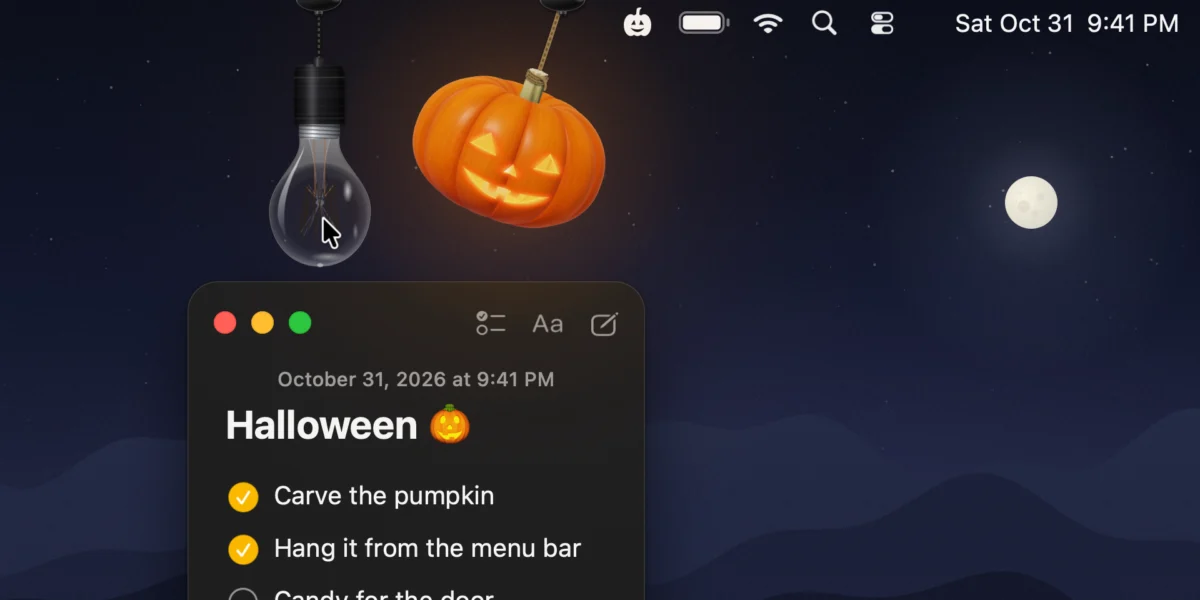
Built as a seasonal homage to Halloween, Pumpkin Lights hangs a real-time, ray-traced 3D jack-o-lantern directly from the user’s macOS menu bar. Rather than serving as a static graphic icon or relying on standard operating system toggles buried deep within the Control Center or System Settings, the application introduces a physics-driven, interactive object that responds organically to mouse movements. By turning a routine system preference into a tangible digital artifact, the application highlights a growing consumer appetite for software that rewards curiosity, blending utility with playful, desktop-bound art.
Main Facts and Core Functionality
At its foundation, Pumpkin Lights functions as a customizable toggle switch for macOS appearance settings. By default, interacting with the hanging jack-o-lantern—either by clicking or pulling on it—immediately shifts the operating system between its light and dark modes. However, the utility extends far beyond a simple appearance switch. Users can configure the object’s primary action to trigger a wide array of secondary commands, including launching specific applications or websites, executing a customized Apple Shortcut, running a terminal command, muting system audio, or engaging a "Coffee" mode to prevent the Mac from entering sleep state.
The application’s primary technical achievement lies in its rendering engine and physics simulation. The jack-o-lantern is not a flat, static vector icon, but a fully modeled 3D object rendered in real time. The developer implemented ray-tracing techniques to simulate how candlelight flickers and diffuses through the carved facial features of the pumpkin. Furthermore, the object is suspended from a customizable cord that features authentic pendulum physics. Users can physically toss, swing, and spin the pumpkin across the desktop space, watching the cord twist and react dynamically to momentum and gravity.
For users seeking a more minimalist aesthetic or a year-round alternative to a Halloween decoration, the application also includes an option to swap the pumpkin for a hanging incandescent light bulb that performs the exact same mechanical and system-toggle functions. Customization runs deep throughout the software, allowing users to "grow" various pumpkin designs, select from four distinct color variations, and adjust the properties of the suspension rope to suit their personal desktop setup.
Chronology and Design Inspiration

The conceptual lineage of Pumpkin Lights can be traced back to earlier holiday-themed desktop utilities that have captured the attention of the Mac community in recent years. In late 2024, similar independent applications—such as Festivitas, which introduced interactive holiday lights to the macOS menu bar—demonstrated that users harbor a strong nostalgic appetite for festive desktop ornamentation reminiscent of early personal computing aesthetics, but modernized with contemporary rendering technologies.
The genesis of Pumpkin Lights, however, emerged from a very specific design frustration regarding modern operating system ergonomics. According to developer Boyu Cheng, the project was conceived while analyzing a micro-interaction that computer users perform multiple times per day without conscious thought: switching between Light and Dark Mode. On modern macOS installations, this action typically requires navigating to the Control Center or digging through System Settings. Cheng noted that the standard digital toggle "never feels like anything"—it lacks physical feedback, tactile resistance, or spatial presence in the user’s workflow.
Seeking to bridge the gap between digital utility and physical realism, Cheng spent months engineering the micro-details of the application. Rather than prioritizing rapid feature expansion, the development timeline concentrated heavily on complex mathematical modeling: refining how the suspension cords flex under tension, how momentum dictates swinging physics, and how real-time light interplay affects the visual texture of the 3D model. The explicit design goal was to ensure that the interaction remained delightful and surprising even after a user engaged with it hundreds of times, resisting the quick fatigue often associated with novelty software.
Technical Specifications and System Requirements
Pumpkin Lights is distributed as a lightweight, native macOS application designed to integrate smoothly into the existing Cocoa framework without placing an undue burden on system resources. Despite utilizing real-time ray-tracing and physics calculations, the software is optimized to minimize CPU and GPU overhead during idle states, ensuring that it does not negatively impact battery life on portable MacBook Air and MacBook Pro models.
The application is compatible with any Apple Silicon or Intel-based Mac running macOS 14 Sonoma or later, taking advantage of modern graphics APIs available in recent iterations of Apple’s operating system. Because it operates primarily from the macOS menu bar, it remains accessible across different full-screen applications and multi-monitor configurations without cluttering the active desktop space. The software is distributed entirely free of charge directly through the developer’s official web portal, eschewing traditional software repositories or paywalls in favor of community-driven visibility.
Developer Philosophy and the Indie App Ecosystem
The release of Pumpkin Lights arrives during a period of notable resurgence for the independent macOS developer community. Often referred to in the tech media landscape through dedicated coverage series like Indie App Spotlight, independent developers have increasingly filled gaps left by major tech conglomerates, creating hyper-focused utilities that emphasize personalization, whimsy, and craftsmanship over enterprise-scale uniformity.

In statements detailing the creation of the application, Cheng emphasized a return to software craftsmanship that treats digital interfaces as physical spaces. This philosophy counters the hyper-flat, purely utilitarian design trends that have dominated operating system aesthetics over the past decade, championed by companies seeking universal visual consistency across mobile, desktop, and tablet platforms. By reintroducing skeuomorphic elements—such as swinging cords, physical weight, and dynamic lighting—developers like Cheng are tapping into a psychological desire for digital environments that acknowledge the physical world’s rules of engagement.
Broader Impact and Desktop Customization Trends
While Pumpkin Lights is explicitly framed as a seasonal novelty for the autumn and Halloween period, its underlying architecture points to a broader trend in desktop computing customization. Operating systems have historically grown more rigid in their visual presentation, with Apple, Microsoft, and Linux distributors tightly controlling the user interface to maintain branding integrity and accessibility standards.
However, utilities that safely modify or augment peripheral interface areas—such as the menu bar, the notch, or the system tray—have cultivated massive, dedicated user bases. These applications allow individuals to reclaim a sense of personal ownership over their computing hardware. In an era where work computers are frequently managed, locked down, or standardized by corporate IT departments, personal machines serve as blank canvases for self-expression.
Furthermore, the technical complexity required to build such an application highlights the democratization of advanced graphics tools for solo creators. The inclusion of real-time ray-tracing and physics engines in a casual menu bar utility demonstrates how accessible high-end rendering libraries have become for indie developers operating outside major game studios or enterprise software houses.
Future Outlook and Availability
Pumpkin Lights is currently available for download via the developer’s dedicated website, pumpkin.boyucheng.me, with ongoing updates and community engagement coordinated through developer channels on platforms such as X (formerly Twitter). As independent software continues to find viable distribution channels outside traditional walled-garden app stores, utilities like Pumpkin Lights demonstrate that there remains ample room for creativity, humor, and physical simulation in modern software engineering. By turning a routine system toggle into an interactive physics object, the application successfully proves that even the most mundane digital interactions can be transformed into moments of unexpected delight.