The evolution of generative artificial intelligence has moved rapidly from simple prompt-response interactions to complex, autonomous systems capable of executing multi-step tasks. At the center of this shift is the concept of "agentic workflows," where large language models (LLMs) are no longer treated as isolated oracles but as the reasoning engines of broader software architectures. LangGraph, a library developed by the creators of LangChain, has emerged as a critical tool for developers seeking to build these systems. By representing an agent as a stateful graph, LangGraph addresses the inherent limitations of traditional "chaining" methods, providing a robust framework for handling persistent memory, tool execution, and complex decision-making loops.
The Architectural Shift: From Chains to Graphs
In the early stages of LLM application development, most workflows followed a linear "chain" pattern. A user provided input, the model processed it, and a result was returned. However, real-world utility often requires more than a single pass. Agents frequently need to query external databases, use specialized software tools, and—most importantly—loop back to refine their answers based on new information.
LangChain initially solved some of these issues with its "Chains" API, but as workflows grew in complexity, these linear abstractions became difficult to manage and debug. LangGraph was introduced to provide a more flexible, cyclic architecture. By utilizing a directed acyclic graph (DAG) or even cyclic graphs, developers can define exactly how an agent should behave when a model decides to call a tool or when an error occurs. This graph-based approach allows for a level of transparency and control that was previously difficult to achieve in autonomous agent design.
The Three Pillars of LangGraph: State, Nodes, and Edges
Every LangGraph implementation is built upon three fundamental primitives: State, Nodes, and Edges. Understanding these is essential for any developer moving beyond simple chatbot implementations.
State: The Shared Memory
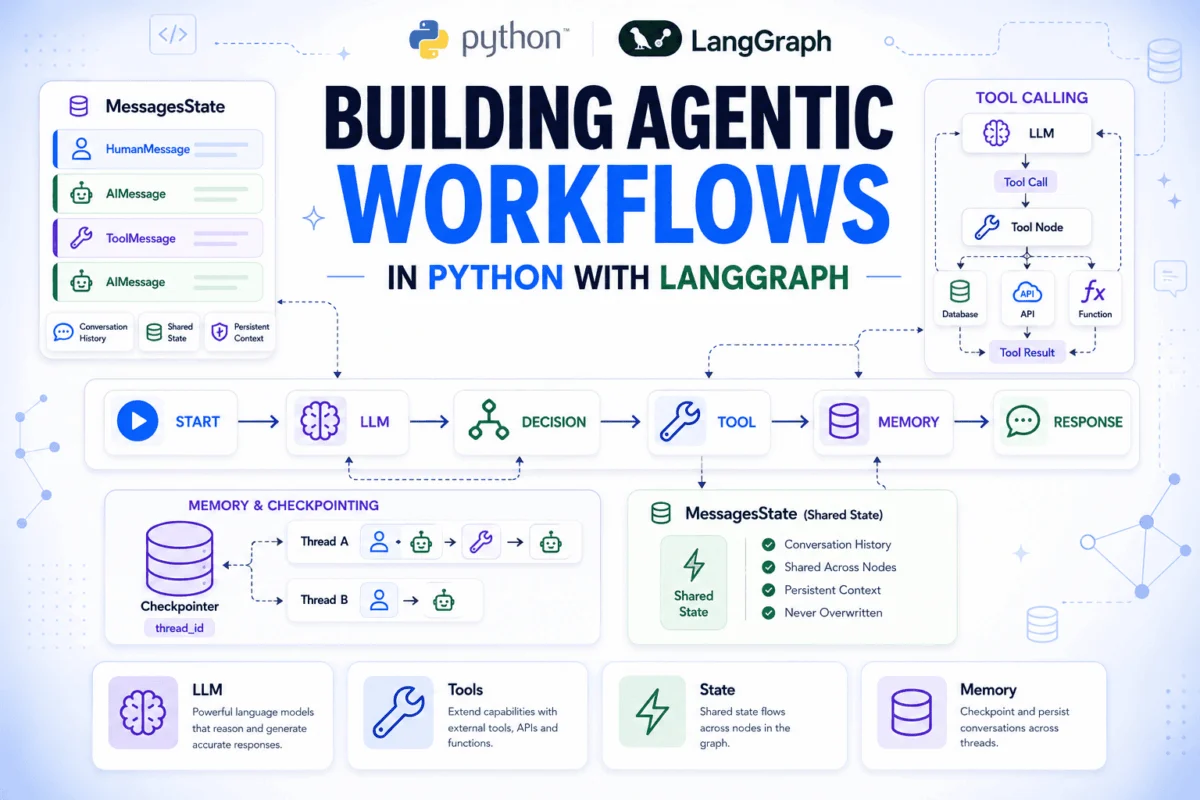
The State is a central object, typically a Python TypedDict, that serves as the shared memory for the entire graph. In a standard LangGraph workflow, every node reads from this state and returns updates to it. Unlike traditional programming where variables might be passed explicitly between functions, the graph state ensures that the entire history of the conversation, including system logs and tool outputs, is available to any part of the system at any time.
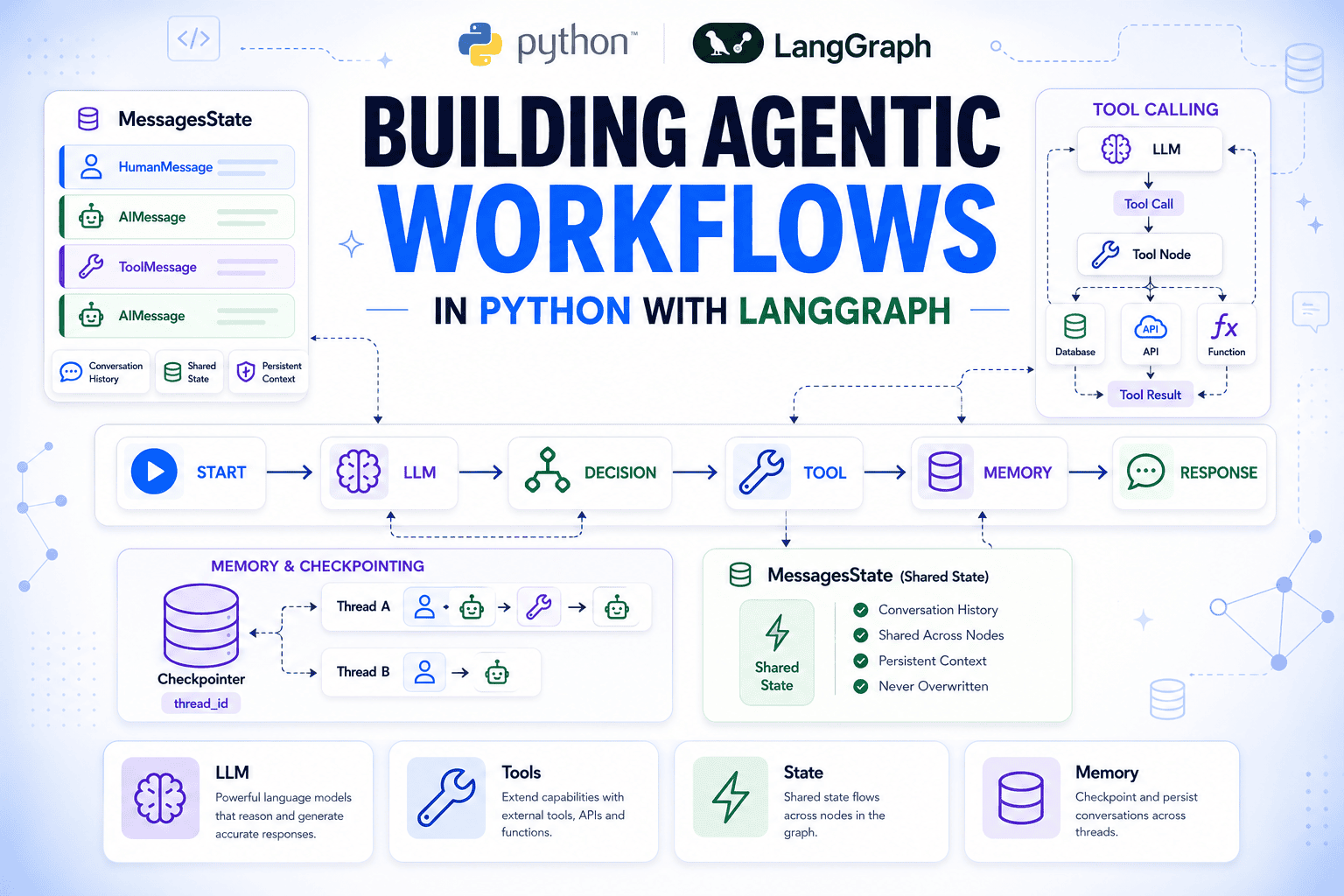
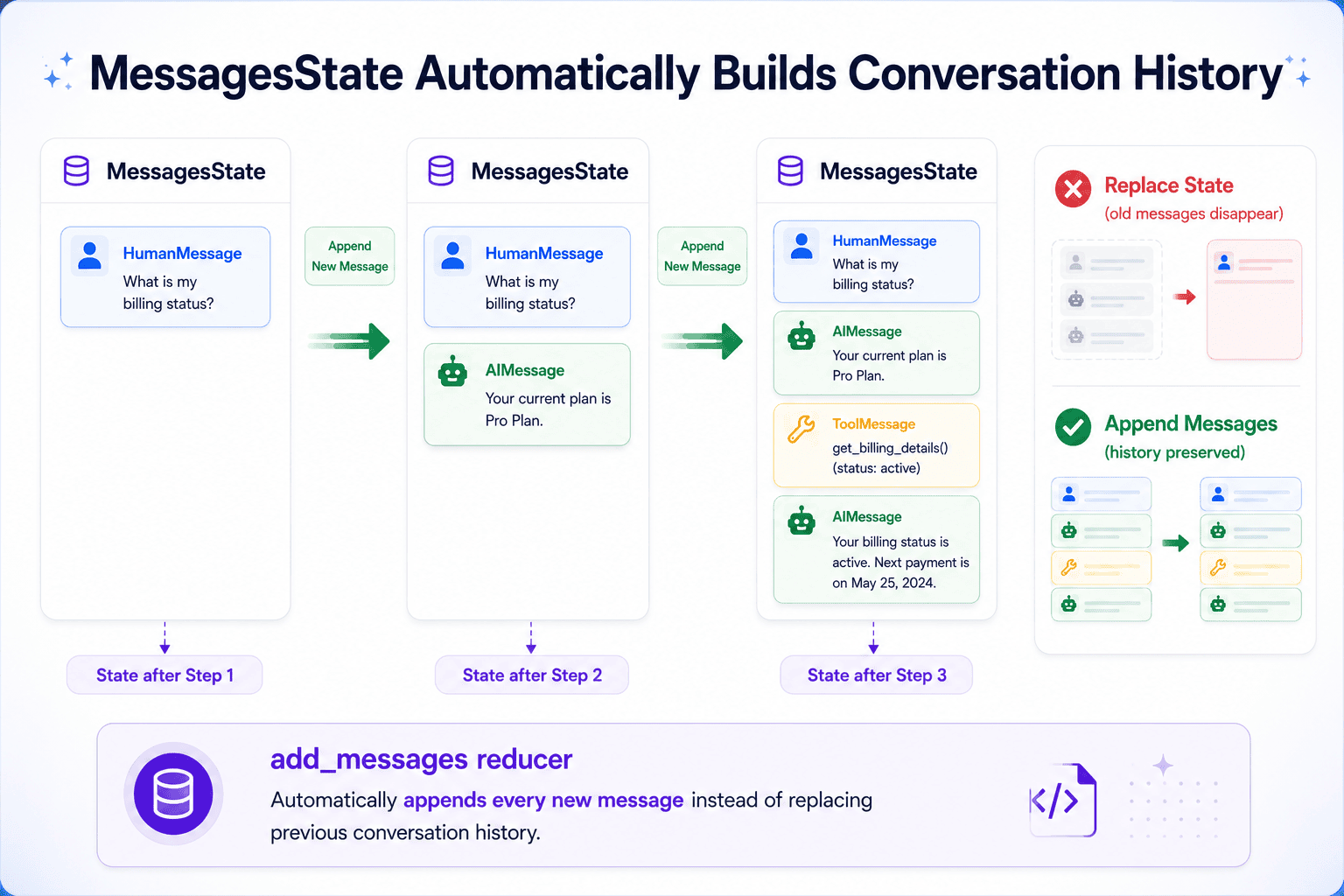
A critical feature of the State is the "reducer." By default, if two nodes write to the same state field, the second write overwrites the first. However, by using a reducer function like operator.add, developers can instruct the graph to append data instead. This is how message histories are maintained without manual intervention, ensuring the LLM always has the full context of a multi-turn conversation.
Nodes: The Units of Work
Nodes are essentially Python functions that execute specific tasks. In an agentic workflow, a node might be responsible for calling the LLM, querying a SQL database, or searching the web. LangGraph treats these functions as "black boxes" that take the current state as input and return a dictionary of updates. This modularity allows developers to test individual components of an agent in isolation before integrating them into the larger graph.
Edges: The Logic of Flow
Edges define the path the agent takes through the graph. A simple edge connects Node A to Node B, ensuring B runs immediately after A finishes. However, the power of LangGraph lies in "conditional edges." These edges use a routing function to decide the next step based on the current state. For instance, if an LLM’s response contains a request to use a tool, a conditional edge will route the workflow to a Tool Node. If the LLM provides a final answer, the edge routes the workflow to the end of the process.
Chronology of Implementation: Building a Persistent Agent
To understand how these components function in a real-world scenario, one must look at the standard timeline of building an agentic workflow, from environment setup to deployment.
Phase 1: Environment and Configuration
The process begins with the installation of the core libraries: langgraph, langchain-openai, and python-dotenv. Developers must configure environment variables, specifically API keys for models like GPT-4o or Claude 3.5 Sonnet. The integration of python-dotenv ensures that sensitive credentials are managed securely outside of the primary code logic.
Phase 2: Defining the MessagesState
For conversational agents, LangGraph provides a built-in MessagesState. This specialized state type is pre-configured with a "messages" field and an add_messages reducer. This reducer is sophisticated enough to handle message deduplication and ensure that the sequence of HumanMessage, AIMessage, and ToolMessage objects remains chronologically accurate.
Phase 3: The LLM Integration and Tool Binding
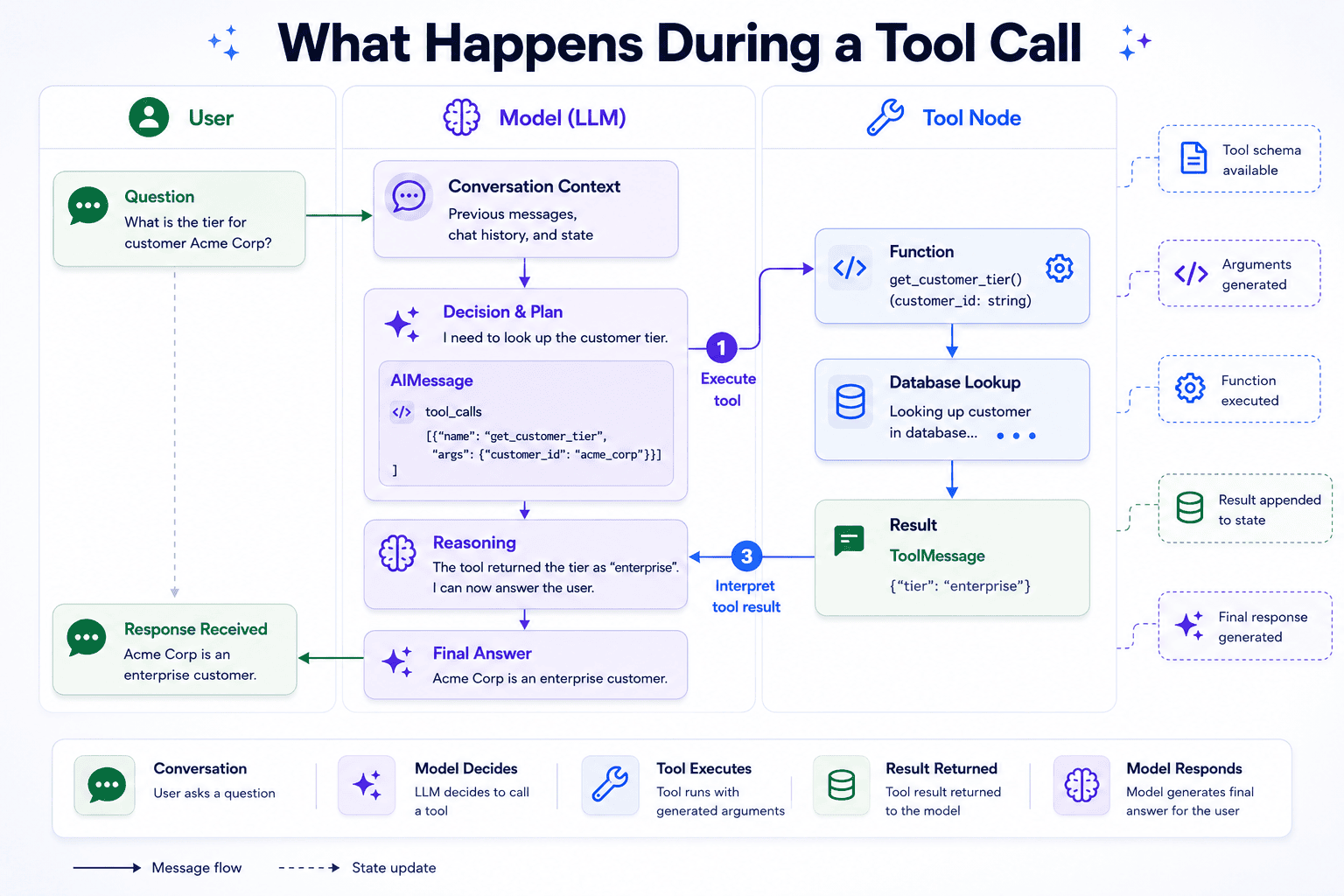
The core "reasoning" node is created by invoking a chat model. Modern LLMs support "function calling" or "tool use," where the model can output a structured request for an external function rather than just text. By using the bind_tools method, developers provide the LLM with a schema of available functions. For example, a SaaS support agent might be given a tool called get_customer_tier that looks up subscription data. The model does not execute the code itself; it merely outputs the intention to do so.
Phase 4: The ReAct Loop and Conditional Routing
This phase implements the "Reasoning and Acting" (ReAct) pattern. The graph is structured so that if the model outputs a tool call, the workflow moves to a ToolNode. This node executes the actual Python function (e.g., a database lookup) and returns a ToolMessage. The graph then loops back to the model, which now has the tool’s output in its context window to formulate a final, informed response.
Data and Performance Analysis: The Cost of Agency
While agentic workflows offer unprecedented capabilities, they come with specific performance trade-offs. Data suggests that every tool use adds latency and cost. In a standard ReAct loop, a single user query that requires a tool lookup results in at least two model invocations:
- Inference 1: The model analyzes the user query and decides to call a tool.
- Inference 2: The model analyzes the tool’s output and generates the final response.
For enterprise applications, this means latency can double or triple compared to a simple RAG (Retrieval-Augmented Generation) setup. Furthermore, token usage increases as the full message history, including the structured tool calls and results, must be passed back to the model in the second inference step. Developers must balance the "intelligence" of the agent with these operational costs, often opting for smaller, faster models like GPT-4o-mini for routing and tool-calling tasks.
The Role of Persistence: Memory Across Sessions
One of the most significant hurdles in AI development is maintaining state across different user sessions. Without persistence, an agent "forgets" everything as soon as the code finishes executing. LangGraph solves this through "Checkpointers."
A checkpointer, such as the InMemorySaver, saves a snapshot of the graph state after every node execution. By associating these snapshots with a thread_id, developers can allow an agent to remember a conversation that happened days or weeks ago. When a user returns with the same thread_id, LangGraph automatically restores the state, including all previous messages and tool outputs.
In production environments, InMemorySaver is typically replaced with persistent storage solutions like PostgreSQL or Redis. This allows for horizontal scaling, where different instances of an application can access the same conversation state from a centralized database.
Official Responses and Industry Impact
The release of LangGraph has been met with significant interest from the enterprise sector. Harrison Chase, CEO of LangChain, has noted that the industry is moving away from "black box" agents toward "controllable" agents. The sentiment among lead developers at major tech firms suggests that the ability to "trace" the reasoning loop—seeing exactly why an LLM chose a specific tool—is a prerequisite for deploying AI in regulated industries like finance and healthcare.
By making the execution flow explicit, LangGraph provides a form of "AI observability." Developers can use tools like LangSmith to visualize the graph’s path, identifying where a model might be getting stuck in a loop or where a tool is returning malformed data.
Broader Implications and Future Trends
The rise of frameworks like LangGraph signals a democratization of complex AI automation. Previously, building a reliable, stateful agent required a custom-built backend and complex state-management logic. Today, these primitives are available as standard libraries.
Looking forward, the trend is moving toward "multi-agent systems." In this architecture, a single LangGraph state might be shared among multiple specialized agents—one for coding, one for research, and one for quality assurance. A "supervisor" node routes tasks between these agents, creating a digital version of a corporate department.
As local LLM execution (via Ollama or vLLM) becomes more efficient, we may also see these agentic workflows running entirely on-premise, providing the power of autonomous agents without the data privacy concerns associated with cloud-based APIs. The foundation laid by LangGraph’s stateful, graph-based architecture will likely remain the standard for these future developments, providing the necessary structure for the next generation of autonomous digital workers.