










In the modern digital workplace, the ability to capture, annotate, and disseminate visual information is no longer merely a convenience; it is a fundamental professional requirement. While photographers and creative professionals spend countless hours mastering high-end equipment to capture portraits and landscapes, the "screenshot" remains the most ubiquitous yet underutilized tool in daily communication. Whether drafting a technical support email, constructing a complex instructional PDF, or designing a high-stakes presentation, visual data is proven to improve comprehension and retention. Research from the Social Science Research Network suggests that approximately 65% of the population are visual learners, and visuals are processed 60,000 times faster in the brain than text, underscoring why an efficient, high-quality snipping tool is an essential asset in any digital toolkit.

The Evolution of Screen Capture Technology
The history of screen capture is inextricably linked to the development of the graphical user interface (GUI). In the early days of computing, capturing a screen required specialized hardware or complex command-line prompts. The introduction of the "Print Screen" key on IBM PCs in the 1980s marked the first major shift toward democratizing screen capture. However, these early methods were rudimentary, often capturing the entire screen with no options for cropping, editing, or real-time annotation.
As operating systems matured through the 2000s and 2010s, Microsoft and Apple began integrating native, lightweight snipping utilities. These tools sought to replace the need for third-party software for the average user, providing a baseline level of functionality. Today, the market for these tools is bifurcated: users can rely on the increasingly robust native tools provided by OS developers, or they can opt for high-performance third-party applications designed for power users, designers, and software engineers who require advanced OCR (Optical Character Recognition), cloud synchronization, and rapid workflow integration.

Native Solutions: The Windows and Mac Baseline
The Windows operating system has evolved significantly from the basic Snipping Tool introduced in Windows Vista. In current iterations of Windows 10 and 11, the "Snip & Sketch" application serves as the primary utility. Accessible via the universal shortcut Windows + Shift + S, this tool allows for rectangular, freeform, window-based, or full-screen captures. Once captured, the image is sent to the clipboard and a notification center, where it can be opened in an editor that supports basic ink annotations, cropping, and saving in multiple formats, including PNG and JPEG.
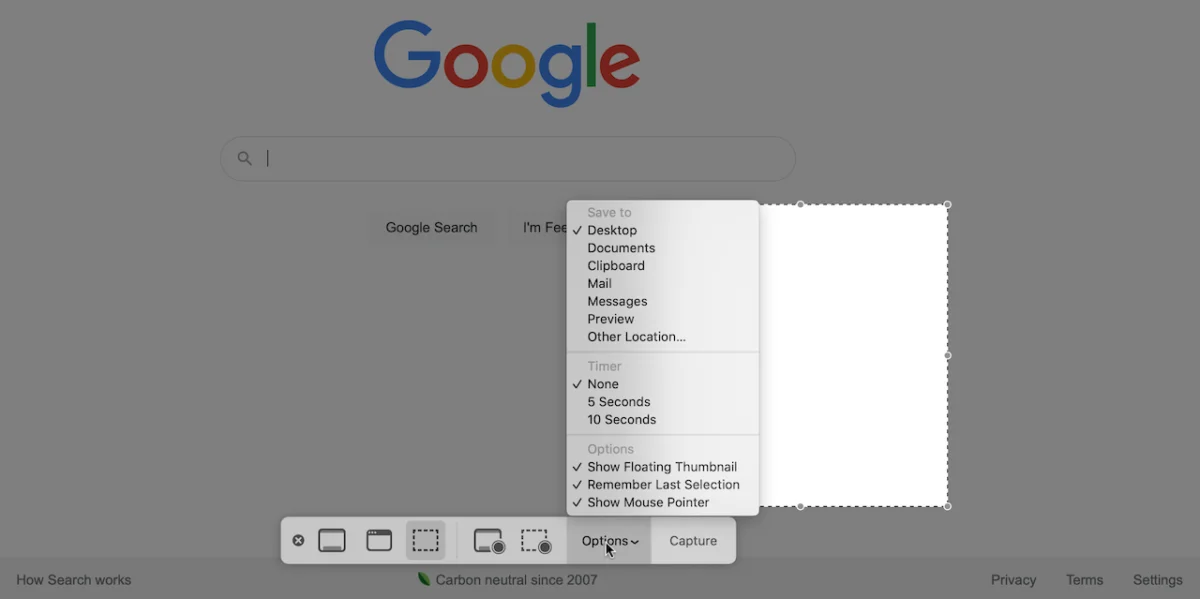
Apple’s macOS ecosystem approaches screen capture with a similarly integrated philosophy. By invoking the Shift + Command + 5 shortcut, users are presented with a comprehensive control panel that handles both still imagery and screen recording. This utility allows for precise window selection, timed captures, and direct export to specific folders or the clipboard. For many general users, these native tools are sufficient; however, they often lack advanced features such as scrolling window capture, long-term cloud hosting, or direct integration with project management software like Jira or Trello.

Strategic Selection: Evaluating Third-Party Alternatives
When native tools fail to meet the requirements of complex workflows, the market offers several specialized solutions. The selection of a tool should be based on specific professional needs, such as the necessity for data security, team collaboration, or advanced graphic manipulation.
Snagit: The Enterprise Standard
Developed by TechSmith, Snagit is widely considered the industry standard for professional screen capture. Unlike free alternatives, Snagit is a paid, robust suite. Its primary advantage lies in its "all-in-one" capture capabilities, which can handle complex tasks such as scrolling captures—perfect for documenting long web pages or spreadsheets. Beyond capture, its "Grab Text" feature, which utilizes sophisticated OCR to extract editable text from static images, provides significant time savings. Recent updates have focused on enterprise-level needs, including pre-made templates for technical documentation and the ability to convert screen recordings directly into animated GIFs.

Greenshot: The Open-Source Favorite
For software developers and project managers who prioritize lightweight, open-source software, Greenshot remains a staple. It offers a highly customizable environment where users can define specific output paths, such as sending a screenshot directly to an email client, a printer, or a specific image editor. Its portability—the ability to run the program without a full installation—makes it ideal for secure, locked-down work environments where administrative privileges may be restricted.
Lightshot: Speed and Simplicity
Lightshot is designed for the user who demands speed. By replacing the default Print Screen function, it triggers an overlay that allows for instant selection and annotation. Its standout feature is a "similar image" search, which enables users to identify duplicates or find the source of an image on the web. While it lacks the deep editing features of Snagit, its ability to upload screenshots to a cloud server and provide an instant, shareable link makes it a preferred tool for quick feedback loops in fast-paced teams.

Gemoo Snap and Monosnap: The Collaboration Focused Tools
Gemoo Snap has gained traction by focusing on "Screenshot & Feedback" workflows. It allows users to pin screenshots as floating windows, facilitating side-by-side reference during coding or design sessions. This "Pin" feature is invaluable for developers who need to compare a mockup against a live build.
Monosnap, conversely, positions itself as a secure, team-oriented platform. With over one million active users, its primary value proposition is its encrypted cloud storage and collaboration features. It allows team members to record short video clips or GIFs during meetings, which can then be uploaded to a secure, private cloud environment. This is particularly relevant for remote teams requiring compliance with strict data privacy protocols.

Comparative Data and Feature Analysis
To assist in professional selection, the following table summarizes the primary capabilities of these tools:
| Tool | Platform | Primary Strength | Best For |
|---|---|---|---|
| Snagit | Win/Mac | Advanced Editing/OCR | Technical Writing/Docs |
| Greenshot | Win/Mac | Open-Source/Customizable | Developers |
| Lightshot | Win/Mac | Speed/Cloud Sharing | Quick Communication |
| Monosnap | Win/Mac | Secure Cloud/Video | Remote Collaboration |
| ShareX | Windows | Feature Depth/Automation | Power Users |
The Impact of Efficient Visual Communication
The adoption of a dedicated screen capture tool has measurable impacts on workplace productivity. A study by the Nielsen Norman Group regarding user experience and documentation suggests that users who utilize annotated visuals are 32% more likely to successfully follow complex instructions compared to those provided with text-only documentation.

Furthermore, the integration of OCR-capable tools like ShareX and Snagit reduces the "manual transcription gap"—the time lost when a user has to re-type data found in an image or a PDF. By automating the transition from a visual reference to editable text, firms can reclaim hundreds of hours annually in administrative overhead.
Security and Ethical Considerations
As companies shift toward remote and hybrid models, the security of screen capture data has become a focal point. When using third-party tools that rely on cloud storage, it is imperative that organizations verify the encryption standards of the provider. Tools like Monosnap and ScreenRec offer private, encrypted links, which are vital when sharing sensitive project data. Users should be cautioned against using browser-based, "free" capture tools that may store data on public servers, potentially exposing proprietary information to unauthorized access.

Future Implications and Conclusion
The trajectory of snipping tools is moving toward greater integration with Artificial Intelligence. We are already seeing the early stages of AI-driven tools that can identify elements within a screenshot, automatically categorize them, and suggest relevant team members for notification. As these tools become more intelligent, the "snipping" process will likely evolve into a more seamless data-extraction process.
In conclusion, while native Windows and Mac snipping tools serve as a reliable foundation for casual users, the professional landscape requires a more specialized approach. Whether the goal is to streamline technical documentation, enhance team collaboration, or improve the clarity of daily communication, the current market provides a spectrum of tools to suit any requirement. By evaluating the specific needs of a project—be it the need for OCR, secure cloud storage, or advanced annotation—professionals can optimize their workflows, ensuring that their visual communication is as efficient and effective as possible. The transition from basic screen captures to a professionalized, tool-supported visual workflow is a low-cost, high-impact investment in organizational efficiency.