The evolution of modern workspace ergonomics has placed a renewed emphasis on desktop organization, cable management, and eye strain mitigation. While millions of professionals spend upwards of eight hours a day illuminated primarily by the harsh glow of computer displays, auxiliary desktop lighting has traditionally remained an afterthought. Bulky traditional desk lamps consume valuable surface area, cast erratic shadows, and frequently introduce unwanted glare onto glossy monitor panels. Addressing this niche, electronics and peripheral manufacturer BenQ has spent years refining its proprietary ScreenBar product line, establishing a category of monitor-mounted LED light bars designed to project illumination downward onto the desk surface rather than backward into the glass. The latest iteration in this specialized ecosystem is the BenQ iScreenBar, an accessory engineered explicitly for aesthetic and functional integration with select Apple hardware, yet one that continues to attract interest from broader desktop users seeking a streamlined aesthetic.
Evolution of Screen-Mounted Illumination Technology
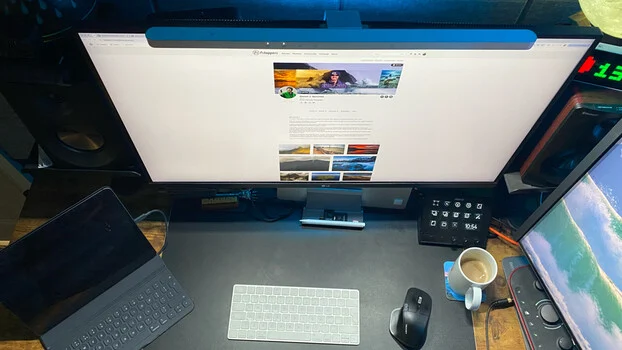
The concept of the monitor light bar fundamentally alters traditional desk lighting physics. Rather than positioning a light source adjacent to the user on a weighted base, a screen-mounted bar utilizes a counterweight mechanism to rest securely upon the top bezel of a display. Powered via a standard USB connection—typically eliminating the need for an independent wall outlet plug—the device delivers targeted illumination directly to the keyboard, mouse, and physical documents.
BenQ’s historical entry into this market focused on universal compatibility, allowing users to attach light bars to a wide array of third-party monitors, curved screens, and traditional desktop setups. However, the introduction of the iScreenBar marks a strategic shift toward hardware-specific ecosystem integration. Officially engineered to match the exact dimensions, color profiles, and mounting requirements of compatible 24-inch iMac models manufactured from 2021 onward, the product represents a convergence of high-end home office accessories and native hardware design language.
Design Architecture and Aesthetic Integration
The physical construction of the iScreenBar draws heavily from contemporary industrial design principles popularized by Apple. Constructed with a premium aluminum outer casing, the light bar features a sleek, low-profile silhouette finished in a silver tone intended to complement modern metallic desktop environments.
By avoiding protruding mechanical switches or bulky external control pucks—common in earlier generations of monitor lights—BenQ opted for an integrated touch panel. The capacitive touch sensors sit flush against the upper surface of the unit, preserving clean lines and preventing the accessory from visually disrupting a minimalist workstation. The mounting system relies on a precision-engineered clamp that aligns with the specific bezel depth and contours of targeted iMac models, securing the fixture without obstructing built-in FaceTime cameras or microphones native to the display.
Furthermore, power delivery is handled via a discreet USB-C interface. When routed properly down the rear support column of a monitor, the cable remains virtually invisible from a seated perspective, adhering to strict desktop minimalism standards where visible cord clutter is minimized.
Functional Performance: Optics and Glare Reduction
At the core of the iScreenBar’s engineering is its asymmetric optical design. Standard lamps emit light in a 360-degree radius or a wide forward cone, which inevitably reflects off glass display panels, causing visual fatigue, eye strain, and obscured screen visibility. BenQ’s optical architecture utilizes a precision-cut reflector to direct light strictly downward and forward onto the working plane.
According to manufacturer specifications, the unit achieves a 500 lux coverage area spanning approximately 85 centimeters by 50 centimeters. This distribution pattern effectively illuminates typical keyboard and mouse zones without generating concentrated hotspots directly in front of the user. For professionals engaged in color-sensitive work—such as digital photography editing, graphic design, and video grading—the elimination of specular highlights and monitor reflections is critical. While the iScreenBar does not replace specialized, calibrated ambient bias lighting required for critical color-accurate editorial work, it significantly enhances overall visual comfort during extended computer sessions.
Users can manually cycle through a broad spectrum of color temperatures and brightness levels using the flush-mounted touch controls. Cooler color temperatures (higher Kelvin ratings) are typically deployed during daytime hours to promote alertness and productivity, while warmer tones are selected during evening hours to reduce blue light exposure and align with circadian rhythms. Additionally, BenQ provides a dedicated macOS companion application, allowing users to save custom illumination presets and manage adjustments programmatically via software.
Smart Features: Video Mode and Proximity Sensing
Beyond basic illumination, the iScreenBar incorporates advanced functional automation designed to streamline user workflows. Among these is "Video Mode," a specialized distribution setting engineered to optimize lighting conditions during video conferencing. When engaged, the central portion of the LED array deactivates, leaving only the outer sources illuminated. This architectural adjustment prevents direct light interference from washing out built-in webcams or creating harsh facial shadows during virtual meetings.
The device also integrates automatic presence detection via integrated sensors. The system is programmed to activate the light automatically when a user approaches the desk and power down when the workstation is vacated. While this feature promotes energy efficiency and hands-free operation, field testing reveals potential operational quirks. In scenarios where a user remains relatively motionless for extended periods—such as during meticulous image retouching or reading—the proximity sensors may interpret the stillness as an absence, causing the light to extinguish after approximately three minutes. Consequently, users engaged in stationary desk work occasionally find themselves required to manually re-engage the motion sensor.
Market Positioning, Pricing, and Compatibility Considerations
Positioned firmly in the premium accessory tier, the BenQ iScreenBar carries a manufacturer’s suggested retail price (MSRP) of $189. In a market saturated with generic, unbranded USB-powered desk lamps retailing for a fraction of that cost, the pricing strategy reflects investments in proprietary optical engineering, premium materials, software integration, and industrial design fidelity.
A critical consideration for prospective buyers involves hardware compatibility. BenQ officially markets the iScreenBar as an exclusive accessory designed for compatible 24-inch iMac models from 2021 onward. The mounting mechanism, power integration, and physical tolerances are calibrated specifically for Apple’s slim-profile all-in-one desktop architecture.
For users operating alternative monitor setups or custom PC configurations, utilizing the iScreenBar falls outside the manufacturer’s official support guidelines. While alternative display users have experimented with fitting the hardware onto standard thin-bezel screens with varying degrees of success, doing so forfeits guaranteed structural stability and may compromise the intended alignment of integrated features like the presence sensor and video mode optics.
Industry Implications and Workplace Ergonomics
The commercial reception of the iScreenBar highlights a broader trend within the modern consumer electronics market: the demand for hyper-specialized peripheral accessories that match the exact design paradigms of flagship computing hardware. As remote and hybrid work models persist, home offices increasingly double as permanent living spaces, elevating the importance of aesthetic harmony and space-saving ergonomics.
By merging functional task lighting with minimalist desktop architecture, manufacturers are shifting away from traditional desktop footprints toward zero-footprint accessories. While the premium price point and strict hardware pairing may limit its mass-market appeal, the iScreenBar establishes a distinct benchmark for how computer-adjacent hardware can integrate cleanly into high-end professional and creative environments.