










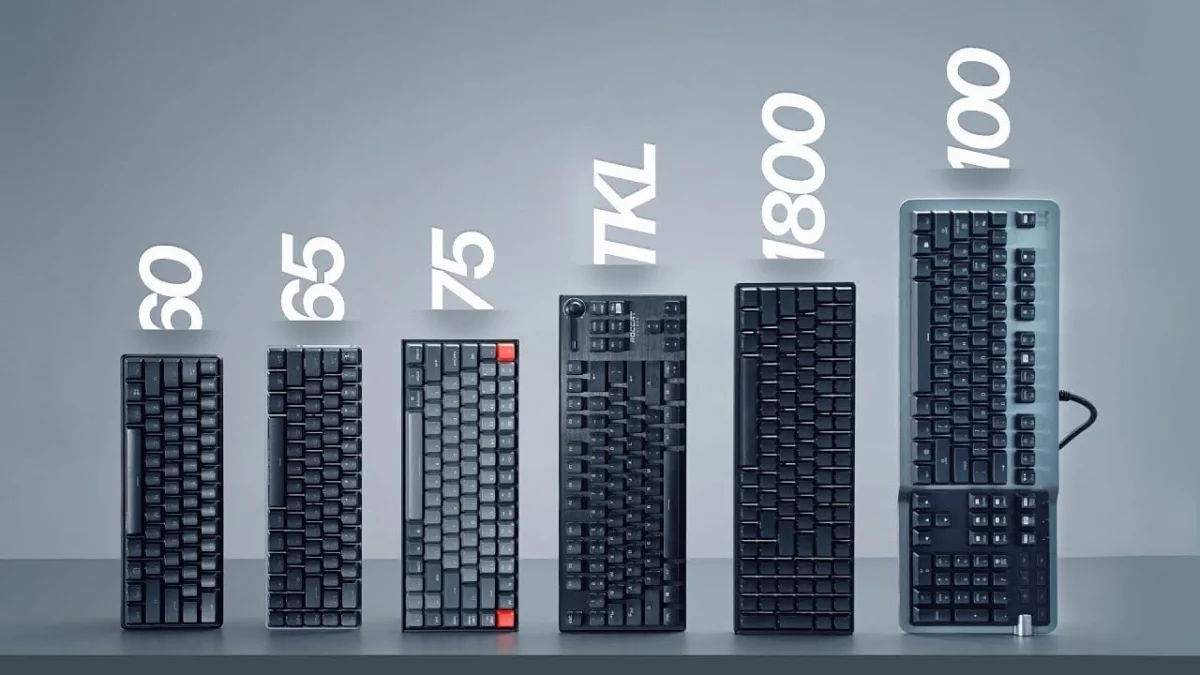
The evolution of computer peripherals over the past decade has transformed the mechanical keyboard from a standard office utility into a specialized tool for productivity, gaming, and ergonomic customization. As the mechanical keyboard market expands, manufacturers now offer a diverse array of layouts, categorized primarily by physical dimensions and key counts relative to a standard 100% board. Understanding these form factors—ranging from expansive full-size units to ultra-minimalist 40% configurations—requires an analysis of utility, ergonomic impact, and workspace optimization.
Background Context and Industry Evolution
For decades, the standard 100% full-size keyboard dominated both commercial offices and home setups, largely inherited from the legacy layout of IBM Model M keyboards introduced in the 1980s. However, the rapid growth of competitive esports in the 2010s fundamentally shifted consumer priorities. Gamers required significantly more desk space to accommodate lower mouse sensitivities, which necessitated sweeping arm movements.
This spatial demand spurred manufacturers to innovate, leading to the popularization of Tenkeyless (TKL) boards and, subsequently, the custom mechanical keyboard movement popularized by enthusiast communities on platforms like Reddit and Geekhack. Today, the keyboard market is segmented into distinct tiers defined by percentages of the traditional full-size layout, catering to specific professional and recreational use cases.
Chronology of Layout Adoption and Market Trends
The timeline of keyboard miniaturization reflects broader computing trends toward portability and minimalism:
- Pre-2010s: The 100% full-size layout holds a near-monopoly on the market, accompanied by early specialized macro-pads.
- 2010–2015: The rise of competitive multiplayer gaming drives the mainstream adoption of Tenkeyless (TKL) layouts, eliminating the numeric keypad to improve desktop ergonomics.
- 2015–2020: Enthusiast communities pioneer 60% and 40% programmable layouts, utilizing QMK/VIA firmware to compress functionality via hidden layers.
- 2020–Present: The introduction of standardized 75% and 65% layouts bridges the gap between enthusiast custom boards and mainstream productivity, offering dedicated arrow keys and function rows in condensed footprints.
Analysis of Keyboard Form Factors
Full-Size (100%)
The full-size keyboard remains the most commercially ubiquitous layout, featuring an alphanumeric cluster, a dedicated function row, a home/navigation cluster, and a numeric keypad.
- Advantages: Ideal for data entry, accounting, and financial modeling due to the dedicated numeric pad. These boards frequently feature advanced auxiliary hardware, such as USB passthrough ports, dedicated media controls, digital volume rollers, and extensive macro columns.
- Disadvantages: The expansive width forces the user’s mouse further to the right, which can cause shoulder strain and suboptimal ergonomic posture during extended computer use.
1800-Compact and 96%
The 1800-compact layout retains every key found on a full-size board but compresses the physical boundaries by eliminating the empty space between the navigation cluster, arrow keys, and numeric pad.
- Advantages: Delivers the complete functionality of a 100% keyboard within a significantly smaller footprint, making it a popular choice for professionals who require a numeric pad but possess limited desk space.
- Disadvantages: The lack of physical separation between key clusters can increase the incidence of typing errors and mispresses until the user adapts to the tighter spacing.
Tenkeyless (TKL / 80%)
Tenkeyless layouts omit the numeric keypad entirely while preserving the standard alphanumeric zone, function row, and dedicated navigation cluster.
- Advantages: TKL keyboards represent the equilibrium point for many gamers and touch-typists. By removing the numpad, the mouse is positioned closer to the user’s centerline, improving shoulder ergonomics. It also provides the necessary lateral space for wide mouse sweeps required in low-DPI gaming environments.
- Disadvantages: Premium custom TKL units are often priced higher than their full-size counterparts due to lower production volumes and specialized manufacturing runs. Furthermore, standard full-size keycap sets may leave numerous keys unused.
75% Layout
The 75% layout is a compressed TKL variant that eliminates the negative space between clusters. The function row is pulled directly down against the number row, and the navigation keys are arranged in a vertical column.
- Advantages: Retains dedicated function keys and arrow clusters while reducing the overall desk footprint to near-TKL dimensions. This layout has become a staple of the custom enthusiast market, championed by prominent aluminum-case group buys.
- Disadvantages: Sourcing aftermarket keycap sets can be difficult because the right-side modifier keys and bottom row often require non-standard sizing.
65% Layout
The 65% form factor builds upon the 75% design by removing the dedicated function row entirely, relegating those commands to secondary layers accessible via a function (Fn) key. However, it preserves dedicated arrow keys and a single column for navigation keys (such as Delete and Page Up/Down).
- Advantages: Highly portable, making it an ideal companion for laptop users who travel frequently. It offers maximum desk clearance for mouse movement without sacrificing the essential arrow keys required for general navigation and basic coding.
- Disadvantages: The absence of a dedicated function row requires a learning curve for software applications that rely heavily on F1 through F12 inputs.
60% Layout
The 60% keyboard strips away the function row, navigation cluster, and dedicated arrow keys, leaving only the core alphanumeric block and modifiers. Arrow keys and navigation functions are typically mapped to secondary layers operated by holding the Fn key.
- Advantages: Exceptional portability and maximum desk space for competitive gaming setups. The standardization of the 60% layout ensures a vast selection of compatible aftermarket keycaps and customizable cases.
- Disadvantages: Highly inefficient for productivity tasks, data entry, and software development where rapid access to function keys, tildes, and navigation arrows is mandatory.
Ultra-Compact (40% and Gaming Keypads)
Representing the extreme edge of minimalism, 40% keyboards eliminate the number row, function row, and navigation cluster, retaining only the primary alphabet and essential modifiers. Users rely entirely on multiple programmable firmware layers to input numbers, symbols, and directional commands.
- Advantages: Ultimate portability and striking aesthetic appeal for enthusiast collections.
- Disadvantages: Steep learning curve requiring extensive configuration and muscle memory training, rendering them impractical for casual users.
Industry Implications and Market Outlook
The diversification of keyboard sizes highlights a broader consumer shift away from one-size-fits-all hardware toward specialized, task-specific peripherals. Industry data indicates that while mainstream consumers continue to purchase pre-built full-size and TKL keyboards for general home office use, the enthusiast and gaming sectors increasingly favor 75% and 65% layouts.
Manufacturers are responding by prioritizing hot-swappable PCB designs, wireless multi-device connectivity, and programmable firmware across intermediate form factors. Ultimately, selecting a keyboard size requires balancing functional requirements—such as data entry volume—against ergonomic health and physical workspace constraints.