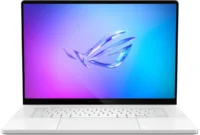
The evolving landscape of portable computing has continually forced manufacturers to choose between lightweight mobility and heavy-duty processing power. Traditional ultrabooks offer exceptional portability, slim profiles, and extended battery life, but they routinely falter when subjected to intensive workloads such as modern gaming, 3D rendering, or professional video editing. Conversely, desktop replacement laptops deliver uncompromising performance at the cost of immense weight, poor battery longevity, and cumbersome power supplies. Into this long-standing industry compromise steps ASUS with the ROG Flow X13, a device designed to disrupt the conventional boundaries of form and function. By merging a 360-degree 2-in-1 convertible chassis with a high-performance mobile processor and a proprietary external GPU ecosystem, ASUS has engineered a versatile machine aimed at capturing both the creative professional and the mobile gamer markets.
Market Context and Product Evolution
The introduction of the ROG Flow X13 arrives at a time of significant technical transition within the semiconductor industry. Historically, external graphics processing unit (eGPU) docks relied heavily on Thunderbolt interfaces. While Thunderbolt solutions provided universal connectivity across various laptop brands, they suffered from well-documented performance bottlenecks due to PCIe bandwidth limitations, high latency, and frequent driver instability that often required system reboots. Recognizing these limitations, ASUS engineers developed a proprietary connection interface paired with the XG Mobile dock, bypassing standard protocol restrictions to feed a direct PCIe Gen 3 x8 link to an external graphics card.
Positioned directly against established ultraportable powerhouses such as the Razer Blade Stealth 13, the Flow X13 aims to outclass its competitors not merely through raw specifications, but through its modular scaling capability. The device made its debut wave in early 2021, instantly generating significant industry interest due to its unprecedented pairing of an ultra-slim 13-inch chassis with top-tier AMD Ryzen 5000-series mobile silicon. However, global supply chain constraints and semiconductor shortages immediately plagued its launch, turning retail availability into an unpredictable exercise for consumers attempting to secure units during rolling restock windows.
Hardware Configurations and Pricing Strategy
The ASUS ROG Flow X13 is marketed across multiple configurations, balancing cost, thermal output, and visual fidelity. The baseline standard edition, retailing at approximately $1,500 USD, equips users with an AMD Ryzen 9 5900HS processor featuring 8 cores and 16 threads. This is complemented by 16GB of LPDDR4X RAM soldered to the motherboard, a 1TB PCIe NVMe M.2 solid-state drive, an NVIDIA GeForce GTX 1650 discrete GPU for lightweight graphics tasks, and a 120Hz 1200p (16:10 aspect ratio) display tailored for high-refresh-rate gaming.
Higher-tier configurations, including the reviewed SuperNova Edition featuring the slightly faster AMD Ryzen 9 5980HS processor, step up display specifications to a 60Hz 4K IPS panel protected by Corning Gorilla Glass. While the 4K panel provides exceptional color accuracy—covering 99% of the sRGB color space, 80% of Adobe RGB, and 86% of DCI-P3—industry analysts and technical reviewers frequently recommend the 120Hz 1200p panel for gaming applications, citing the GTX 1650’s limitations in native 4K rendering and the visual drawbacks of a 60Hz cap in fast-paced software environments.
For users seeking desktop-class graphical performance, ASUS offers the XG Mobile dock housing an NVIDIA GeForce RTX 3080 laptop GPU as an optional add-on. Priced independently at approximately $1,500 USD, the combined bundle of the Flow X13 and the XG Mobile typically retails near $3,000 USD, though ASUS has periodically offered bundle discounts of around $200. Despite the substantial financial investment, the combined ecosystem targets a specialized demographic requiring ultra-portability during transit and uncompromised workstation or gaming capabilities at a stationary desk.
Design, Build Quality, and Ergonomics
Constructed from a rigid magnesium alloy chassis, the Flow X13 successfully avoids the structural creaking often associated with ultra-slim form factors. Weighing just under 3 pounds (approximately 1.35 kilograms) and measuring a mere 0.62 inches in thickness, it undercuts several primary competitors in physical heft while maintaining robust structural integrity. The exterior top lid features textured, linear ridges designed to enhance grip during travel while effectively resisting fingerprint smudges.
The interior design maintains a professional, stealth-oriented matte black finish. The keyboard layout features well-spaced keys with adequate travel distance, drawing favorable comparisons to larger stablemates like the ROG Zephyrus G15. Dedicated hotkeys for volume control, microphone muting, and the ASUS Armoury Crate utility software are integrated cleanly into the deck. Unlike many ROG-branded devices that feature extensive Aura RGB lighting zones, the Flow X13 opts for a subdued white LED backlight.
The trackpad, while functional and responsive with tactile primary click mechanisms, is relatively compact and prone to collecting skin oils, requiring routine maintenance to preserve its finish. Notably, the device breaks from recent ultraportable trends by integrating a functional webcam directly into the upper display bezel, satisfying a rising demand for remote communication tools without necessitating external peripherals. Audio performance, delivered via downward-firing stereo speakers, remains serviceable for casual media consumption though inherently constrained by the physical limitations of a 13-inch chassis.
Display and Input Versatility
The integration of a 360-degree hinge transforms the Flow X13 from a traditional clamshell ultrabook into a functional tablet, media kiosk, or presentation display. The 16:10 aspect ratio provides valuable vertical screen real estate, beneficial for productivity tasks, document editing, and coding. Peak brightness reaches approximately 390 nits, which, when combined with the anti-reflective properties of the Corning Gorilla Glass overlay, allows for adequate outdoor visibility. Touch screen support and compatibility with active styluses expand the device’s utility for digital artists and note-takers, bridging the gap between laptop productivity and tablet interactivity.
Connectivity and I/O Limitations
Due to its ultra-slim profile, the standalone I/O selection on the Flow X13 is inherently restricted. The right flank houses a single USB Type-C 3.2 Gen 2 port supporting Power Delivery (PD) and DisplayPort 1.4 output, alongside a full-size USB Type-A Gen 2 port and a power button with an integrated fingerprint scanner. The left side features a secondary USB-C port, an HDMI 2.0b output, a 3.5mm audio combo jack, and the proprietary connector interface reserved exclusively for the XG Mobile dock. This proprietary port is protected by a small silicone cap that is easily misplaced, representing a minor ergonomic oversight. Consequently, users relying solely on the laptop without the dock will frequently require external USB hubs to manage multiple peripheral connections.
When paired with the XG Mobile dock, however, connectivity constraints are entirely eliminated. The dock expands the system’s capabilities by adding four full-size USB Type-A ports, an additional HDMI 2.0b output, a dedicated DisplayPort 1.4, an RJ45 Gigabit Ethernet jack, and a UHS-III SD card reader, effectively converting the portable notebook into a fully featured desktop workstation hub.
Performance Analysis: CPU, Thermal Dynamics, and Power Delivery
The inclusion of high-performance AMD Ryzen 9 mobile processors within a 13-inch chassis necessitates aggressive thermal management and power tuning. The Ryzen 9 5980HS inside the SuperNova Edition operates within tight thermal and wattage constraints compared to larger laptops. Thermal testing indicates that under standard Performance Mode, CPU temperatures are effectively managed, hovering around 80°C. In Turbo Mode, temperatures rise further, though they remain well below AMD’s thermal throttle threshold of 105°C.
However, comparative analysis with larger form-factor devices, such as the ASUS ROG Zephyrus G15 equipped with a Ryzen 9 5900HS, highlights the complex relationship between silicon specifications, power delivery, and sustained performance. Because the Flow X13 restricts sustained power draw to preserve battery life and manage chassis heat—dropping from an initial 42W burst down to 35W in Performance Mode—its multi-core sustained clock speeds occasionally lag behind thicker machines that can continuously funnel higher wattage to the processor. Real-world multi-core benchmarks reflect this limitation; while the Flow X13 remains the fastest 13-inch ultrabook tested in its class, raw multi-threaded output is deliberately reined in compared to larger counterparts.
Storage performance is governed by a compact M.2 2230 NVMe SSD, which provides reliable data transfer speeds but restricts user-upgradability to specialized short-form drives. System memory (RAM) is entirely soldered to the motherboard, meaning purchasers must select their desired memory capacity at the time of purchase with no post-market upgrade path available.
Battery Life and Power Trade-offs
Battery longevity presents a notable compromise. Equipped with a relatively modest 60Wh battery capacity to maintain its lightweight profile, the Flow X13 delivers competitive light-load runtime—approaching conversational estimates of up to 10 hours for basic web browsing and document editing. Under heavy computational loads, however, battery depletion accelerates significantly, dropping runtime to slightly over two hours. While acceptable for a high-performance gaming platform, this duration falls short of conventional, non-gaming ultrabooks designed strictly for all-day mobile productivity.
The XG Mobile Ecosystem and External Graphics Performance
The defining engineering achievement of the ROG Flow X13 platform is the XG Mobile eGPU dock. Weighing under 2.5 pounds and equipped with an integrated physical kickstand, the dock houses an RTX 3080 laptop GPU operating near its maximum power limits—drawing up to 150W in Turbo Mode and 120W in Performance Mode. Crucially, the dock also supplies power directly to the Flow X13 via its proprietary cable, eliminating the need to connect a separate laptop power brick and freeing up the chassis USB-C ports.
Setup is engineered for simplicity: connecting the power cable to the dock, engaging the proprietary plug into the laptop port, and locking the mechanical switch initiates an automated software prompt. Once acknowledged, the system transitions graphical processing duties to the RTX 3080 within approximately 60 seconds. Disconnection requires a manual software safe-removal command from the Windows taskbar icon tray.
Benchmark evaluations demonstrate that when connected to the XG Mobile dock, the Flow X13 achieves near desktop-class graphical performance. In 1440p and 4K gaming scenarios, frame rates scale drastically, outperforming many traditional mid-range desktop configurations and approaching the output of systems equipped with high-end desktop CPUs and dedicated GPUs. At 1080p resolutions, minor performance variances emerge due to occasional CPU bottlenecking, but graphical demands at higher resolutions showcase the true potential of the PCIe Gen 3 x8 direct link.
Acoustic performance under load mirrors this raw output; while the standalone laptop operates quietly during basic tasks, engaging the XG Mobile under heavy gaming loads generates substantial fan noise, and the exterior exhaust zone of the dock operates at elevated thermal levels, functioning effectively as a localized heat source. Furthermore, early-generation software quirks—such as intermittent external storage non-recognition, video output handshake failures, and sleep-state prevention bugs—highlight the nascent nature of this proprietary ecosystem.
Industry Implications and Future Outlook
The ASUS ROG Flow X13 represents a bold philosophical shift in mobile hardware design. By demonstrating that a 13-inch convertible chassis can scale from a lightweight travel companion into an uncompromising gaming and creation workstation via a proprietary eGPU dock, ASUS has established a new sub-category within the PC market.
Industry analysts view the Flow X13 as a technological milestone, yet caution that proprietary ecosystems carry inherent longevity risks. Because the XG Mobile connector is specific to ASUS hardware, consumers investing in the ecosystem face uncertainty regarding future upgrade paths—specifically whether subsequent generations of laptops will maintain interface compatibility with older docks, or vice versa.
Despite these long-term ecosystem questions, the ROG Flow X13 successfully bridges two traditionally disparate computing categories. For niche consumers willing to navigate the premium pricing structure and first-generation hardware quirks, it delivers an unprecedented convergence of portability and raw processing power, signaling a potential roadmap for the future of modular computing architecture.