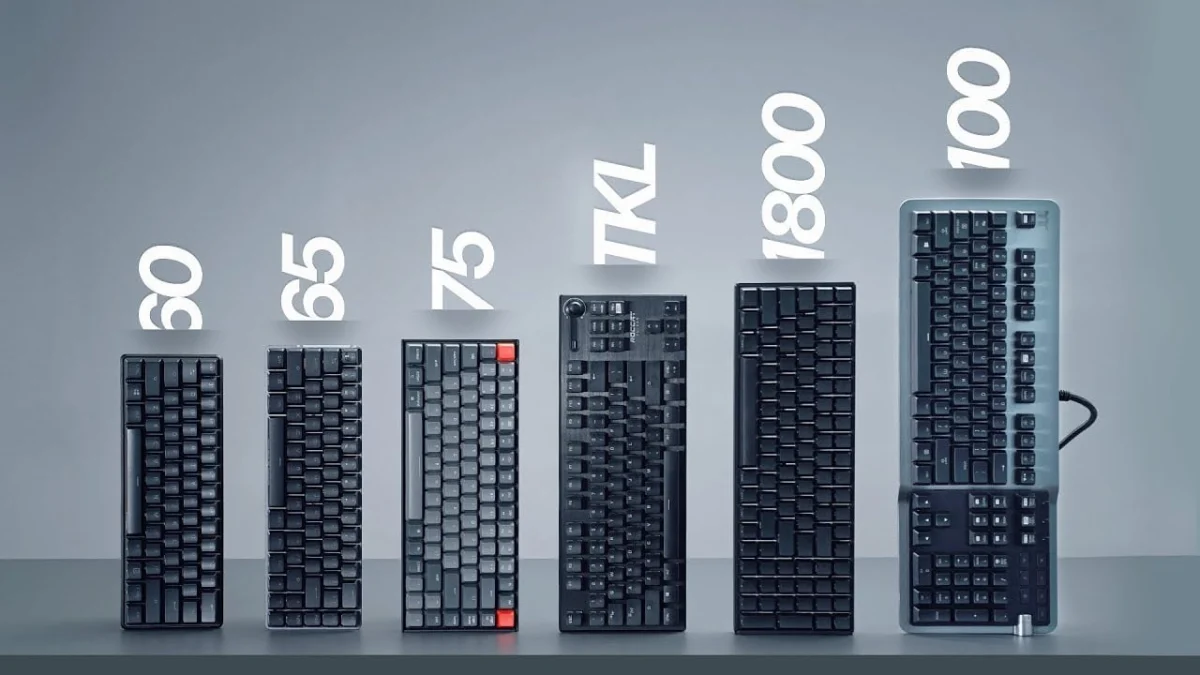
The modern personal computer peripheral market has undergone a dramatic structural shift over the past decade, evolving from a landscape dominated by uniform, full-sized input devices into a specialized ecosystem defined by bespoke layouts, ergonomic considerations, and distinct use-case applications. While the standard 100% full-size keyboard historically reigned supreme as the default inclusion with pre-built desktop systems, contemporary consumers now face a dizzying array of form factors. Understanding the nuanced differences between full-size, 1800 compact, tenkeyless (TKL), 75%, 65%, 60%, and ultra-compact 40% layouts is essential for optimizing both productivity workflows and gaming performance.
The Evolution of Peripheral Design and Market Dynamics
To understand the current variety of keyboard sizes, one must examine the historical context of computer input hardware. Early computing required dedicated numeric keypads for accounting, ledger work, and basic data entry. Consequently, manufacturers prioritized comprehensive, uncompromised layouts that featured independent function rows, navigation clusters, and dedicated numeric pads.
However, the rise of competitive PC gaming and the shrinking footprint of modern workspaces catalyzed a demand for ergonomic optimization. Industry analysts note that professional and amateur gamers alike soon realized that a sprawling full-size peripheral forced their mouse arm outward, resulting in an unnatural shoulder posture and reduced sweeping area for low-sensitivity mouse tracking. This realization sparked the development of the Tenkeyless (TKL) layout in the late 2000s, which effectively removed the numeric keypad to reclaim valuable desk real estate.
By the mid-2010s, the enthusiast mechanical keyboard community—championed by open-source firmware projects, group buys, and custom manufacturers—pushed the boundaries of minimization further. This led to the popularization of 75%, 65%, and 60% form factors, transforming what was once a niche hobbyist pursuit into a multi-million-dollar global manufacturing segment.
Analyzing the Spectrum of Keyboard Sizes
Full-Size (100%)
The full-size keyboard remains the most commercially prevalent form factor in the global marketplace, largely due to its ubiquity in office environments and pre-built OEM bundles. Featuring a complete numeric keypad, a dedicated navigation cluster (Insert, Delete, Home, End, Page Up, Page Down), an independent function row, and standard arrow keys, the 100% layout offers maximum out-of-the-box utility.
- Advantages: Exceptional for data entry, accounting, and applications requiring frequent numeric input. Full-size models frequently showcase advanced manufacturer features first, including dedicated macro columns, integrated USB and audio passthroughs, high-polling rates, digital volume rollers, and sophisticated lighting controls.
- Disadvantages: Poor ergonomic alignment for typing, as the expansive width forces the user’s hands wider apart, and a significantly restricted mouse maneuvering area on standard desktop setups.
1800 Compact
Bridging the gap between the full-size layout and a space-saving footprint, the 1800 compact format integrates the numeric keypad and navigation cluster tightly against the main alpha-numeric block without intervening dead space. Some variations maintain a traditional rectangular alignment with a compressed arrow cluster, while others feature a slightly offset or sunken arrow row.
- Advantages: Retains the full functional capabilities of a 100% keyboard—including the dedicated number pad—while shaving off several centimeters of overall width.
- Disadvantages: The lack of physical separation between key clusters can lead to inadvertent keystrokes for users transitioning from standard full-size boards, and aftermarket keycap compatibility can be complex due to non-standard bottom-row and right-side column dimensions.
Tenkeyless (TKL / 80%)
The Tenkeyless layout represents the foundational standard for modern gaming peripherals. By surgically removing the numeric keypad while preserving the dedicated function row, arrow keys, and navigation cluster, the TKL strikes a middle ground between comprehensive functionality and ergonomic efficiency.
- Advantages: Dramatically improves shoulder ergonomics by centering the primary typing area and creates a substantial increase in mouse-tracking space—a critical advantage for first-person shooter (FPS) gamers. Mainstream and enthusiast markets alike offer vast arrays of TKL options.
- Disadvantages: Generally commands a price premium over full-size equivalents despite containing fewer physical components, and standard full-size keycap sets will leave surplus numeric-pad keys unused.
75% Layout
The 75% form factor is an enthusiast-driven layout that compresses the TKL design into a significantly smaller physical footprint by eliminating gaps between the function row, navigation cluster, and main typing block. Keys are typically arranged in a clustered, "squished" matrix.
- Advantages: Retains all critical keys—including dedicated function keys and arrow clusters—while reducing the overall board length, making it ideal for compact desk setups.
- Disadvantages: Finding compatible third-party keycap sets can be challenging due to the compressed right-side modifier keys and non-standard column layouts, and the dense visual presentation may not appeal to all users.
65% Layout
By eliminating the dedicated function row entirely and relying on programmable secondary layers (accessed via a Function or ‘Fn’ key), the 65% keyboard provides a remarkably compact typing solution while retaining dedicated arrow keys and a minimal navigation column.
- Advantages: Serves as an ideal companion for laptop users and mobile professionals who require a dedicated arrow cluster without the bulk of a larger frame. It maximizes desk space for mouse movement while preserving intuitive cursor control.
- Disadvantages: Essential keys such as the F-row, tilde (~), and Home/End functions require a two-key chord combination. Furthermore, bottom-row standardization varies significantly across manufacturers, complicating aftermarket keycap replacement.
60% Layout
The 60% keyboard strips away the arrow keys, navigation cluster, and function row entirely, leaving only the core alphanumeric block and modifiers. Arrow keys, media controls, and navigation functions are embedded as secondary layers within the standard key matrix.
- Advantages: Unmatched portability and the maximum possible clearance for mouse movement, making it a favorite among competitive esports athletes. Because of its massive popularity, the 60% layout benefits from the widest selection of standardized aftermarket keycap sets and custom chassis options in the industry.
- Disadvantages: Highly disruptive learning curve for productivity tasks, programming, and general office work where frequent use of the dedicated arrow keys, escape sequences, or function rows is mandatory.
Ultra-Compact (40% and Specialized Keypads)
Occupying the extreme periphery of input device design, 40% keyboards eliminate number rows, function rows, and dedicated punctuation keys, forcing users to rely entirely on multiple programmable firmware layers (often utilizing QMK or VIA software) to input numbers and symbols. Concurrently, standalone gaming keypads target single-hand operation for genre-specific gaming.
- Advantages: Ultimate minimalism, conversation-starting aesthetics, and elimination of hand movement away from the home row.
- Disadvantages: Steepest possible learning curve, rendering the device virtually unusable for untrained third-party operators without extensive configuration and muscle memory conditioning.
Industry Implications and Consumer Guidance
Market researchers observing the peripheral sector note that consumer preferences are increasingly polarized. Mainstream casual users and accounting professionals continue to drive steady baseline sales for 100% full-size keyboards, valuing convenience and all-in-one capability. Conversely, the gaming demographic and software development communities have decisively shifted toward TKL, 75%, and 65% layouts as the new operational standards.
Ergonomic specialists and occupational health researchers frequently endorse the adoption of smaller keyboards—specifically TKL and 65% formats—citing reduced ulnar deviation. By bringing the computer mouse closer to the midline of the body, users experience less shoulder strain and a lower incidence of repetitive strain injuries (RSI) over prolonged working sessions.
When selecting a keyboard size, industry experts recommend evaluating primary daily tasks over aesthetic trends. Consumers who spend the majority of their time working with spreadsheets and financial databases should prioritize 100% or 1800 compact units. Conversely, individuals balancing gaming performance, desk ergonomics, and general text input will find optimal utility in the TKL or 65% configurations. Ultimately, the modern keyboard market ensures that regardless of spatial limitations or workflow requirements, an engineered input solution exists to match every specific operational demand.