In a significant move to unify its artificial intelligence (AI) experience across diverse platforms, Google has officially rolled out the Neural Expressive design language to its Gemini application for macOS. This update, arriving concurrently with the launch of Gemini 3.6 Flash, signals Google’s sustained commitment to refining user interaction with its flagship AI assistant, ensuring a consistent and visually appealing interface regardless of the device in use. The Neural Expressive design, first unveiled at I/O 2026 for Android, iOS, and web platforms, now extends its modern aesthetic and functional enhancements to the desktop environment for Apple users, marking a crucial step in Google’s multi-platform AI strategy.
The Evolution of Gemini and its Design Philosophy
Google Gemini, originally launched as Bard, represents Google’s ambitious foray into conversational AI, designed to be a multimodal assistant capable of understanding and generating various forms of content, from text and code to images and audio. Its evolution has been rapid, driven by intense competition in the AI landscape and a strategic vision to integrate AI deeply into Google’s vast ecosystem. The rebranding to Gemini was not merely a name change; it signified a consolidation of Google’s most advanced AI models under a unified brand, emphasizing its multimodal capabilities and expansive potential.
Central to this evolution has been the refinement of its user interface (UI) and user experience (UX). Early iterations of Bard and Gemini featured functional but often utilitarian designs. However, as AI tools become more ubiquitous, the demand for interfaces that are not only intuitive but also aesthetically pleasing and emotionally engaging has grown exponentially. This is where the Neural Expressive design language comes into play.

Unpacking the Neural Expressive Design Language
The Neural Expressive design language is Google’s latest effort to humanize AI interaction. Its core philosophy revolves around making AI feel more natural, responsive, and, as its name suggests, "expressive." This goes beyond mere aesthetics; it aims to create a more dynamic and less static interaction, reflecting the fluid nature of human conversation and thought.
Key principles underpinning Neural Expressive include:
- Fluidity and Responsiveness: Interactions are designed to feel seamless, with animations and transitions that guide the user rather than jarring them. The temporary gradient surrounding the prompt bar at launch, for instance, serves as a subtle visual cue, indicating readiness for input.
- Clarity and Simplicity: While expressive, the design avoids clutter. Icons are streamlined to a thin outline style, promoting quick recognition and reducing visual noise. This minimalist approach ensures that the focus remains on the AI’s output and the user’s input.
- Consistency Across Platforms: A major objective of Neural Expressive is to provide a uniform experience. Whether a user is interacting with Gemini on a smartphone, a web browser, or now a macOS desktop, the visual cues, button placements, and overall feel are intended to be familiar, reducing the learning curve and fostering a sense of continuity.
- Emotional Connection: The "expressive" aspect hints at a design that evokes a more positive and engaging emotional response from users. Color gradients, subtle animations, and thoughtful iconography contribute to an interface that feels less like a sterile tool and more like a helpful companion.
This design philosophy is a direct response to the increasing ubiquity of AI. As AI moves from niche applications to mainstream daily use, its interface becomes paramount. A well-designed interface can significantly lower barriers to adoption, enhance user satisfaction, and ultimately drive engagement.
A Detailed Look at the macOS Implementation
The Gemini for macOS application, now updated to version 1.86, fully embraces the Neural Expressive design language. Users will immediately notice several key visual changes:
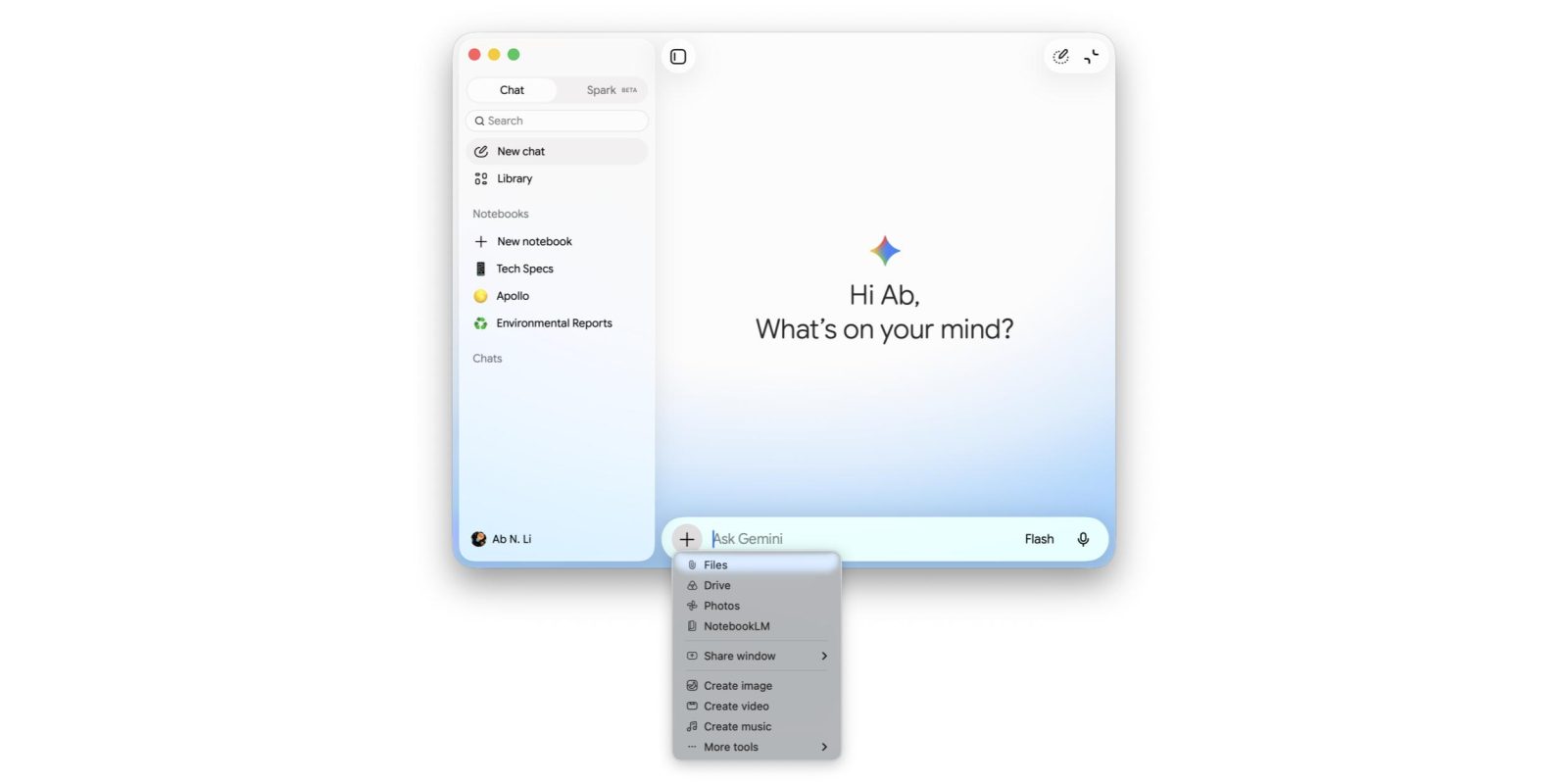
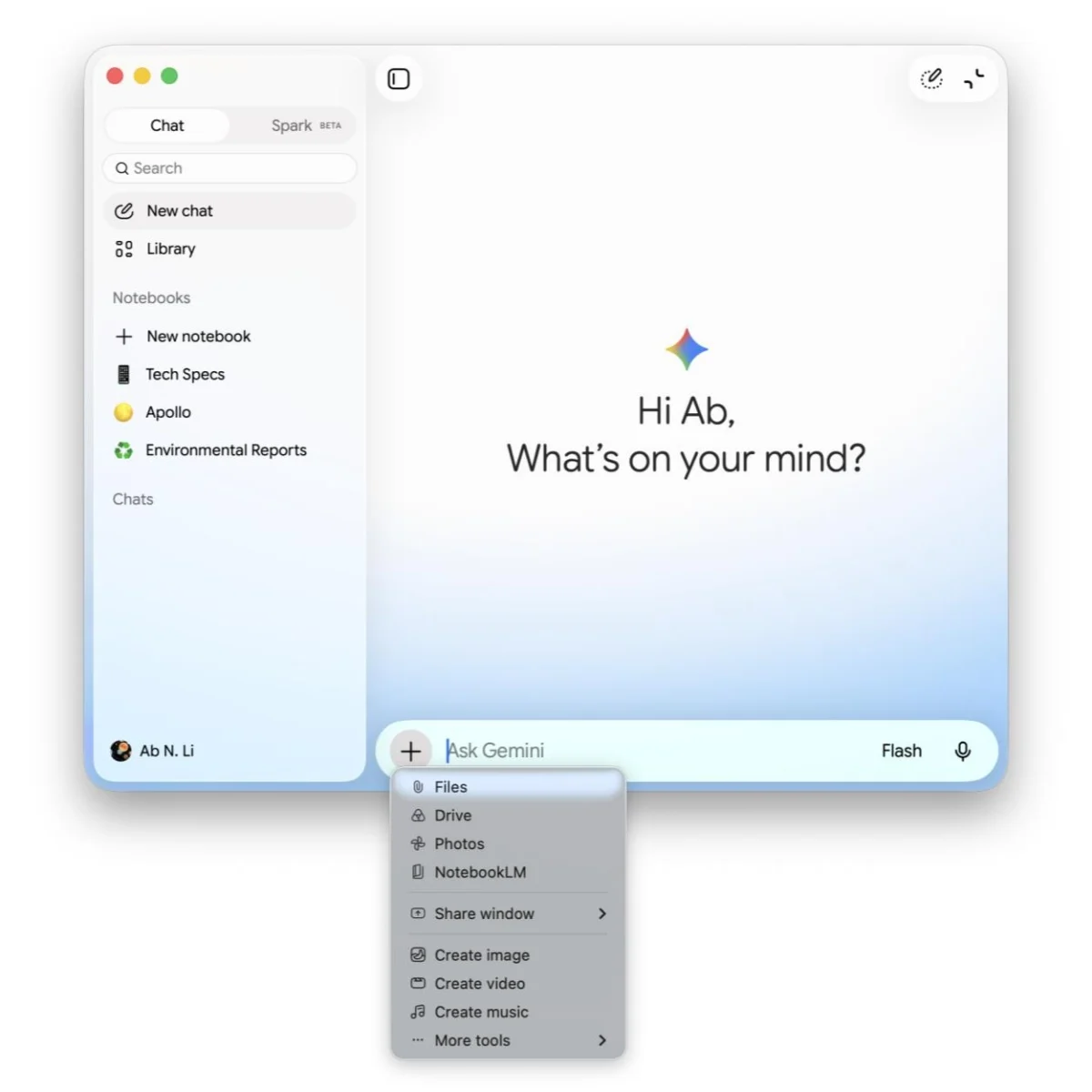
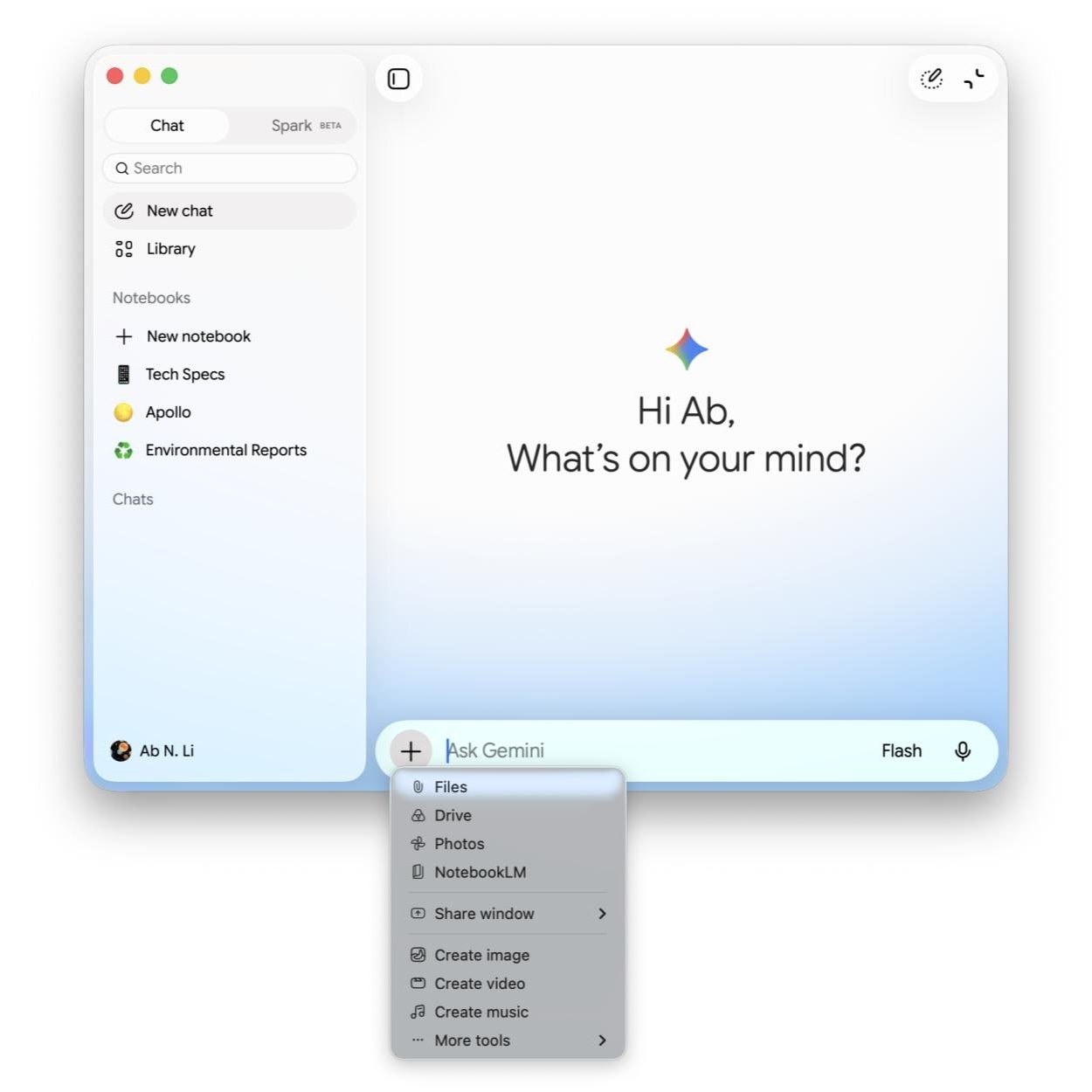
- Dynamic Prompt Bar: Upon launching the application, a vibrant, colorful gradient temporarily encircles the prompt bar. This visual flourish not only adds a touch of modern aesthetic but also serves as an engaging readiness indicator, signaling the AI’s availability for interaction.
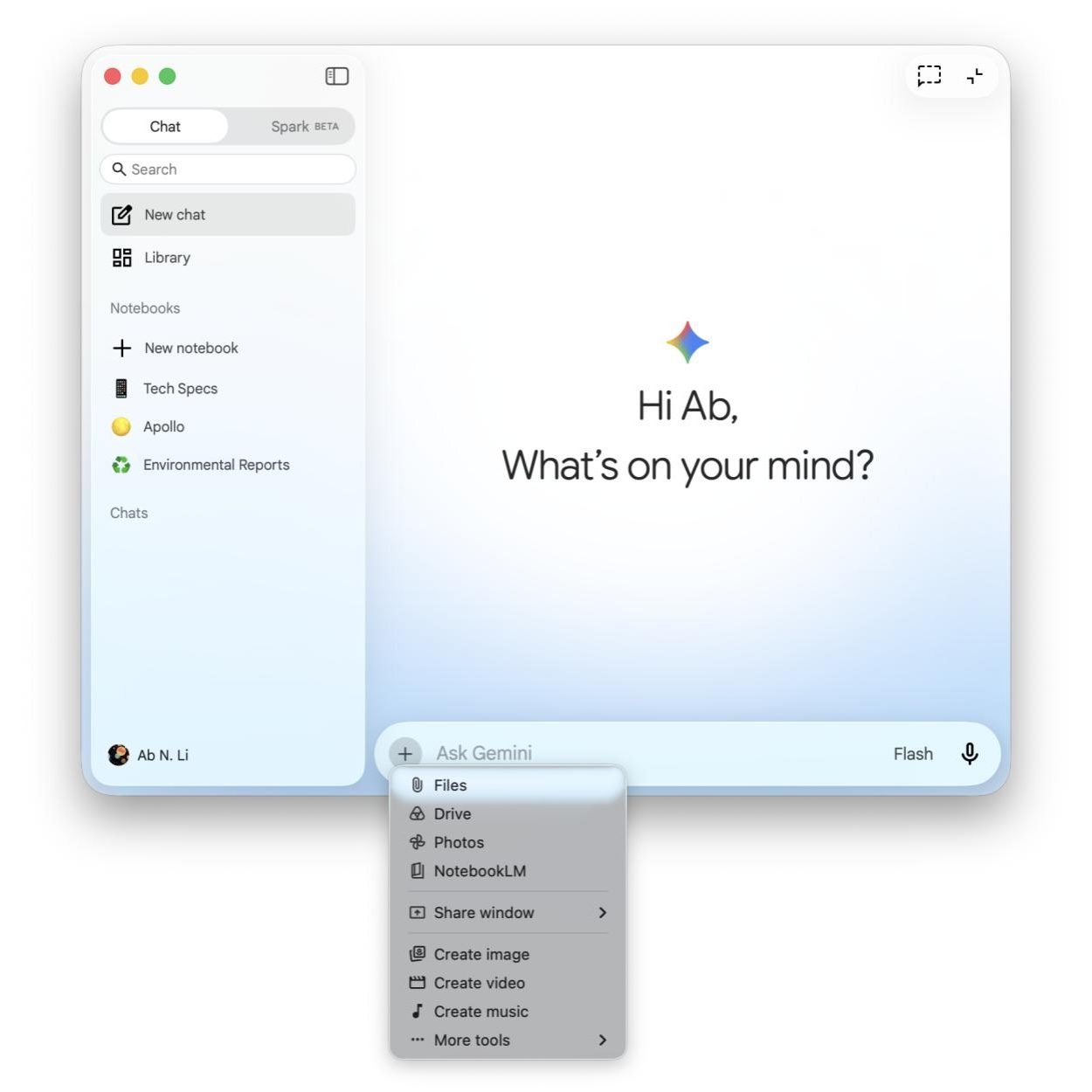
- Streamlined Iconography: All icons throughout the application have been updated to a sleek, thin outline style. This change affects critical elements on the homepage, including buttons for the side panel, voice input, the "Temporary chat" feature, and the toggle between full app and mini view. The mini-view toggle, notably, has been redesigned with a more rounded aesthetic, aligning with contemporary UI trends.
- Enhanced ‘Plus’ Menu: The ‘plus’ menu, typically used for accessing additional functionalities or input options, now features new icons. This ensures visual consistency with how this menu appears across other platforms where Neural Expressive has been implemented, reinforcing the cross-platform uniformity Google aims for.
- Updated Navigation Drawer: The side navigation drawer, which allows users to switch between different sections or chat histories, now employs pill-shaped indicators. These indicators visually highlight the user’s current selection, offering a clearer and more modern navigational experience compared to previous designs.
- Refreshed Settings Menu: The Settings menu, a critical area for customization and control, has also received a comprehensive update, bringing its visual language in line with the new design principles. This ensures that even administrative parts of the application contribute to the cohesive Neural Expressive experience.
These specific changes are not merely cosmetic; they are carefully considered elements designed to improve readability, intuitiveness, and overall user satisfaction. The shift from older, potentially heavier icons to a lighter, outline style reflects a broader trend in digital design towards minimalism and clarity.
Chronology of Google’s AI Design Rollouts
The journey to the Neural Expressive design on macOS has been a strategic, multi-stage rollout:
- Early 2023: Introduction of Bard, Google’s initial conversational AI, with a functional but evolving interface.
- Late 2023/Early 2024: Rebranding of Bard to Gemini, accompanied by initial design refinements and the introduction of mobile apps for Android and iOS, aiming for a unified brand identity.
- May 2026 (I/O 2026): Google officially unveils the Neural Expressive design language. This major announcement highlighted the new visual and interaction paradigms, with a commitment to roll it out across Gemini on Android, iOS, and the web. The design was showcased as a core component of making AI interactions more natural and intuitive.
- June-July 2026: Gradual rollout of the Neural Expressive design across mobile (Android, iOS) and web versions of Gemini, gathering initial user feedback and fine-tuning elements.
- July 21, 2026: Simultaneous launch of Gemini 3.6 Flash and the Neural Expressive redesign for Gemini on macOS (version 1.86). This signifies the completion of the core rollout for key platforms. Notably, the Gemini for Chrome side panel currently remains on the previous design language, indicating that the rollout is still in progress for certain integrated experiences.
This phased approach allows Google to iterate and optimize the design based on real-world usage data and user feedback, ensuring that the final product is robust and well-received across its diverse user base.
Broader Implications for Google’s AI Ecosystem
The consistent application of Neural Expressive across platforms is a clear signal of Google’s strategic intent: to embed Gemini deeply and uniformly into the user’s digital life. This isn’t just about a single application; it’s about building a coherent AI ecosystem.
Other recent visual updates within Google’s AI offerings underscore this commitment:
- AI Mode on Android: This week saw the rollout of the latest design for AI Mode on Android. The prompt box, traditionally docked to the bottom of the screen like a sheet, has been transformed into a floating container. This change offers greater flexibility and a more dynamic interaction area. Additionally, the ‘plus’ menu and submit button are now presented in pill-shaped elements, aligning with the clean, modern aesthetic seen in Neural Expressive.
- Unified Prompt Box Vision: Historically, both the Gemini app and other Google AI interfaces (like the pre-Neural Expressive AI Mode on Android) shared a "bottom sheet" look for their prompt boxes. This was an interesting attempt to unify the AI experience. The move towards floating containers and pill-shaped elements in Neural Expressive represents an evolution of this idea, aiming for more adaptable and less restrictive interface elements that can gracefully scale across different screen sizes and interaction contexts. It’s worth noting that some legacy interfaces, such as the Google Health Coach, may still retain the older bottom sheet design, illustrating the gradual nature of such large-scale design transitions within a company as vast as Google.
This consistent design language helps to reduce cognitive load for users who frequently switch between devices and applications. It fosters a sense of familiarity and reliability, which are crucial for building trust in AI tools that are still relatively new to many users.
Competitive Landscape and User Experience Analysis
The introduction of Neural Expressive on macOS positions Gemini more competitively within the desktop AI assistant market. Apple, a significant player in the desktop space, has its own AI initiatives, and Microsoft’s Copilot is deeply integrated into Windows. For Google, a polished and consistent Gemini experience on macOS is essential to attract and retain users who operate within the Apple ecosystem but may prefer Google’s AI capabilities or already use Google services extensively.
Potential User Impact:
- Enhanced Usability: The visual refinements, such as clearer icons and navigational cues, are expected to improve the overall usability of the Gemini app, making it easier for users to find features and interact with the AI.
- Increased Engagement: A more aesthetically pleasing and responsive interface can lead to increased user engagement. When an application feels modern and intuitive, users are more likely to spend time with it and explore its capabilities.
- Brand Perception: For many users, the interface is the application. A sleek, modern design reinforces Google’s image as an innovator in AI and design, potentially attracting new users who prioritize a premium user experience.
- Cross-Platform Synergy: For users who frequently switch between their Mac, Android phone, or web browser, the consistent design will create a more seamless and less fragmented digital experience. This synergy is a powerful draw for users deeply embedded in the Google ecosystem.
However, the success of such design changes is also contingent on practical functionality. While the aesthetics are crucial, the underlying AI performance, accuracy, and feature set remain paramount. The simultaneous launch of Gemini 3.6 Flash, a more powerful and efficient model, suggests that Google is addressing both form and function, aiming for a holistic improvement in the Gemini experience.
The Road Ahead for Google AI
The Neural Expressive redesign for Gemini on macOS is more than just an aesthetic refresh; it’s a strategic investment in the future of Google’s AI. As AI continues to evolve and integrate into every facet of digital life, the interface through which users interact with these powerful tools will become increasingly critical. Google’s focus on a unified, expressive, and intuitive design language across its diverse product portfolio reflects a deep understanding of user needs in an AI-first world.
The journey of AI integration is ongoing, and future developments are likely to see even deeper embedding of Gemini into operating systems, further refinements to its multimodal capabilities, and continuous improvements to its user interface. For macOS users, this update brings Gemini squarely into the modern design paradigm, offering a more delightful and efficient way to leverage Google’s cutting-edge AI directly from their desktop. This move underscores Google’s ambition not just to lead in AI research, but also to deliver that power through compelling and user-centric experiences across all major platforms.