The meticulous maintenance of computing peripherals, particularly keyboards, is a critical aspect of ensuring their longevity, optimal performance, and user hygiene. After two years of continuous use since its 2019 launch, an XTRFY K40 TKL RGB mechanical keyboard served as a prime candidate for a comprehensive deep cleaning procedure, revealing the often-unseen accumulation of debris that can compromise both aesthetics and functionality. This in-depth process, utilizing readily available tools and systematic methodology, demonstrates how a thorough cleaning can restore a keyboard to near-new condition, mitigating common issues associated with prolonged use.
The Unseen Accumulation: Why Keyboards Get Dirty
Keyboards, as primary input devices, are constantly exposed to environmental contaminants and human contact, making them breeding grounds for various particles and microorganisms. Research has consistently highlighted the alarming levels of bacteria found on typical keyboards, with some studies indicating they can harbor more germs than a toilet seat. Common accumulations include dead skin cells, food crumbs, dust, pet dander, hair, natural oils from fingertips, and moisture, all of which coalesce into a sticky, grimy residue over time. This particulate matter not only creates an unsanitary environment but can also physically impede the smooth operation of mechanical switches, leading to inconsistent key presses, reduced responsiveness, and an overall degradation of the typing experience.
Beyond performance issues, the hygienic implications are significant. Regular contact with a contaminated surface can contribute to the spread of bacteria and viruses, potentially leading to skin irritations, allergies, or even more serious infections, especially in shared workspaces. For a device like the XTRFY K40 TKL RGB, which has been a "go-to" peripheral for an extended period, the build-up is inevitable, even without accidental spills. The objective of a deep clean extends beyond mere aesthetics; it is a fundamental practice in maintaining a healthy and efficient computing environment.
The Case Study: An XTRFY K40 TKL RGB Transformation
The subject of this comprehensive cleaning initiative was a specific Hardware Canucks Edition XTRFY K40 TKL RGB mechanical keyboard, a model renowned for its robust build and tactile feedback. Acquired upon its launch in 2019, the keyboard had accumulated a significant amount of gunk over its two years of service. This accumulation manifested as visible grime on the keycaps and the frame, along with a substantial collection of debris beneath the keycaps and around the mechanical switches. Unlike keyboards with a "floating keycap" design, which offers easier access to the switch area, the K40’s design, where keycaps sit within a top plate, presents a slightly greater challenge for debris removal, necessitating a more thorough disassembly. The expectation was that removing the top frame element would provide the necessary access to address the entrenched grime effectively.
Strategic Preparation: Tools and Techniques
Effective keyboard cleaning begins with meticulous preparation and the assembly of appropriate tools. While specialized keyboard cleaning kits are commercially available, their quality varies widely. A pragmatic approach often involves utilizing common household items, complemented by a few specialized tools. Essential items for this deep clean included:
- Keycap Puller: Indispensable for safely removing keycaps without damaging the switch stems.
- Small Brushes: Toothpicks, Q-tips, toothbrushes, and soft-bristled paintbrushes are effective for dislodging and sweeping away loose debris from intricate areas.
- Tweezers: Useful for grasping and removing individual hairs or larger particles.
- Cleaning Solutions: A mixture of rubbing alcohol (isopropyl alcohol) and water (typically a 70% alcohol to 30% water ratio) for dissolving stubborn grime, and a mild soapy water solution for soaking keycaps.
- Microfiber Cloths/Kitchen Towels: For drying and polishing components.
- Safety Precautions: Crucially, the keyboard must be disconnected from its power source (the computer) before any cleaning commences to prevent electrical damage or injury.
The initial step in addressing the accumulated gunk involved a simple yet effective physical manipulation: turning the keyboard upside down and gently tapping it. This action leverages gravity to dislodge loose particles, hair, and crumbs that have settled between and beneath the keycaps, offering a preliminary reduction in surface debris before more intensive cleaning begins. For optimal results and to aid in reassembly, it is highly recommended to photograph the keyboard’s layout before removing any keycaps, or to keep a high-resolution image of the product’s layout readily accessible on a monitor.
Deconstruction for Deep Access: The Disassembly Process
A distinguishing feature of the XTRFY K40 TKL RGB, and a significant advantage for deep cleaning, is its modular construction which allows for the removal of the top plate. This design contrasts with many "floating style" keycap keyboards where the top plate is either integrated or less accessible, often simplifying initial debris removal but complicating deep cleaning around the switches. On the K40, the removable top plate provides unobstructed access to the very edges of the keyboard base and the areas surrounding each switch. This not only facilitates a more thorough cleaning of the top plate itself as a separate component but also dramatically simplifies the subsequent keycap removal process, particularly for those situated on the periphery of the keyboard. The removal of the top plate typically involves unscrewing several small fasteners, a process that should be undertaken with care to avoid stripping screw heads or damaging the plastic housing.
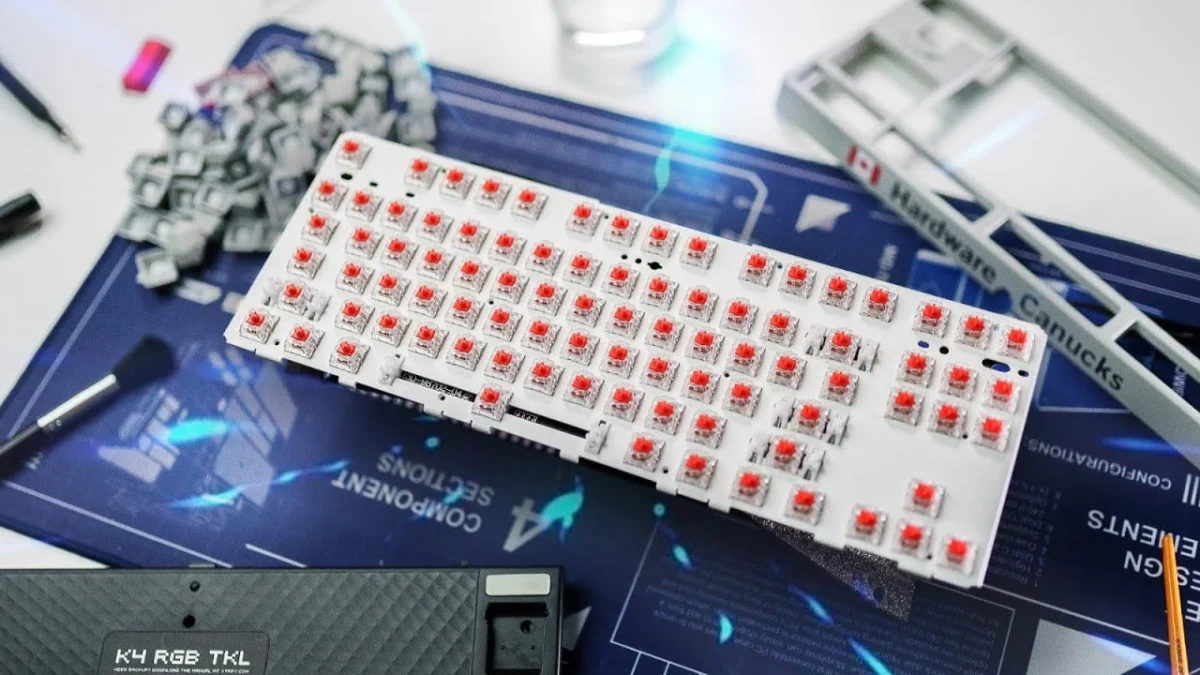
Following the top plate removal, the main base of the keyboard becomes accessible. In the case of the K40, further disassembly involved removing a few more screws to separate the top frame from the main PCB (Printed Circuit Board) and switch assembly. This step revealed additional, often surprising, accumulations of debris within the otherwise enclosed black frame. A notable observation during this stage was the presence of dampening foam filling the hollow base, a design choice that contributes significantly to the keyboard’s acclaimed acoustic profile. Removing the USB cable at this juncture also ensured it did not obstruct the cleaning process, allowing for greater maneuverability of the base unit.
Keycap Restoration: A Soapy Immersion
With the top plate and frame components separated, the next critical phase involved the systematic removal of all keycaps. The use of a keycap puller, particularly after the top plate has been removed, makes this process considerably faster and safer, minimizing the risk of bending switch stems. Special attention was paid to larger keys such as the spacebar, Enter, and Shift keys, which are often equipped with stabilizers. These require careful, balanced pulling from both sides to prevent damage to the stabilizer mounts or the keycap itself.
Once removed, the keycaps were immediately transferred to a basin filled with a mild soapy water solution for an extended soak, typically for about an hour. This "soapy bath" serves a dual purpose: it effectively loosens and dissolves the grease and grime that accumulate on the surface of the keycaps from finger oils and environmental exposure, and it helps dislodge any particles or residue that might be clinging to the underside of the keycaps near the stem. While an initial inspection might suggest a moderate level of cleanliness, a closer examination, perhaps with a macro lens, often reveals the true extent of the gunk accumulation, including fine hair particles and sticky residues embedded in the texture of the plastic. The chemical action of the soap helps emulsify the oils and lifts away particulate matter, preparing the keycaps for manual cleaning.
The Heart of the Keyboard: Cleaning the Base and Switches
With the keycaps soaking, attention shifted to the keyboard’s base plate and the exposed mechanical switches. This phase is crucial for addressing the core of the accumulated grime. A soft-bristled paintbrush was employed first to sweep away larger, loose particles such as hairs, dust, and crumbs from around the switches and the base plate. It was observed that debris was particularly concentrated around high-usage areas like the spacebar, the Enter key, and the left Shift key, indicating common points of contact and particle ingress. The brush, while effective for loose debris, quickly became grimy itself, highlighting the sticky nature of the accumulated gunk.
Further cleaning involved the stabilizers, which often accumulate a mixture of hair and the original lubricant. While it is important to clean around them, extreme care must be taken not to remove excessive amounts of the factory lubricant, as this can negatively impact the feel and sound of the stabilized keys. If necessary, fresh lubricant can be reapplied later.
For the more stubborn, sticky grime, cotton swabs dipped in the rubbing alcohol and water mixture proved indispensable. Unlike plain water, the alcohol solution effectively cuts through oils and sticky residues, preventing the gunk from merely spreading. This process required significant physical scrubbing, as the grime was deeply adhered and not easily wiped away. It was a repetitive task of scrubbing, wiping with a fresh swab, and repeating until the surface was clean. Fortunately, the most persistent grime was largely confined to specific high-traffic zones, such as the spacebar, left Shift, and right Enter keys, with other areas like the WASD cluster and the surrounding base remaining surprisingly clean, almost in a brand-new state. The white base plate of the XTRFY K40 made the visibility of this grime particularly stark, emphasizing the dramatic improvement achieved through diligent scrubbing.
Rehydration and Drying: Preparing for Reassembly
After approximately an hour of soaking, the keycaps were ready for individual cleaning and drying. Each keycap was removed from the soapy water, one by one, and thoroughly rinsed under running water to remove all traces of soap and dissolved residue. It is crucial to replace the soaking water multiple times during this rinsing process to ensure all contaminants are fully flushed away. Special attention was given to cleaning all five sides of each keycap, addressing any gunk that might have accumulated on the vertical edges.
Once rinsed, the keycaps were placed face-up on a clean kitchen towel to air dry. A common pitfall is residual water trapped inside the keycap, so tapping each keycap vigorously helps expel any trapped moisture. Ensuring complete dryness is paramount before reassembly to prevent moisture from damaging the keyboard’s internal electronics. Similarly, the keyboard base and all disassembled components were left to air dry completely, or carefully wiped with a microfiber cloth, ensuring no dampness remained. The feeling of the now-clean base plate around the switches was markedly different – smooth and non-sticky, a stark contrast to its previous grimy state.
The Art of Reassembly: Bringing it All Back Together
With all components thoroughly cleaned and dried, the reassembly phase began. This stage, often considered the least enjoyable, demands patience and precision. The first step involved reconnecting the USB cable to the keyboard’s PCB. Before reattaching the top plate, a final sweep of the base was performed to ensure no stray particles had settled during the drying process. This sweep involved brushing in an upward or downward motion, directing any remaining dust or debris off the board rather than merely moving it around. This final check ensures the base is pristine before being sealed.
Reattaching the top plate, once the base was confirmed clean, was straightforward, involving screwing it back into place. The subsequent task of reattaching the keycaps required referring to the photographic documentation or the online image of the keyboard layout. A systematic approach is recommended: beginning with easily identifiable keys such as the F-keys, the larger Control, Enter, and Shift keys, and then methodically filling in the standard alphanumeric keys. Care was taken when reattaching the stabilized keys, ensuring they properly seated onto both the switch stem and the stabilizer wires.
The final touch involved giving each reassembled keycap a gentle polish with a clean microfiber cloth. This step removes any residual fingerprints or smudges acquired during handling, leaving the keyboard with a truly "brand new" appearance.
Industry Perspectives and Broader Implications
The deep cleaning of mechanical keyboards, while a meticulous process, offers substantial benefits that resonate across user experience, product longevity, and public health. Keyboard manufacturers, while typically not detailing deep cleaning in user manuals, generally endorse regular maintenance for optimal product performance and to maintain warranty validity. Industry experts in peripheral design emphasize that dust and grime can accelerate wear on switch mechanisms and keycap legends. From a public health standpoint, hygiene professionals consistently advocate for regular cleaning of high-touch surfaces in workstations to mitigate germ transmission, especially in light of increased awareness regarding infectious diseases.
The implications of such a cleaning regimen are multifaceted:
- Economic Impact: Extending the lifespan of expensive mechanical keyboards reduces the frequency of replacements, offering significant long-term cost savings for consumers and businesses. This proactive maintenance lessens the financial burden of hardware upgrades.
- Environmental Impact: By prolonging the operational life of electronics, deep cleaning contributes to reducing electronic waste (e-waste). This aligns with broader sustainability efforts to minimize the environmental footprint of technology consumption.
- User Experience: A clean keyboard offers a noticeably superior typing experience. The switches operate smoothly, keycaps feel fresh, and the overall aesthetic appeal is restored. This contributes to increased user satisfaction and potentially enhanced productivity.
- Health and Safety: A demonstrably cleaner workstation fosters a healthier environment, reducing the risk of germ-related illnesses and allergies, particularly crucial in shared office spaces or during flu seasons.
The XTRFY K40 TKL RGB, with its removable top plate, exemplifies a design that facilitates such deep cleaning, making the process more accessible for users. However, even keyboards with integrated top plates can benefit from thorough cleaning, albeit with slightly different approaches. The critical considerations remain consistent: avoiding excessive liquid near electronics, using appropriate cleaning agents, and ensuring all components are completely dry before reassembly.
Conclusion
The deep cleaning of the XTRFY K40 TKL RGB mechanical keyboard proved to be an immensely satisfying and worthwhile endeavor. The transformation from a heavily used, grimy peripheral to one that feels and looks practically brand new, as it did two years ago, underscores the value of regular and thorough maintenance. This process was simplified by the keyboard’s thoughtful design, particularly the removable top plate and easily accessible screws, which obviated the need to remove rubber feet for disassembly. While this cleaning did not involve disassembling individual switches or fully stripping stabilizer lube, the targeted cleaning around these components was highly effective. The successful restoration of this keyboard serves as a testament to the benefits of responsible peripheral care, ensuring both optimal performance and a hygienic computing environment for years to come.