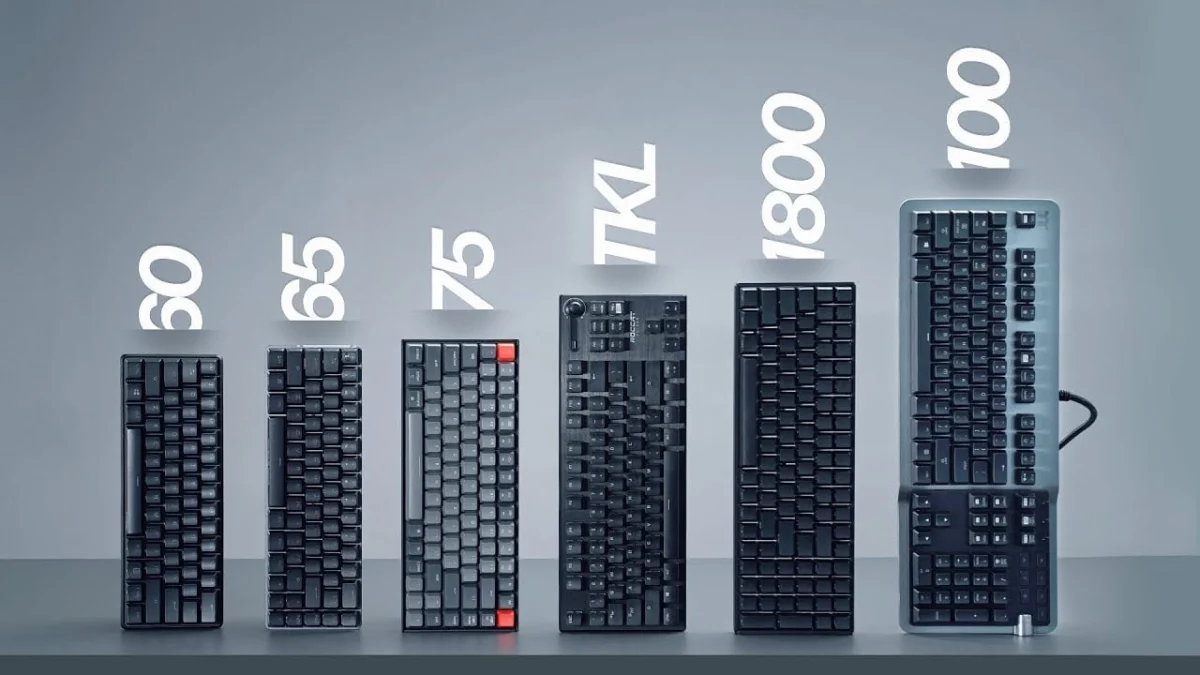
The modern personal computing landscape offers consumers an unprecedented array of peripheral hardware choices, with mechanical keyboards emerging as a significant segment for both general productivity and specialized gaming. As the market for desktop customization has expanded over the past decade, manufacturers have moved far beyond the traditional, standardized full-size desktop layout. Today, buyers navigate a complex taxonomy of form factors measured by percentages and specialized acronyms, ranging from massive 100% boards equipped with dual-side macro clusters to ultra-minimalist 40% configurations. Understanding the distinct structural, ergonomic, and functional differences among these sizes is essential for consumers seeking to optimize their workspace efficiency and hardware investment.
The evolution of keyboard form factors mirrors the broader shifts in computing ergonomics and gaming culture. Historically, the standard 100% layout dominated offices and homes alike, largely inherited from the design conventions of early IBM terminals that prioritized numeric data entry above all else. However, as computer mice gained prominence in the 1990s and 2000s, the physical reach required to operate a mouse alongside a full-size unit became recognized as a contributing factor to repetitive strain injuries and poor shoulder alignment. This ergonomic realization, coupled with the explosive growth of competitive esports where desk space directly correlates with mouse movement precision, catalyzed a permanent shift toward compact keyboard engineering. Manufacturers began systematically editing out redundant keys, giving rise to the Ten Key Less (TKL) movement, and eventually spawning the enthusiast custom market that defines the contemporary hardware landscape.
A comprehensive examination of available form factors reveals distinct operational profiles tailored to specific user demographics. At the upper end of the spectrum sits the Full-Size (100%) keyboard. This layout remains the volume leader in global retail sales, primarily due to its universal familiarity and the inclusion of a dedicated numeric keypad. Data entry professionals, accountants, and software developers who frequently input numerical data rely heavily on the dedicated numpad, occasionally favoring variants that position the keypad on the left side to keep the mouse closer to the typing center. Furthermore, full-size units often serve as the testbeds for cutting-edge peripheral technology, frequently featuring high polling rates, USB and audio passthroughs, dedicated media dials, proximity sensors, and elaborate RGB illumination zones. While their expansive footprint limits mouse maneuverability and forces a wider arm posture, their design completeness ensures that users never sacrifice immediate access to specialized keys.
Bridging the gap between full-size functionality and space conservation, the 1800 Compact layout condenses the traditional 100-percent feature set into a tightly integrated chassis. By eliminating the dividing spaces between the main typing block, the navigation cluster, and the numeric keypad, 1800 Compact boards achieve a significantly reduced physical length without losing a single key. Some iterations stack the arrow keys directly beneath the lower right modifier keys or compress the numpad closer to the main block. While this layout appeals to users who demand a numeric pad within a constrained desk area, its non-standard keycap spacing often complicates aftermarket customization.
For the vast majority of mainstream gamers and professional typists, the Ten Key Less (TKL)—often designated as an 80% board—represents the optimal balance of comfort and utility. By shearing off the numeric keypad entirely, TKL designs liberate substantial desktop territory, allowing gamers to angle their input devices aggressively and expand their mouse-tracking surface area. Ergonomically, TKL keyboards reduce ulnar deviation by centering the primary alphabet cluster directly in front of the user’s torso, aligning the hands more naturally with the shoulders. Despite these advantages, high-end TKL models frequently command premium pricing relative to their full-size counterparts, and custom keycap sets tailored for full-size boards will inevitably leave the user with surplus, unused numeric keys.
As the enthusiast community sought even greater compactness, the market embraced fractional layouts, led by the 75% and 80% hybrid configurations. The 75% layout compresses a TKL arrangement by merging the function row, navigation cluster, and arrow keys into a tight, bezel-less matrix. Popularized heavily by custom enthusiast platforms such as the Glorious GMMK Pro, 75% keyboards maintain dedicated function and navigation keys while shrinking the overall footprint to near-netbook dimensions. Similarly, the alternative 80% hybrid layout maintains the exact footprint of a 75% board but introduces a distinct visual separation between the function row and the number row. These designs offer a striking aesthetic profile and cater heavily to productivity users who prioritize desk real estate and visual uniqueness, though finding compatible aftermarket keycap sets for non-standard bottom rows remains a persistent challenge.
Descending further into the ultra-compact tier, 65% and 60% keyboards sacrifice dedicated navigation columns and function rows entirely to achieve maximum portability and workspace efficiency. The 65% layout retains dedicated arrow keys and a single vertical column of home cluster keys (such as Delete, Page Up, and Page Down), making it an ideal companion for laptop users and a favorite among first-person shooter (FPS) gamers who require vast expanses of uninterrupted mousepad space. Secondary functions, including the F-row and tilde key, are embedded into the primary key matrix and accessed via a function (Fn) modifier layer.
The 60% layout pushes minimalism a step further by eliminating the dedicated arrow keys entirely, embedding them alongside the navigation and function clusters deep within the primary key layers. While 60% boards benefit from a heavily standardized keycap market—offering consumers a vast array of colorways and aesthetic modifications—the steep learning curve required to master layer-based navigation often alienates office workers and heavy data-entry personnel. Industry analysts note that while 60% keyboards dominate entry-level gaming sales, productivity users frequently report fatigue due to the constant requirement of chording modifier keys for basic navigational inputs.
At the absolute fringes of peripheral engineering lie highly specialized alternatives, including single-handed gaming keypads and ultra-minimalist 40% layouts. Gaming keypads, produced by major hardware manufacturers like Razer and Logitech, cater exclusively to macro-heavy gaming genres by offering ergonomic wrist rests and programmable thumb clusters, though their utility is strictly limited outside of gaming applications. Conversely, 40% keyboards discard the number row, function row, and arrow keys altogether, reducing the hardware to a bare alphanumeric block. These enthusiast-driven boards rely on complex, programmable layer architectures managed via specialized firmware like QMK, serving as experimental canvases for keyboard hobbyists rather than practical tools for the general workforce.
Industry metrics and market forecasts indicate that while full-size keyboards continue to dominate baseline global sales volume due to corporate procurement and consumer inertia, the market share of TKL and 60%/65% compact formats is expanding rapidly within the consumer electronics sector. Hardware manufacturers report that ergonomic advocacy, the rise of remote work setups with constrained home office footprints, and the explosive growth of the PC gaming demographic are the primary catalysts driving this structural transition. Furthermore, the burgeoning aftermarket custom keyboard community has transformed peripherals from utilitarian office tools into lifestyle accessories, where form factor choice is dictated as much by aesthetic preference and desk architecture as it is by functional necessity.
Ultimately, selecting the correct keyboard size requires a careful audit of individual workflow demands, ergonomic requirements, and physical workspace constraints. While data-centric professionals will continue to anchor their productivity to full-size or 1800 compact models, the broader market trend clearly favors the balanced ergonomics of TKL and 65% layouts. As engineering standards evolve and software-based layer customization becomes more intuitive, the traditional boundaries of desktop hardware will continue to shrink, empowering users to tailor their physical interface with unprecedented precision.