The landscape of mobile computing has long been defined by a constant, delicate balancing act between thermal performance, battery longevity, and raw processing power. Because laptops are constrained by physical dimensions that limit cooling capacity, manufacturers routinely impose strict power limits—often referred to as TGP (Total Graphics Power)—on discrete mobile graphics processing units. However, a new community-developed software utility has emerged that challenges these factory boundaries, enabling daring users to push their hardware significantly beyond official specifications.
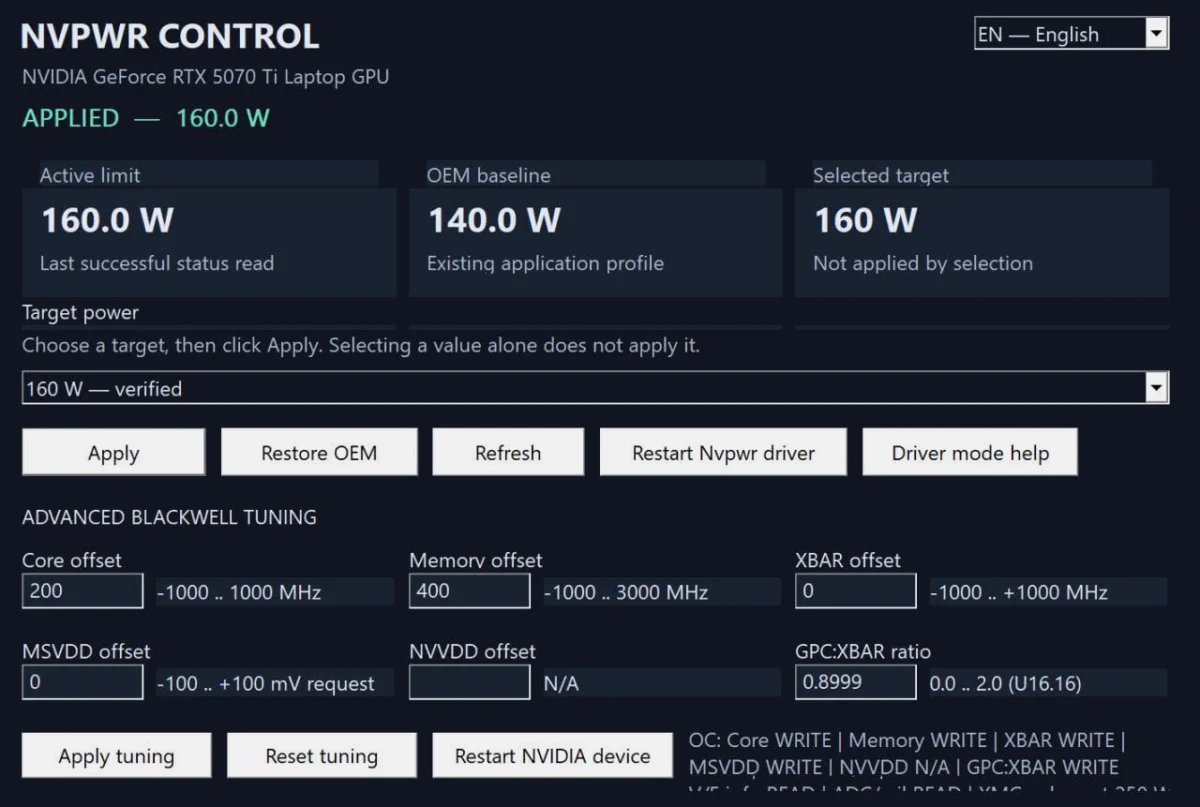
A newly released software tool designated as NvpwrControl has recently surfaced within the PC hardware modding community, offering Nvidia-based gaming laptop owners the ability to bypass traditional factory constraints. Spotted initially by hardware reporting outlets such as VideoCardz and made publicly available on GitHub by developer LevinAi-arch, the utility permits users to escalate the power limits of contemporary mobile graphics cards by up to 40 watts. While this unauthorized influx of electrical energy promises tangible performance gains in demanding graphical workloads, it introduces substantial risks regarding hardware reliability, thermal integrity, and overall component longevity.
The introduction of NvpwrControl arrives at a time when mobile gaming hardware is achieving unprecedented levels of computational density. As laptop GPUs continue to narrow the performance gap historically held by their desktop counterparts, enthusiasts are increasingly seeking methods to extract every available ounce of performance from their portable rigs. This comprehensive overview examines the mechanics of the new tool, the context of mobile GPU power tuning, the potential hardware ramifications, and the broader implications for the PC gaming community.
Understanding Mobile GPU Power Limits and TGP
To fully comprehend the significance of NvpwrControl, one must examine how mobile graphics processors operate within constrained thermal and electrical envelopes. Unlike desktop graphics cards, which benefit from massive heatsinks, expansive chassis airflow, and dedicated power supplies capable of delivering hundreds of watts without restriction, mobile GPUs must operate within tightly monitored parameters.
Nvidia’s mobile architecture relies on advanced power management frameworks, including Dynamic Boost technology, which allocates power dynamically between the central processing unit and the graphics processor based on workload demands. Additionally, laptop manufacturers configure specific TGP ratings for their machines depending on the thermal design power (TDP) capabilities of the cooling solution they have engineered into a particular chassis. For instance, a thin-and-light gaming laptop might feature an RTX 40-series or 50-series mobile GPU restricted to 80 or 100 watts, whereas a bulky, desktop-replacement laptop might allow that same silicon to draw 150 or 175 watts.
Historically, modifying these power limits required deep technical interventions, such as flashing modified VBIOS (Video BIOS) roms onto the graphics card. VBIOS flashing carries severe risks, including the potential to permanently brick the GPU, corrupt the display output, or render the system entirely unbootable. Furthermore, finding compatible modified firmware for specific laptop models has always been a hazardous endeavor due to variations in voltage regulator module (VRM) layouts, power delivery phases, and cooling configurations across different OEM designs.
The Emergence and Mechanics of NvpwrControl
NvpwrControl represents a shift in how enthusiasts approach mobile GPU tuning. Rather than requiring complex and risky firmware modifications via flashed VBIOS files, this experimental utility interacts directly with the system’s software environment to negotiate higher power states.
Hosted on GitHub under the repository associated with developer LevinAi-arch—notably tied to projects exploring power limits for configurations such as the RTX 5070 Ti laptop GPU—the tool gives users a direct interface to manipulate the power delivery ceilings enforced by the system. According to documentation and community observations, the software can elevate the power limits of mobile GPUs significantly. For high-end configurations, such as mobile variants akin to the hypothetical or newly emerging RTX 5090 laptop GPUs, power ceilings can reportedly be pushed up to 225 watts, while mid-tier offerings like the RTX 5070 Ti laptop variant can see thresholds raised to approximately 160 or 180 watts—representing an increase of up to 40 watts over standard OEM configurations.
The utility is explicitly categorized as ‘experimental’ by its creator. This designation is not merely a formality; it serves as a critical warning regarding the physical realities of forcing electronic components to consume more electrical current than intended by the manufacturer.
Risks to Hardware Reliability and Longevity
The primary engineering hurdle facing any attempt to increase mobile GPU power limits is thermal dissipation. When an electronic component consumes more electrical power, it generates a proportional increase in heat energy. Laptop cooling solutions are engineered with precise tolerances matched to the factory TGP specifications. Introducing an additional 40 watts of heat into a chassis that lacks the thermal headroom to expel it can lead to severe thermal throttling, where the GPU automatically reduces its clock speeds to prevent catastrophic meltdown.
Beyond immediate thermal throttling, sustained operation above factory power limits poses long-term risks to hardware health:
- Voltage Regulator Module (VRM) Stress: Laptop motherboards feature compact power delivery systems designed to handle specific amperage loads. Forcing extra wattage through these circuits can cause overheating, accelerated component degradation, and potential failure of MOSFETs or capacitors.
- Solder Fatigue: The repeated thermal expansion and contraction caused by higher operating temperatures can eventually lead to micro-fractures in the solder joints connecting the GPU die and video memory chips to the motherboard.
- Battery and Power Brick Strain: The internal battery management system and the external AC adapter may be pushed beyond their rated capacities when the total system draw spikes significantly during simultaneous CPU and GPU loads.
- Fan Wear: Laptop cooling fans will be forced to spin at maximum RPMs constantly, increasing the likelihood of bearing wear or premature fan failure.
Industry Context and Manufacturer Stance
Major hardware manufacturers, including Nvidia, AMD, Intel, and original equipment manufacturers like ASUS, MSI, Razer, and Lenovo, design their products with specific safety margins. However, these margins are calculated to ensure reliability over a multi-year warranty period under normal operating conditions. When users employ third-party or community-created tools like NvpwrControl, they inherently void standard hardware warranties if the modification leads to component failure.
Historically, hardware manufacturers have taken a guarded approach to user-level overclocking and power modification in laptops. While desktop software like Nvidia Inspector, MSI Afterburner, and proprietary OEM tuning suites (such as ASUS Armoury Crate or MSI Center) often allow for minor core and memory clock offsets or modest power slider adjustments, these software suites operate strictly within the boundaries established by the manufacturer’s VBIOS safety checks.
Tools that bypass these built-in safety parameters, such as NvpwrControl, operate in a regulatory gray area. They appeal exclusively to the enthusiast and modding communities—users who accept personal financial and technical responsibility for the hardware they manipulate.
Chronology of Mobile GPU Power Tuning
To understand how the community arrived at the development of utilities like NvpwrControl, it is helpful to look at the historical evolution of mobile graphics tuning over the past decade:
- Pre-2018: Mobile GPUs were largely locked down, with strict thermal and power limits enforced by mobile Intel and Nvidia architectures. Overclocking was rare and limited to specialized, heavy-duty enthusiast laptops with customized cooling blocks.
- 2019–2021: The introduction of Nvidia’s Max-Q and Max-P design paradigms led to widespread confusion among consumers regarding laptop GPU performance. Manufacturers began advertising varying TGP levels for the same physical GPU chip, prompting the community to seek ways to flash higher-TGP VBIOS versions from one laptop brand onto another of a similar chassis design.
- 2022–2024: Advanced software modding techniques grew more sophisticated. Community members began utilizing low-level hardware debugging tools and registry modifications to adjust power states, though VBIOS flashing remained the dominant method for major power unlocks.
- Late 2024–Present: The release of tools like NvpwrControl marks a transition toward software-level power limit manipulation, reducing the barrier to entry—and consequently increasing the risk profile—for everyday users seeking to bypass manufacturer restrictions.
Analysis of Implications for Consumers and the Market
The availability of NvpwrControl carries several distinct implications for the PC gaming ecosystem:
For the performance-obsessed enthusiast, the utility offers a tantalizing proposition. In scenarios where a laptop’s cooling system is over-engineered or where the user employs an aggressive external cooling pad, the extra 40 watts of power can translate into measurable frame rate increases, smoother minimum framerates, and enhanced ray tracing performance. For users who purchased a mid-tier laptop but desire high-end performance, software tweaks represent a cost-free method to bridge the performance gap.
However, for the broader consumer market, such tools introduce consumer protection challenges. If users modify their hardware using experimental software and subsequently experience component failure, manufacturers are entirely justified in denying warranty claims. This creates potential pitfalls for secondary markets, where unsuspecting buyers might purchase a used gaming laptop that has been subjected to prolonged high-wattage stress testing, leading to latent hardware defects that manifest shortly after purchase.
Furthermore, the trend highlights a growing desire among consumers for greater hardware transparency and modularity. As laptops become increasingly integrated and difficult to repair or upgrade physically, software-level tuning becomes the primary outlet for the DIY ethos that has long defined desktop PC culture.
Conclusion and Best Practices for Enthusiasts
As NvpwrControl and similar experimental utilities continue to circulate within repositories like GitHub, prospective users must exercise extreme caution. The promise of unlocking an additional 40 watts of GPU power must be weighed heavily against the very real possibility of permanently damaging an expensive piece of modern computing hardware.
For those who nonetheless choose to experiment with the utility, hardware analysts recommend adhering to strict safety protocols:
- Monitor Temperatures Closely: Utilize hardware monitoring software (such as HWMonitor, MSI Afterburner, or HWiNFO64) to keep a vigilant eye on GPU core temperatures, hotspot temperatures, and VRM temperatures.
- Invest in External Cooling: Employ high-performance laptop cooling pads or stands that improve ambient airflow and reduce the thermal burden on the internal heatsink assembly.
- Benchmark Incrementally: Avoid jumping straight to the maximum power increase. Test performance stability incrementally while monitoring for artifacts, system crashes, or thermal throttling.
- Accept the Risks: Understand clearly that any hardware degradation resulting from the use of experimental, unapproved software tools will be borne entirely by the user, without support from hardware manufacturers or retailers.
Ultimately, NvpwrControl serves as a powerful testament to the ingenuity of the PC modding community, illustrating both the remarkable adaptability of modern silicon and the strict physical limits that govern the world of high-performance mobile computing.