
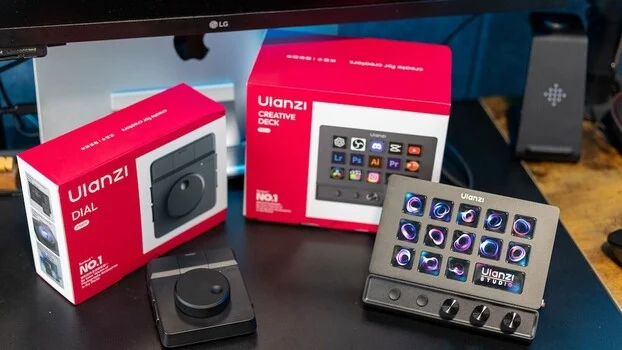
For creative professionals, the constant battle against time spent tethered to a desk is a familiar one. The allure of editing tools that promise to accelerate workflow is strong, yet few truly redefine how work is accomplished. This review delves into the Ulanzi D200X Creative Deck and the Ulanzi Dial, examining whether these peripherals can genuinely reduce desk time or merely add complexity to an already intricate process. As a photographer and videographer, the hours dedicated to editing, file management, client communication, and strategic planning are significant. A well-optimized setup that prioritizes efficiency and comfort is therefore not just a luxury, but a necessity.
My current workstation is robust, featuring a sit-stand desk, a supportive chair, and a deep familiarity with my computer’s capabilities. Yet, the inherent pull towards landscape photography and client-facing interactions remains. The administrative and post-production aspects of the job, while crucial, are often less straightforward than capturing the perfect shot. Consequently, the pursuit of enhanced output and minimized desk hours is a continuous endeavor. The emergence of studio-style control devices, equipped with dials, knobs, and programmable buttons, offers a compelling proposition: to condense repetitive actions into single, intuitive inputs. This approach resonates particularly with individuals like myself who already leverage keyboard shortcuts extensively for both photo and video editing.
Ulanzi D200X Creative Deck: A Multifaceted Control Hub
The Ulanzi D200X Creative Deck emerges as a successor to the Ulanzi D200, a device that previously offered an alternative to the popular Elgato Stream Deck, providing comparable functionality at a more accessible price point with 14 customizable keys. The D200X builds upon this foundation, aiming to be more than just a shortcut facilitator. Its design incorporates features intended to improve cable management and serve as a compact hub within a digital workstation.
On paper, the D200X presents a comprehensive suite of capabilities. While specific technical specifications were not detailed in the initial product information, its positioning suggests a device designed for broad application across creative software suites. The overarching goal is to offer a tangible, hardware-based interface that complements the digital environment of editing suites.
Setup and Initial Impressions
The unboxing experience for the D200X is commendably straightforward. The device is self-contained, and unlike its predecessor, the D200X features a fixed base, precluding any adjustment of the viewing angle. Included in the package are a USB-C to USB-C cable, with an adapter for USB-A connectivity, and a physical manual—a welcome inclusion in an era often dominated by digital-only documentation.
The device’s full functionality is unlocked through the Ulanzi Studio application, available for both macOS and Windows. Installation is a simple process, and upon connection, the D200X is immediately recognized by the software, facilitating a smooth transition from unboxing to active use.
Software and Customization: The Core of the Experience
The Ulanzi Studio software is where the D200X truly demonstrates its utility. Upon initial launch, users are presented with pre-configured profiles designed to address common tasks across various operating systems and applications. These profiles leverage hotkeys, effectively consolidating complex sequences of inputs into single button presses. For instance, capturing a screenshot on a macOS system, which typically requires a multi-key combination, is reduced to a solitary press on the D200X.
All 13 programmable buttons offer a high degree of customization, allowing users to create multiple profiles tailored to specific workflows. The larger display button serves a dual purpose, capable of showing the current time, system statistics such as CPU, RAM, and GPU usage, or a personalized custom image. This dynamic display feature enhances user awareness and provides at-a-glance information relevant to ongoing tasks.
Real-World Workflow Integration
The most compelling aspect of the D200X lies in its integration with professional editing software. Pre-configured profiles for applications like Adobe Lightroom and Photoshop are available for download, significantly altering the interaction paradigm. Once launched, these profiles dynamically adapt the button functions:
- Lightroom Integration: Buttons can be assigned to common editing adjustments such as exposure, contrast, highlights, and shadows. The tactile nature of these physical controls offers a nuanced experience that mouse and keyboard interactions often lack. For users seeking to maximize their Lightroom proficiency, resources like "Mastering Adobe Lightroom: How to Use Lightroom" provide a solid foundational understanding that complements hardware controllers.
- Photoshop Workflow: Similarly, Photoshop profiles can map buttons to frequently used tools, layers, or adjustment layers, expediting complex retouching tasks.
Beyond editing, the D200X proved invaluable for website navigation. The repetitive actions of opening browser tabs, searching bookmarks, or re-typing URLs for frequently visited sites like Fstoppers or personal websites were streamlined. By assigning these to dedicated buttons on the D200X, users can:
- Instantly access specific websites with a single press.
- Open multiple pre-defined links simultaneously, such as a resource page and a blog editor.
- Navigate between different sections of a website without manual input.
These seemingly minor time savings accumulate significantly over a full working day, contributing to a more fluid and less fragmented workflow. The integrated SD and microSD card readers have also been a practical addition, offering convenient, on-device access for transferring media.
Build, Design, and Daily Usability
The D200X exhibits a robust build quality, integrating seamlessly into a desktop setup. Its visual appeal is enhanced by customizable icons and button lighting, adding a distinct aesthetic. Each button acts as a mini-display, capable of showing user-assigned icons or images, which aids in rapid identification of functions, particularly during high-paced editing sessions.
The device possesses a definite "cool factor," drawing immediate attention on a desk. This was particularly evident in my household, where children were captivated by the interactive nature and the ability to personalize buttons with their own images, perceiving it more as a playful gadget than a professional tool. This reaction underscores the engaging and visually appealing design, which, while secondary to functionality for professional use, remains a positive attribute.
Setup Friction and Limitations
Despite the overall straightforward setup, a few minor points warrant mention:
- Fixed Viewing Angle: The inability to adjust the viewing angle of the D200X can be a minor inconvenience, potentially affecting readability depending on the user’s desk height and seating position.
- Text Legibility: The text labels on the buttons can be difficult to discern from certain viewing angles, a challenge that could potentially be mitigated with a software or firmware update to reposition the text to the top of the button display.
- Learning Curve: Transitioning from established keyboard shortcut habits to a hardware-based workflow requires a dedicated period of adjustment. While the initial setup is simple, mastering the device to achieve true efficiency necessitates conscious effort.
These are not critical flaws but rather minor points that can slightly extend the initial setup and learning curve.
Overall Assessment of the D200X
The Ulanzi D200X offers substantial value for its intended purpose. It acts as a central control unit, consolidating shortcut functionality, system monitoring, and hub-like connectivity into a single, integrated device. Its strength lies in its extensive customization options, dynamic profiles, and tactile dials, which collectively possess the potential to automate numerous repetitive tasks across editing, administrative duties, and general daily operations.
The primary challenge lies not with the device itself, but with the user’s willingness to adapt existing habits. The transition from ingrained keyboard shortcuts to a hardware-centric workflow is an investment of time. However, the clear potential for streamlining repetitive tasks is undeniable. The inclusion of dials for nuanced adjustments provides a tactile advantage that a keyboard alone cannot replicate. As such, the D200X has the potential to become an indispensable part of my setup, contingent on sustained integration into daily use.
Ulanzi Dial: A Focused, Tactile Control Solution
In parallel with the D200X, the Ulanzi Dial was also put to the test. This device presents a more minimalist approach, featuring a single, large dial accompanied by programmable buttons. Like the D200X, it supports full customization and multiple profiles, but without the visual iconography of its larger counterpart. Each button also offers secondary functions, effectively doubling the available command inputs.
Use Case: Video Editing Prowess
The Ulanzi Dial truly shines in video editing workflows, particularly within applications like Final Cut Pro. Its design lends itself to intuitive control over timeline scrubbing, audio level adjustments, and clip navigation. Typical applications include:
- Timeline Scrubbing: The dial allows for precise and fluid movement through video timelines, a crucial function for editors.
- Audio Mixing: Adjusting audio levels for individual tracks or master output becomes a more tactile and responsive process.
- Clip Management: Navigating between clips, marking in and out points, and performing basic edits can be expedited.
This form of control is clearly inspired by professional studio setups, offering a more hands-on and potentially efficient method for editing over time. For photographers venturing into videography, resources like "Introduction to Video: A Photographer’s Guide to Filmmaking" can provide a valuable complementary understanding, aligning well with tactile control interfaces like the Dial.
Value and Performance
Priced at approximately $35, the Ulanzi Dial represents a significantly more accessible entry point into hardware control compared to similar devices such as Loupedeck. Its value proposition is further enhanced by:
- Simplicity: The focused design makes it less overwhelming for users new to dedicated control surfaces.
- Tactile Feedback: The prominent dial provides satisfying physical feedback for adjustments.
- Affordability: Its low price point makes it an attractive option for budget-conscious creatives.
For its cost, the Dial delivers robust functionality, particularly for workflows heavily reliant on video editing and timeline manipulation.
Verdicts: D200X vs. Dial
Both the Ulanzi D200X and the Ulanzi Dial address distinct needs within the creative professional’s toolkit, despite belonging to the same product category.
The Ulanzi D200X is positioned as a comprehensive command center for the desk. It harmoniously blends shortcut control, system monitoring, and hub functionality into a single unit. Its standout feature is the extensive customization potential, enabling users to replace numerous repetitive actions across editing, administrative tasks, and daily computer use through programmable buttons, dynamic profiles, and tactile dials. The true benefit of the D200X lies in its potential; while functional out of the box, its ultimate value is realized when users commit to integrating it deeply into their workflow. The transition from ingrained keyboard shortcuts may initially feel slower, but the long-term gains in efficiency are substantial. The addition of dials for precise adjustments offers a qualitative improvement over keyboard-only interactions.
The Ulanzi Dial, conversely, adopts a more specialized approach. It deliberately avoids attempting to be an all-encompassing solution, instead offering a simple, tactile control method that excels in specific applications, most notably video editing. Its ease of setup and intuitive nature mean that users can begin to experience benefits without the same level of workflow re-engineering required for the D200X.
In practical terms, the D200X serves as a broader workflow enhancement tool, whereas the Dial is more accurately described as a targeted editing accessory.
Ulanzi D200X: Pros
- Highly customizable buttons and extensive profile support.
- Integrated system monitoring capabilities.
- Acts as a useful USB hub with card readers.
- Visually appealing with customizable button displays.
- Potential to significantly streamline a wide range of repetitive tasks.
Ulanzi D200X: Cons
- Fixed viewing angle can impact readability.
- Text legibility on buttons may be challenging from certain angles.
- Requires a learning curve to fully integrate into existing workflows.
Ulanzi Dial: Pros
- Extremely affordable price point.
- Simple, focused, and intuitive design.
- Excellent for tactile control, particularly in video editing.
- Easy to set up and immediate benefits.
- Secondary button functions effectively double available commands.
Ulanzi Dial: Cons
- Limited visual feedback compared to the D200X.
- Less versatile for general workflow tasks outside of specific editing applications.
Final Considerations
For professionals seeking to fundamentally restructure their interaction with editing software and minimize repetitive actions across their entire workflow, the Ulanzi D200X offers superior flexibility and long-term value. Its comprehensive feature set and deep customization potential cater to those willing to invest time in adapting their processes.
If the primary focus is on more specialized tasks, particularly within video editing and timeline control, the Ulanzi Dial presents a simpler, more immediate, and cost-effective solution. Its ease of use and tactile feedback make it an excellent entry point for enhancing specific editing workflows.
Neither device can substitute for acquired skill or experience. However, both possess the capability to eliminate minor inefficiencies, thereby freeing up valuable time. The extent to which these tools translate into meaningful time savings ultimately hinges on the user’s readiness to adapt their workflow to incorporate them.