










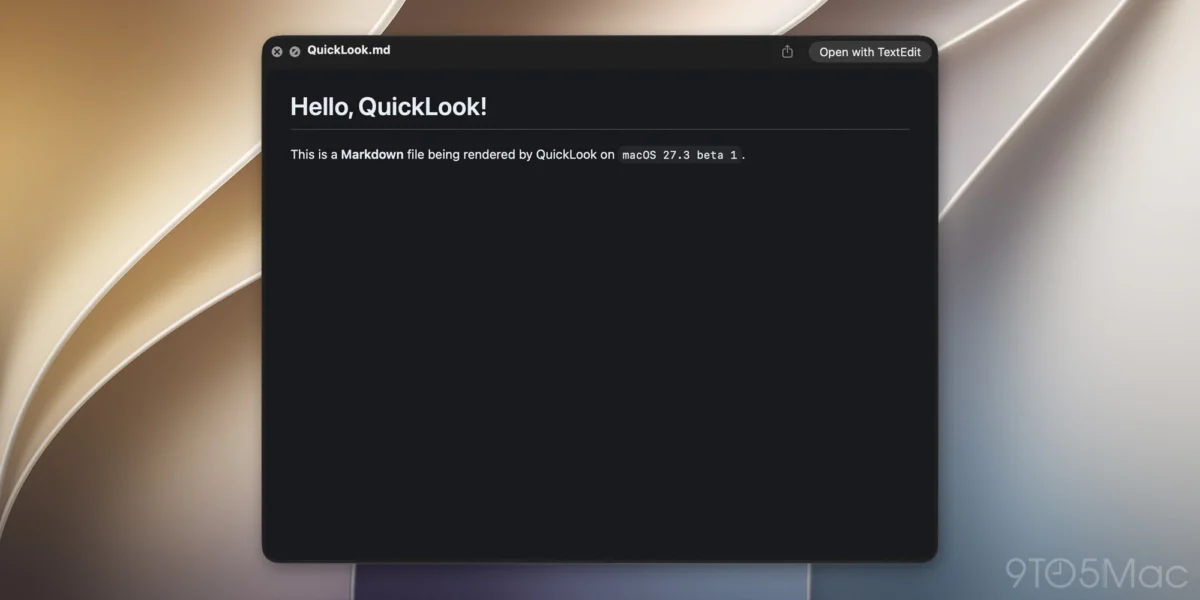
Apple has officially rolled out macOS 27.3 beta 1, bringing a suite of new features, developer tools, and user experience enhancements to its desktop operating system. Among the headline additions—which include advanced Safari updates like Vertical Tabs and Adaptive Dark Mode, alongside expanded Siri AI capabilities—is a subtle yet highly requested productivity feature: native Markdown rendering within the macOS Quick Look utility.
Starting with macOS 27.3, users can preview files with the .md extension directly in Quick Look with proper formatting applied automatically, bypassing the previous requirement to view raw syntax or open a dedicated text editor. This update represents the latest step in Apple’s broader initiative to integrate lightweight markup languages across its ecosystem, aligning with modern software development workflows and the surging popularity of artificial intelligence infrastructure.
The Evolution of Quick Look and macOS File Management
Quick Look has long been heralded as one of the most practical utility features in macOS. Introduced decades ago, the function allows users to press the Space bar on a highlighted file to instantly view its contents without fully launching an application. Over successive macOS iterations, Apple has steadily expanded Quick Look’s native capabilities to support a wide array of formats, including images, PDFs, audio, video, Microsoft Office documents, and source code files with syntax highlighting.
However, until the deployment of macOS 27.3 beta 1, Markdown files (.md) were treated as plain text documents. Users who stored notes, documentation, or project README files in Markdown format were forced to look at unrendered strings of asterisks, hashes, and brackets unless they used a third-party preview extension or opened the file in an application such as TextEdit, Obsidian, or VS Code.
By integrating direct rendering into the operating system’s foundational file preview layer, Apple is bridging a long-standing workflow gap for writers, software engineers, and technical documentarians. The change ensures that a quick scan of a folder containing project documentation or personal notes is as visually informative as browsing a folder of PDFs or rich text documents.
Chronology of Markdown Integration in the Apple Ecosystem
The decision to incorporate native Markdown rendering into macOS Quick Look does not occur in a vacuum; it reflects a multi-year trajectory of Apple gradually embracing the formatting standard across its hardware and software platforms.

Originally created in 2004 by Gruber as a simple text-to-HTML conversion tool for web writers, Markdown quickly evolved into the de facto standard for technical documentation, academic note-taking, and content management. For years, Apple maintained an arm’s-length approach, leaving the implementation of Markdown to third-party developers via the Mac App Store and Quick Look plugins.
The shift toward first-party support accelerated noticeably in recent years. In iOS 26 and accompanying macOS updates, Apple introduced robust import and export capabilities for Markdown files within the native Notes application. This allowed users to sync and edit plain-text formatted notes seamlessly across iPhone, iPad, and Mac without converting them into proprietary rich-text database entries.
The release of macOS 27.3 beta 1 marks the logical next step in this progression, moving Markdown support from application-level file management directly into the operating system’s file system infrastructure.
The Broader Implications: AI Agents and Structured Data
While the addition of Quick Look rendering is a significant convenience for human users, industry analysts note that the timing aligns closely with the shifting technical landscape of artificial intelligence. In recent years, Markdown has experienced a massive resurgence in utility, driven largely by the proliferation of AI agents and Large Language Model (LLM) workflows.
Modern AI development frameworks heavily rely on plain-text Markdown files (.md) to store system instructions, contextual data bases, project scopes, and operational guidelines. These files are human-readable, lightweight, and easily parsed by automated systems, making them ideal containers for agent instructions.
This trend was highlighted following the release of macOS 27.3 beta 1, when developer and technology commentator Federico Viticci pointed out on social media that Apple’s newly introduced Siri AI app skills feature utilizes Markdown-based SKILL.md files. These specialized configuration files allow third-party developers to provide explicit, structured instructions that enable Siri to perform advanced, multi-step tasks within their applications.
As developers increasingly rely on Markdown to instruct both local tools and advanced cloud-based AI models, the ability to instantly inspect these instructional files via Quick Look without launching a heavy IDE or text editor promises to measurably streamline the software development cycle.

Technical Overview and Implementation
For those unfamiliar with the syntax, Markdown utilizes a minimalist set of formatting characters to denote structural elements in plain text. A single hash symbol (#) denotes a top-level heading, asterisks (*) or underscores (_) wrap text to indicate bold or italic formatting, and bracket-parenthesis combinations ([Link Text](URL)) establish hyperlinks.
Under the hood, macOS 27.3 processes these standard plain-text markers and applies a clean, readable typographic hierarchy during the Quick Look generation phase. The underlying file remains untouched as an unformatted plain-text document, preserving the integrity of the data while rendering an intuitive visual representation to the end user.
This approach maintains backward compatibility with all existing version control systems, text editors, and command-line tools that rely on the raw text structure of .md files. Developers do not need to alter their file-saving habits or adopt new file formats; the operating system simply interprets the existing syntax dynamically upon request.
Market Reception and Future Outlook
Early reactions from the developer community and power users testing macOS 27.3 beta 1 have been overwhelmingly positive. On forums, developer boards, and social media platforms, users have praised Apple for listening to long-standing feature requests that enhance everyday productivity rather than relying strictly on cosmetic updates.
As macOS 27.3 progresses through its beta testing lifecycle—moving from developer previews to public beta releases ahead of a general rollout—observers expect additional refinements to the operating system’s developer toolsets and file system integrations.
While native Markdown rendering in Quick Look may appear to be a minor addition in the shadow of major AI-driven ecosystem changes, it exemplifies the attention to detail that characterizes professional-grade desktop operating systems. By catering to the specific needs of modern software engineers, technical writers, and digital creators, Apple continues to reinforce the Mac’s position as an indispensable tool for professional workflows.