Samsung is actively refining its forthcoming One UI 9 software, with recent leaked builds offering an in-depth preview of two pivotal features destined for the company’s flagship smartphones later this summer. The most recent revelations, initially reported by SamMobile, confirm that Samsung has transitioned its development builds to Android 17, moving beyond Android 16, and providing a clearer vision of what users can anticipate. Among the highlights is a more comprehensive look at the "Tap to Share" gesture, a feature that initially surfaced in leaks last month, alongside a suite of new Bixby widgets designed to enhance interaction with the company’s proprietary AI assistant. These developments, observed running on a Galaxy S26 test device, underscore Samsung’s ongoing commitment to differentiating its user experience through both innovative connectivity solutions and a revitalized AI ecosystem.
The Evolution of Proximity Sharing: Unpacking "Tap to Share"
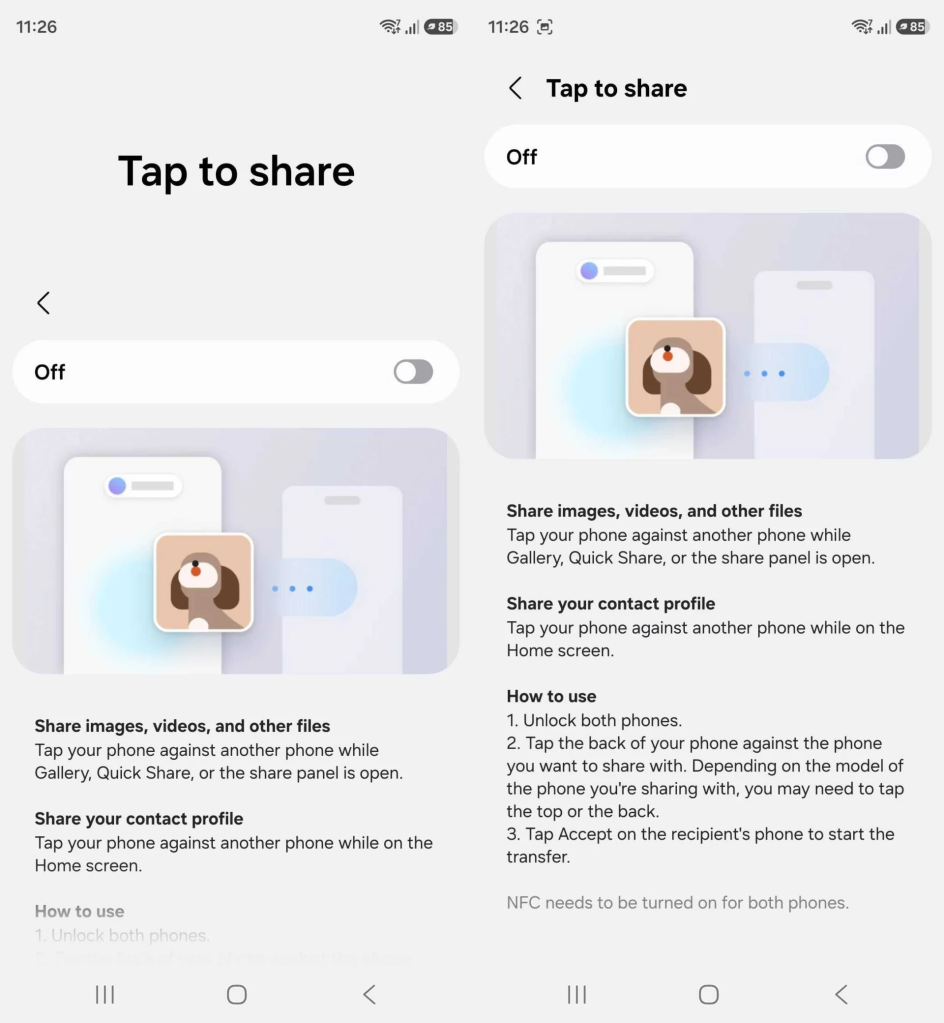
The "Tap to Share" functionality, as detailed in the leaked One UI 9 build, represents a significant refinement of device-to-device data transfer. Unlike previous, more rudimentary implementations, this iteration offers a sophisticated, context-aware sharing mechanism. The leaked settings page for the feature provides a clear, step-by-step guide on its operation, indicating a user-friendly design.
At its core, "Tap to Share" simplifies the process of exchanging various forms of digital content. When a user has an application like Gallery, Quick Share, or any standard share panel open on their device, tapping their phone against another supported Samsung device will initiate a transfer of selected images, videos, or other files. This contextual intelligence streamlines the sharing experience, eliminating the need to navigate through multiple menus or confirm specific file types. A notable addition is the ability to share contact profiles simply by tapping devices together from the home screen. This feature is poised to significantly ease the exchange of personal information such such as phone numbers, email addresses, and social media handles, a common interaction in both professional and social settings.
For the feature to function, both participating phones must be unlocked, and the backs of the devices need to be tapped together. The precise location for this physical interaction, as indicated by Samsung’s internal documentation, may vary depending on the specific models of the phones involved, suggesting an adaptive technology that accounts for different device designs and antenna placements. Following the tap, the receiving device will prompt the user to accept the data transfer, ensuring user control and privacy.

The concept of proximity-based sharing is not entirely new to the Android ecosystem or the broader smartphone market. Early attempts included Android Beam, which utilized Near Field Communication (NFC) technology to facilitate file transfers by touching two compatible devices. While innovative for its time, Android Beam often suffered from slow transfer speeds and inconsistent reliability, leading to its eventual deprecation. Apple’s AirDrop, introduced with iOS 7 in 2013, has long set a benchmark for seamless and efficient proximity sharing within its own ecosystem, leveraging a combination of Wi-Fi and Bluetooth. Samsung’s own Quick Share, introduced in 2020, already incorporates a form of "tap to share" functionality, albeit one that has been described by users as relatively hidden and occasionally inconsistent in its performance.
The new "Tap to Share" in One UI 9 appears to be Samsung’s concerted effort to build upon these predecessors, offering a more polished, reliable, and deeply integrated solution. This move aligns with broader industry trends towards enhancing ecosystem functionality and streamlining user workflows. Google itself has been reportedly working on a similar, cross-OEM functionality, presumably aiming for a universal standard that would allow seamless file sharing between devices from different manufacturers, such as a Galaxy S26 and a Pixel 10. Such a standardization would significantly enhance the overall Android experience, breaking down barriers between device ecosystems.
From a data transfer perspective, the reliance on tapping suggests the likely utilization of Ultra-Wideband (UWB) technology, alongside NFC and Bluetooth. UWB offers precise spatial awareness and high-speed data transfer over short distances, making it ideal for features like "Tap to Share." This technology has seen increasing adoption in recent flagship smartphones for purposes ranging from digital car keys to enhanced augmented reality experiences. Its integration into One UI 9 for sharing could provide a more robust and faster transfer experience than previous NFC-only solutions.
The implications for user convenience are substantial. In an era where digital content is constantly created and shared, quick and intuitive methods are paramount. Whether it’s sharing photos from a recent event, transferring documents for work, or simply exchanging contact details, "Tap to Share" promises to reduce friction and accelerate these common tasks. For Samsung, this feature could serve as a key differentiator, enhancing the perceived value and ease of use within its Galaxy ecosystem, especially when integrated with its robust suite of native applications.
Samsung’s Renewed Commitment to Bixby: New Widgets and AI Integration
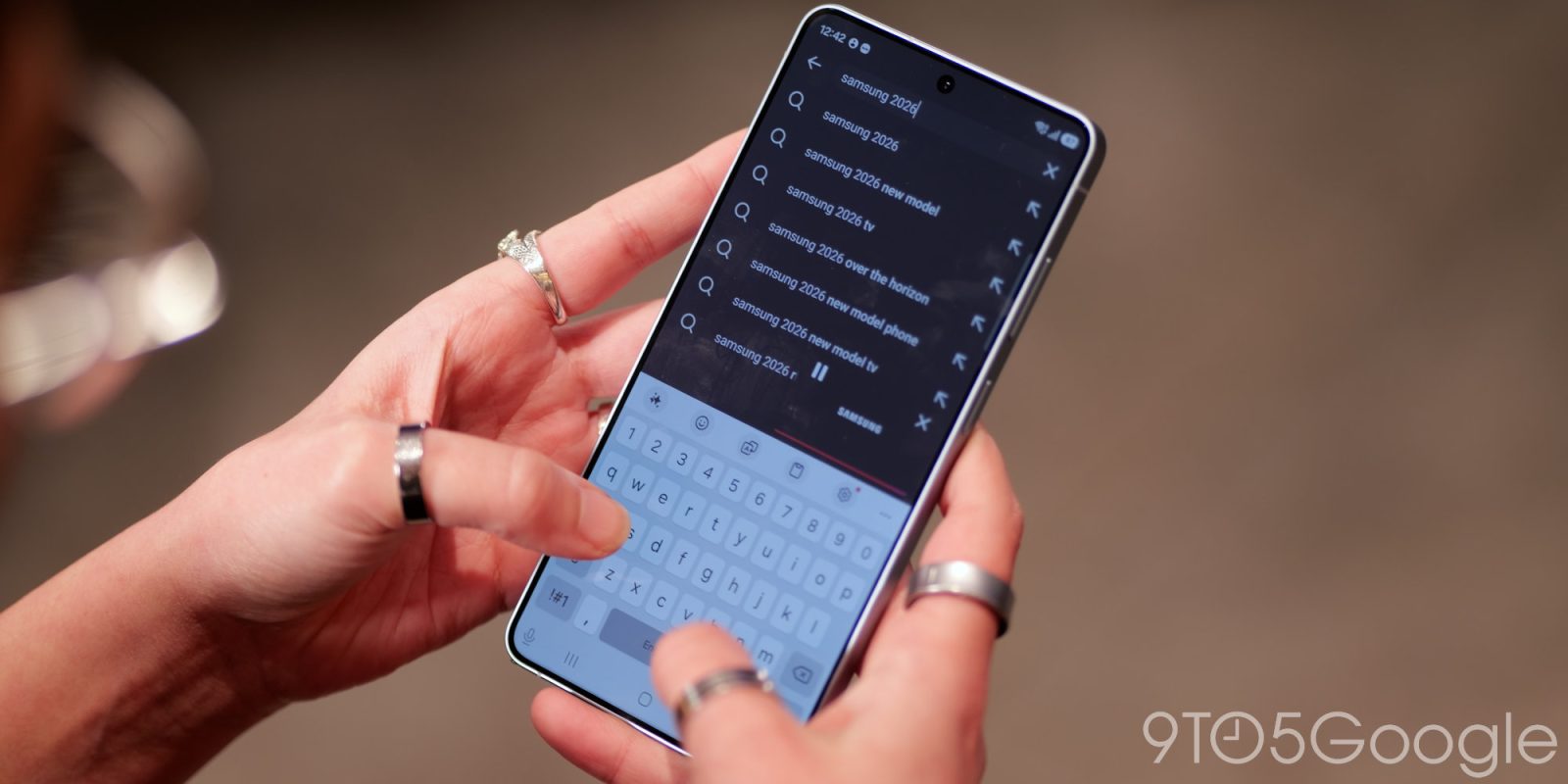
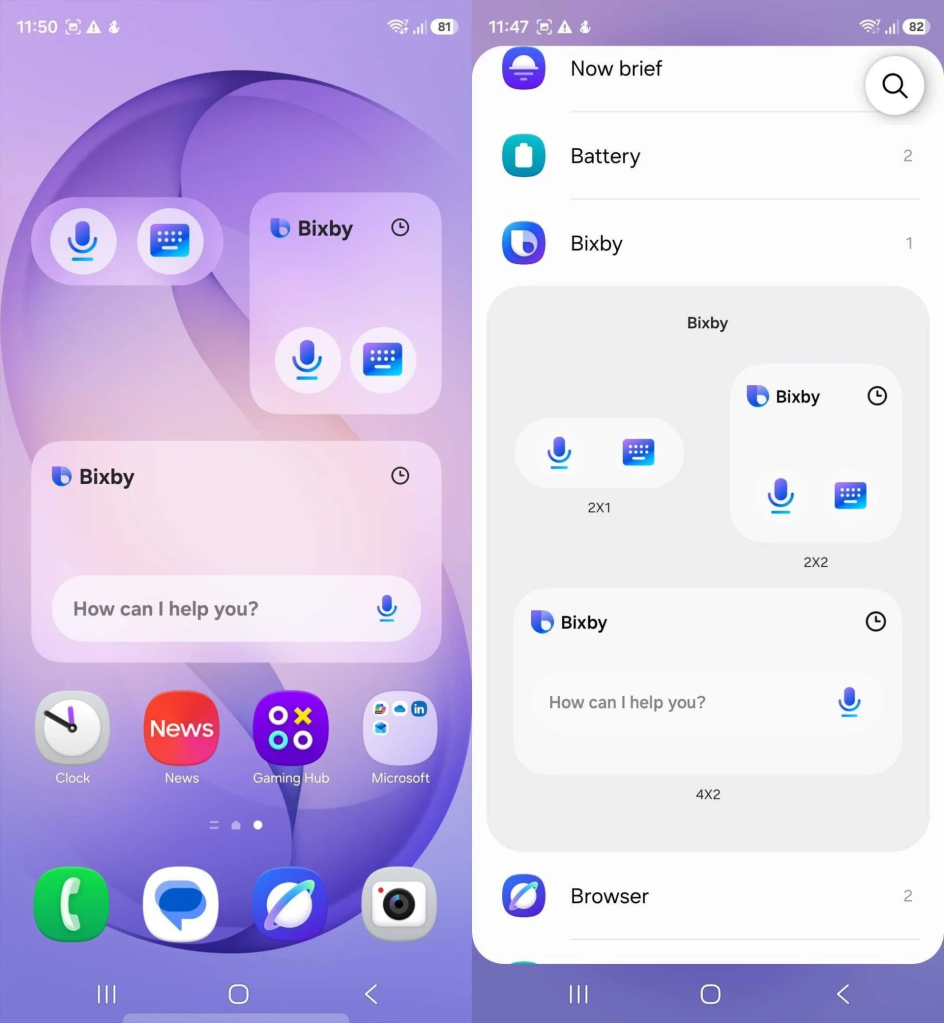
Beyond the innovative sharing capabilities, One UI 9 also signals a renewed, and perhaps more pragmatic, commitment from Samsung to its proprietary AI assistant, Bixby. The leaked builds reveal the development of new Bixby widgets for the home screen, designed to offer easily tappable entry points for interacting with the assistant through both keyboard and voice commands.
Bixby’s journey since its introduction with the Galaxy S8 in 2017 has been a tumultuous one. Positioned as a direct competitor to established AI assistants like Google Assistant, Apple’s Siri, and Amazon’s Alexa, Bixby initially struggled to gain widespread user adoption or critical acclaim. Early versions were often criticized for limited functionality, voice recognition issues, and a lack of integration with third-party services compared to its rivals. Despite Samsung’s persistent efforts, including dedicated Bixby buttons on devices and continuous software updates, the assistant has largely remained a niche feature for many users, often overshadowed by Google Assistant, which is also deeply integrated into the Android operating system.
However, earlier this year, Samsung initiated what appeared to be a significant reboot for Bixby, announcing a strategic partnership with Perplexity, an AI-powered answer engine. This collaboration aims to infuse Bixby with more advanced generative AI capabilities, allowing it to provide more accurate, comprehensive, and contextually relevant responses to user queries. This move is indicative of Samsung’s recognition that a competitive AI assistant is no longer a luxury but a necessity in the rapidly evolving smartphone landscape, especially with the surge in generative AI applications across all tech sectors.
The new Bixby widgets appear to be a direct consequence of this renewed strategy, aiming to increase Bixby’s accessibility and visibility. By placing easily tappable shortcuts directly on the home screen, Samsung is attempting to lower the barrier to entry for users, making interaction with Bixby as simple as launching an app. The inclusion of both keyboard and voice command options acknowledges diverse user preferences, catering to those who prefer typing out queries and those who favor voice interaction.
The strategic rationale behind Samsung’s continued investment in Bixby, despite the dominance of Google Assistant (now Gemini) on Android, is multi-faceted. Firstly, a proprietary AI assistant allows Samsung greater control over the user experience and data, fostering a more integrated and distinct ecosystem. Secondly, it provides a platform for differentiating its devices and services, especially as AI becomes an increasingly central component of smartphone functionality. Lastly, it reduces reliance on a direct competitor (Google) for a core user interaction feature.
However, the challenge for Bixby remains formidable. Google’s Gemini, with its deep integration into the Android OS, vast knowledge base, and extensive third-party partnerships, holds a significant market share and user loyalty. The question for Samsung is whether these new widgets, coupled with the Perplexity integration, will be sufficient to convince a substantial portion of its user base to switch from their preferred AI assistant. User habits are deeply ingrained, and overcoming the inertia of defaulting to Google Assistant will require a truly compelling and consistently superior experience from Bixby.
Market data on AI assistant usage typically shows Google Assistant and Siri leading by a significant margin, followed by Alexa. Bixby, while present on millions of Samsung devices, has historically lagged in active engagement metrics. The success of these new widgets and the Perplexity partnership will depend heavily on the actual improvements in Bixby’s intelligence, responsiveness, and utility in daily tasks. If Bixby can demonstrate tangible advantages in specific Samsung-centric tasks or offer unique capabilities not found elsewhere, it might carve out a more meaningful role for itself.
One UI 9 and Android 17: A Deeper Dive into Samsung’s Software Strategy
The transition of One UI 9 test builds to Android 17 is a critical piece of information, signifying Samsung’s commitment to delivering the latest underlying Android advancements to its users. Typically, Google releases developer previews of new Android versions around March, followed by public betas over the summer, culminating in a stable release in the late summer or early fall. By basing One UI 9 on Android 17 from this stage, Samsung is positioning itself to be among the quickest OEMs to roll out the new operating system to its devices.
One UI itself is Samsung’s heavily customized Android skin, a defining characteristic of Galaxy smartphones. Since its inception, One UI has aimed to provide a user experience tailored to Samsung’s hardware, focusing on ease of use, aesthetic consistency, and proprietary features that differentiate Galaxy devices from other Android phones. Over the years, One UI has evolved significantly, incorporating features like improved one-handed usability, enhanced customization options, and deep integration with Samsung’s ecosystem of services and smart devices.
Samsung’s strategy with One UI is twofold: to offer a distinct user experience that adds value beyond stock Android and to maintain a robust update schedule that keeps its devices current with the latest security patches and features. The move to Android 17 for One UI 9 test builds indicates that Samsung intends to launch this new software iteration relatively soon after Android 17’s official release. This proactive approach is crucial in the competitive smartphone market, where software updates are increasingly a factor in consumer purchasing decisions.
The anticipated launch of One UI 9 is slated for "later this summer," aligning with the typical timeframe for major Android releases and Samsung’s own product cycles. The initial deployment is "presumably planned for the company’s upcoming Galaxy Z Fold 8 and Flip 8." This makes strategic sense, as Samsung often uses its new foldable devices to showcase the latest advancements in both hardware and software. Launching One UI 9 with the Z Fold 8 and Flip 8 would provide these premium devices with a cutting-edge software experience, further justifying their flagship status and price point. Following this initial rollout, One UI 9 would then gradually expand to other eligible Galaxy devices, including the Galaxy S26 series, previous-generation flagships, and eventually mid-range models.
The implications of One UI 9 being built on Android 17 are far-reaching. Users can expect not only Samsung’s custom enhancements but also all the core improvements and new features introduced by Android 17. These typically include advancements in privacy and security, performance optimizations, new UI elements, and expanded API capabilities for developers. For Samsung, rapid adoption of the latest Android version allows it to leverage Google’s foundational work while still layering its unique One UI features on top. This ensures that Galaxy devices remain competitive in terms of both functionality and security.

Broader Market Implications and User Experience
The leaked features from One UI 9 have significant implications for Samsung’s competitive standing, the broader Android ecosystem, and the evolving landscape of user interaction. "Tap to Share" could redefine how users perceive and utilize direct device-to-device communication. If implemented flawlessly and supported across a wide range of devices, it could elevate the convenience of local file sharing, potentially reducing reliance on cloud-based solutions for immediate transfers. This would enhance user privacy and efficiency, particularly in situations with limited internet connectivity. The feature’s success, however, hinges on its seamless integration and reliability, areas where previous attempts have often fallen short. The push by Google for a cross-OEM standard is a strong indicator that the industry recognizes the value of such functionality, and Samsung’s robust implementation could either set a precedent or integrate into a wider standard.
Samsung’s renewed focus on Bixby, spearheaded by the new widgets and the Perplexity partnership, highlights the ongoing battle for AI assistant dominance. In a market increasingly shaped by generative AI, every major tech company is striving to offer the most intelligent and helpful assistant. While Google’s Gemini currently holds a formidable lead on Android, Samsung’s strategic investments reflect its determination to maintain an independent AI voice within its ecosystem. The success of Bixby in One UI 9 will be a critical test of whether a customized, ecosystem-specific AI can genuinely compete with a more universally integrated one. Should Bixby deliver on its promise of enhanced intelligence and utility, it could strengthen Samsung’s ecosystem lock-in, offering unique advantages to Galaxy users. Conversely, if it fails to gain traction, it might necessitate a re-evaluation of Samsung’s long-term AI strategy.
The overall trajectory of One UI 9 on Android 17 demonstrates Samsung’s unwavering commitment to delivering a premium, differentiated smartphone experience. By focusing on both core functionality like sharing and strategic areas like AI, Samsung is aiming to bolster its position in a highly competitive market. The integration of advanced features like "Tap to Share" and accessible Bixby widgets indicates a user-centric design philosophy, seeking to make daily interactions with smartphones more intuitive and efficient. As the smartphone market matures, software innovation and ecosystem integration are becoming increasingly vital for brand loyalty and growth. One UI 9, with its unveiled features, appears to be a calculated step in Samsung’s ongoing effort to solidify its status as a leader in mobile technology. The rollout later this year, beginning with the highly anticipated Galaxy Z Fold 8 and Flip 8, will be a crucial moment to observe the real-world impact and user reception of these significant software advancements.