

Security researchers have recently uncovered four sophisticated Android banking trojan campaigns, dubbed RecruitRat, SaferRat, Astrinox, and Massiv, which employ advanced techniques including deception, stealth, and vanishing application icons to remain undetected after installation. This discovery, made by experts at Zimperium, highlights a significant escalation in the tactics used by cybercriminals targeting mobile users, with the campaigns collectively aiming at over 800 distinct banking, cryptocurrency, and social media applications globally. While the applications themselves boast billions of downloads, actual infections are estimated to be in the millions, underscoring the vast potential reach and the critical threat posed to digital financial security.
The Evolving Landscape of Android Malware
The emergence of these four campaigns marks a new chapter in the ongoing battle against Android malware, particularly banking trojans. Historically, Android has been a lucrative target for cybercriminals due to its vast global market share and the relative openness of its ecosystem compared to iOS. Early Android malware often relied on simpler techniques, such as premium SMS scams or basic data exfiltration. However, banking trojans began to proliferate around the mid-2010s, evolving rapidly from intercepting SMS messages (often used for two-factor authentication) to employing sophisticated overlay attacks.
The modus operandi of these earlier trojans, such as Anubis, Cerberus, and more recently FluBot and SharkBot, laid the groundwork for the current generation. These predecessors perfected techniques like injecting fake login screens (overlays) onto legitimate banking apps, capturing credentials, and abusing Android’s Accessibility Services to gain extensive control over infected devices. The current campaigns — RecruitRat, SaferRat, Astrinox, and Massiv — demonstrate an even higher degree of sophistication, integrating multiple layers of deception and technical evasion to bypass detection and thwart removal attempts. Their ability to target a diverse portfolio of financial and social media applications, from traditional banking apps to emerging cryptocurrency platforms, reflects the broad financial motivations driving these criminal enterprises.
Sophisticated Installation and Deception Tactics
The initial phase of these attacks heavily relies on social engineering, a common yet highly effective method to trick unsuspecting users. The Zimperium report details how victims are lured to seemingly legitimate but malicious websites. These sites are meticulously crafted to impersonate popular online services, ranging from fake job portals that promise employment opportunities (a tactic likely leveraged by RecruitRat) to deceptive streaming services offering premium content for free (potentially used by SaferRat or Astrinox). Other lures include counterfeit software download pages, enticing users with the promise of popular applications or system updates.

This reliance on trickery is paramount because these campaigns often necessitate "sideloading" – the installation of applications from unofficial sources outside of the Google Play Store. Sideloading inherently carries higher risks, as these apps bypass Google’s stringent security checks. Attackers exploit human curiosity, the desire for free services, or professional aspirations to convince users to download and install malicious APK files directly onto their devices.
Furthermore, the installation techniques have become increasingly complex. Many of these attacks utilize multi-stage delivery methods, where the initial download is a seemingly innocuous "dropper" application. This dropper then downloads and installs the true malware payload in a subsequent step, often after a delay, to evade initial static analysis by security tools. One particularly insidious tactic involves mimicking official system update screens, including layouts that closely resemble the Google Play interface. This clever mimicry is designed to lower user suspicion during the installation process, making the malicious software appear as a legitimate system or application update, thereby increasing the likelihood of successful installation and granting of critical permissions.
Post-Infection Persistence and Data Exfiltration
Once successfully installed and activated, the banking trojans immediately seek to establish deep control over the infected device. A critical step for these malware variants is to request Android’s Accessibility permissions. This permission, designed to assist users with disabilities, is a powerful tool in the wrong hands. By abusing Accessibility Services, the malware can:
- Monitor Actions: Observe every tap, swipe, and input on the device.
- Read Screen Content: Access sensitive information displayed on the screen, including banking details, OTPs, and personal messages.
- Grant Additional Privileges: Automatically click through permission requests or install other applications without explicit user consent.
- Perform Actions: Initiate transactions, change settings, or interact with other apps on behalf of the user.
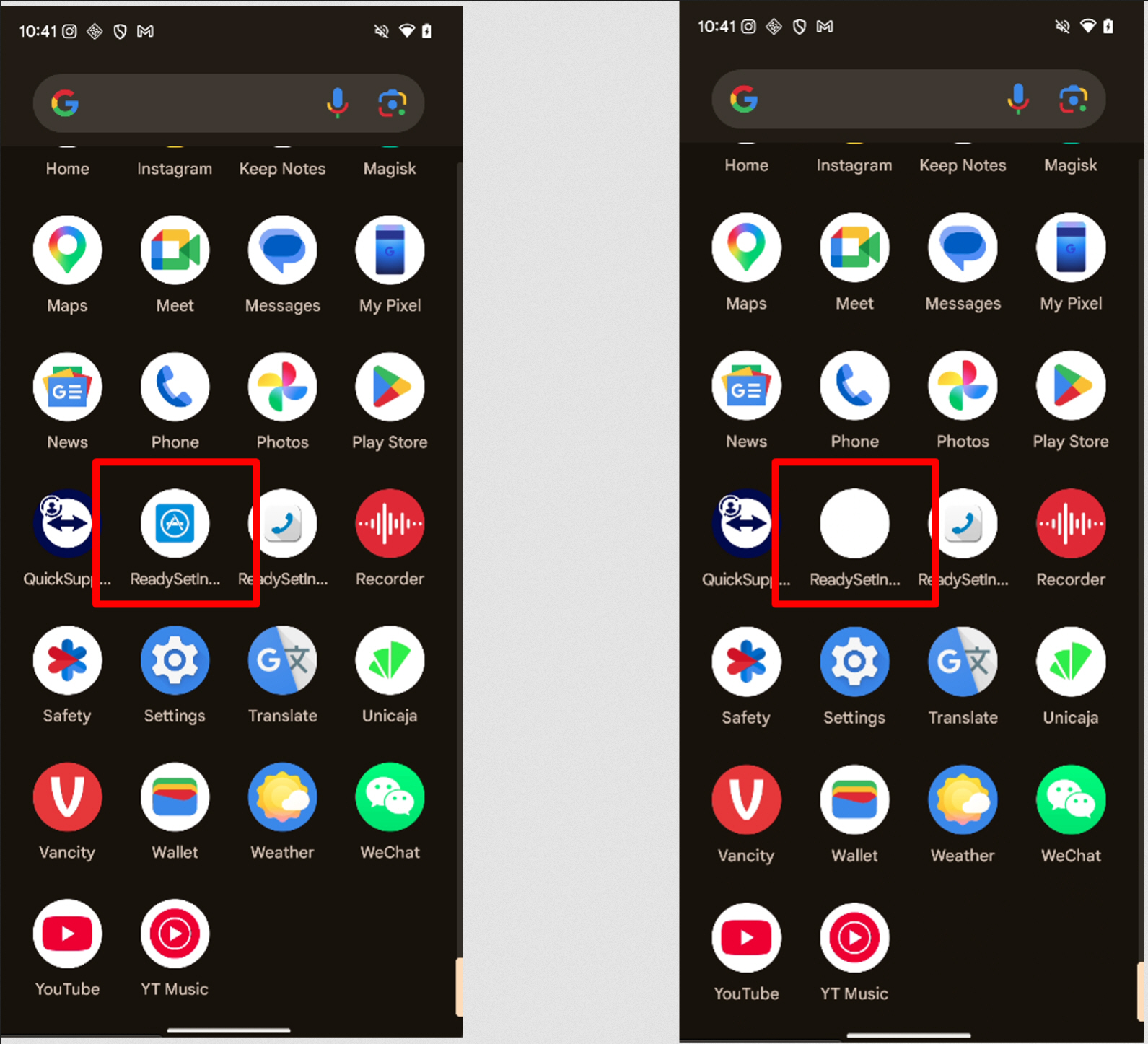
One of the most deceptive features employed by certain variants in these campaigns is the "disappearing app icon." After installation, the malware can replace its visible app icon with a blank image or simply remove it from the device’s app drawer. This makes the malicious application effectively "vanish," creating significant confusion for users who might notice unusual activity but struggle to locate or remove the offending software. This tactic not only aids in persistence but also complicates forensic analysis for non-expert users trying to clean their devices. Complementing this, other versions of the malware actively interfere with attempts to uninstall them. When a user navigates to system settings to remove the app, the malware can detect this action and redirect the user away, often back to the home screen or another innocuous application, frustrating removal efforts.
Screen overlays are a cornerstone of credential theft across all four identified campaigns. These overlays manifest as fake screens that appear on top of legitimate applications or the system interface. For instance, fake lock screens can be displayed to capture PINs, patterns, or biometric data. Similarly, when a user attempts to open a legitimate banking application, the malware can present a simulated login page that perfectly mimics the bank’s interface, harvesting credentials as the user inputs them, believing they are logging into their actual bank. Some variants take this a step further by displaying full-screen "update" messages or "system errors" that prevent normal interaction with the device, allowing background malicious actions to take place unnoticed.
Beyond static credential theft, several families within these campaigns transmit live screen content to remote servers. This effectively provides attackers with a continuous visual feed of the victim’s device activity, akin to a remote desktop session. This "VNC-like" capability is particularly dangerous as it allows attackers to observe authentication steps in real time, potentially bypassing even robust multi-factor authentication (MFA) mechanisms if the attacker can see and react to OTPs or other verification codes as they appear on screen.

All infected devices communicate with centralized command-and-control (C2) systems through encrypted channels. These C2 servers act as the operational hub for the attackers, coordinating widespread attacks, distributing updated instructions to the malware, and exfiltrating stolen data. The ability to manage thousands of compromised devices simultaneously from a single C2 infrastructure makes large-scale financial theft easier to organize and execute, maximizing the criminals’ illicit gains.
Supporting Data and Broader Implications
The findings by Zimperium align with broader trends observed in the mobile security landscape. According to reports from various cybersecurity firms, mobile banking malware continues to be a dominant threat, with hundreds of thousands, if not millions, of new samples detected annually. The global financial impact of mobile banking fraud is substantial, with estimated losses running into billions of dollars each year. A significant portion of these attacks target Android devices, reflecting its market dominance. Data suggests that apps downloaded from unofficial sources are many times more likely to contain malware than those from official app stores. The targeting of over 800 banking, cryptocurrency, and social media applications by these four campaigns alone illustrates the wide net cast by cybercriminals, aiming to maximize their potential victim pool across various digital platforms.
Statements and Expert Reactions
Zimperium, the security firm that unearthed these campaigns, emphasized the critical need for advanced mobile threat defense (MTD) solutions. A spokesperson from Zimperium stated, "These campaigns, RecruitRat, SaferRat, Astrinox, and Massiv, represent a significant evolution in Android banking trojan tactics. Their blend of social engineering, sophisticated multi-stage delivery, and stealth features like disappearing icons and real-time screen mirroring underscores the ongoing arms race between attackers and defenders. Users and organizations must adopt a proactive security posture to protect against these highly evasive threats."
While Google does not typically comment on specific malware campaigns unless they involve the Play Store directly, their official guidance consistently advises users to download apps only from trusted sources like Google Play. Google’s Play Protect service continuously scans billions of apps daily to identify and remove malicious ones, both on the Play Store and on users’ devices. Their ongoing efforts focus on enhancing the security of the Android platform and providing tools to detect and mitigate threats.
Financial institutions have long been at the forefront of combating mobile banking fraud. Representatives from several banking associations, speaking generally about mobile threats, often reiterate the importance of customer vigilance. "We continuously invest in robust security measures, including multi-factor authentication, advanced fraud detection systems, and customer education initiatives," stated a cybersecurity expert from a major European bank. "However, the human element remains the weakest link. Customers must be educated about social engineering tactics and the dangers of sideloading apps from unverified sources."
Independent cybersecurity experts echoed these sentiments, highlighting the increasing difficulty for average users to discern legitimate applications from malicious ones. "The level of impersonation these trojans achieve, mimicking official app store updates or banking interfaces, is truly alarming," noted Dr. Anya Sharma, a mobile security researcher. "The abuse of Accessibility Services is particularly concerning as it grants malware virtually full control, often bypassing traditional security layers. Users need to be extremely cautious about the permissions they grant to newly installed applications, especially those from outside the official app stores."
Broader Impact and Mitigation Strategies
The widespread nature and sophistication of these Android banking trojan campaigns have significant implications across multiple fronts:
- User Impact: For individual users, the consequences can be devastating, ranging from direct financial losses due to unauthorized transactions to identity theft, privacy compromise, and the psychological distress associated with having one’s digital life infiltrated.
- Financial Sector Impact: Banks and financial institutions face heightened reputational risk, increased operational costs for fraud detection and remediation, and a potential erosion of customer trust in mobile banking platforms. This necessitates continuous investment in security infrastructure and customer awareness programs.
- Mobile Security Landscape: The ongoing cat-and-mouse game between attackers and security researchers will continue to drive innovation in both malware development and mobile threat defense solutions. These campaigns underscore the need for advanced endpoint protection, behavioral analysis, and real-time threat intelligence to detect and neutralize evolving threats.
- Regulatory Implications: The scale of potential data breaches and financial fraud could trigger greater scrutiny from regulatory bodies, potentially leading to more stringent data protection laws and compliance requirements for app developers and platform providers worldwide.
To mitigate the risks posed by such advanced banking trojans, users and organizations should adopt a multi-layered security approach:
- Download from Official Sources: Always download applications exclusively from trusted app stores like the Google Play Store. Avoid sideloading APKs from third-party websites or unknown sources.
- Scrutinize Permissions: Carefully review the permissions requested by any app during installation, especially Accessibility Services. If an app requests unusual or excessive permissions for its stated function, it should be a red flag.
- Be Wary of Social Engineering: Exercise extreme caution with unsolicited messages, emails, or pop-ups promising free content, job offers, or urgent updates. Verify the legitimacy of links and sources before clicking or downloading.
- Install a Reputable Mobile Security Solution: Utilize a trusted mobile antivirus or mobile threat defense (MTD) solution to detect and prevent malware infections.
- Keep Software Updated: Ensure the Android operating system and all installed applications are kept up to date to patch known vulnerabilities.
- Enable Multi-Factor Authentication (MFA): Where available, enable MFA for all banking, cryptocurrency, and social media accounts. While live screen streaming can bypass some MFA, it still adds a significant layer of defense.
- Monitor Financial Statements: Regularly review bank and credit card statements for any unauthorized transactions. Report suspicious activity immediately to financial institutions.
- Understand Common Tactics: Educate oneself on prevalent social engineering tactics and malware behaviors to better identify and avoid threats.
The sophistication demonstrated by RecruitRat, SaferRat, Astrinox, and Massiv serves as a stark reminder that mobile security is a continuous challenge. As cybercriminals refine their methods, users and security professionals must remain vigilant and adapt their defenses to protect against these increasingly evasive and destructive threats.