









Technical Enhancements and Performance Metrics
The architectural improvements extend beyond the initial application startup. Internal metrics provided by the Xbox team indicate that core navigation—specifically within the Home, Store, and Game Pass tabs—is now up to 50% faster. Furthermore, the performance of individual in-app windows has seen a marked improvement, with load times reduced by as much as 65%.
These performance gains are contingent upon various environmental variables, including the user’s hardware specifications, network bandwidth, system configuration, and overall software usage patterns. While these percentages reflect optimal laboratory conditions, they represent a significant departure from the historical performance profile of the Xbox PC app, which has often been criticized for being resource-intensive and sluggish compared to competitors such as Valve’s Steam platform.
A Redesigned User Interface and Navigation
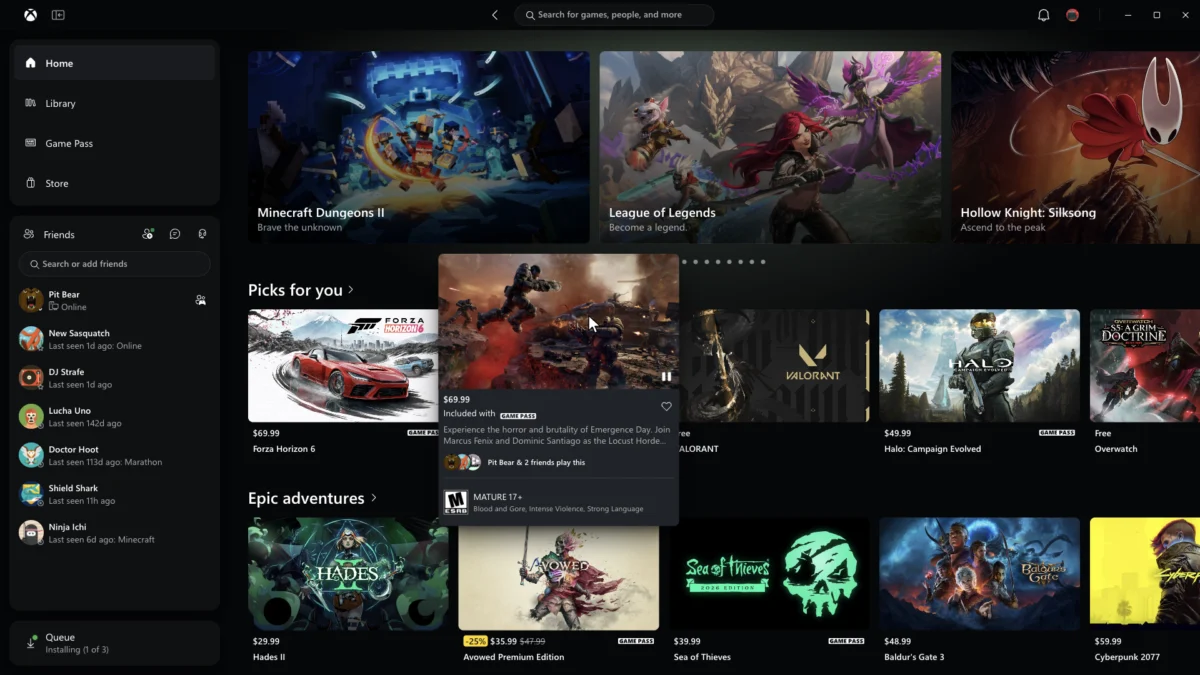
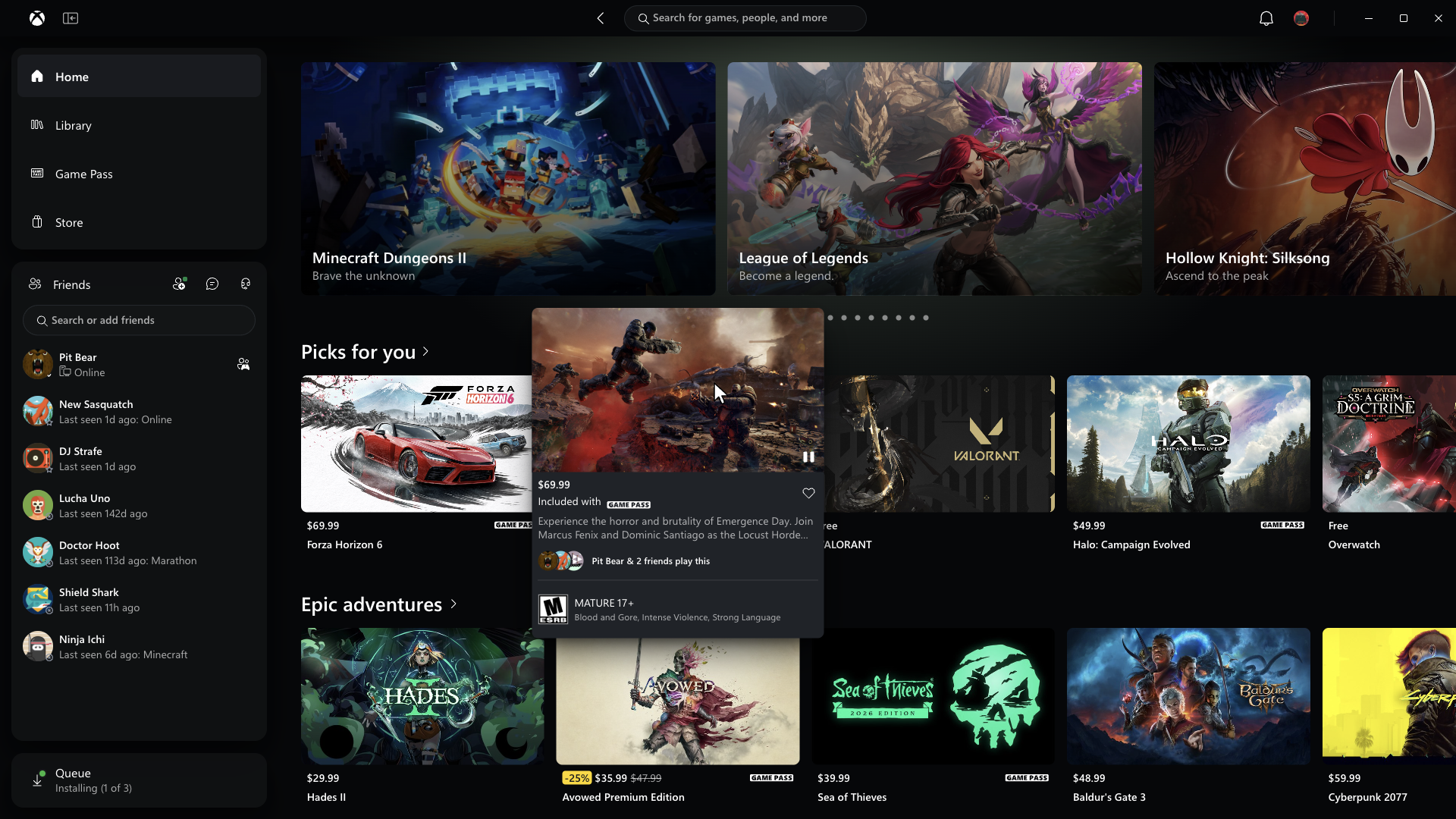
Beyond speed, the update introduces a comprehensive UI refresh designed to simplify library management and social interaction. The navigational hierarchy has been flattened, with search functionality seeing a significant upgrade to allow for faster discovery of titles within the expansive Game Pass catalog.
Perhaps most notably, the integration of social features has been moved to the primary navigation window. By elevating friends lists, party chats, and social status indicators to a more prominent position, Microsoft is attempting to reduce the "friction" that users have historically experienced when trying to coordinate multiplayer sessions. In previous versions, these features were often buried in sub-menus, creating a disjointed experience for players accustomed to the streamlined social integration found in dedicated gaming platforms.
Chronology of the Xbox PC App Evolution
The development of the Xbox app for Windows has been a multi-year project characterized by steady, if sometimes gradual, iteration.
- 2019: Microsoft officially launched the Xbox app for Windows 10, signaling a pivot toward unifying the PC gaming experience with its console ecosystem.
- 2021: Following the acquisition of Bethesda Softworks and the rapid expansion of Game Pass for PC, the application underwent its first major visual overhaul to better integrate the growing library of titles.
- 2023: Microsoft began experimenting with "lightweight" modes and performance-focused updates, responding to community concerns that the app was becoming bloated.
- 2024: The current initiative was formalized, focusing on backend optimization, "vibe-coded" architecture, and the modularization of app components to ensure faster rendering times.
- November 2026: The official rollout of the performance-focused update to the Insider ring, alongside promises of a web-based experience refresh.
The Competitive Landscape of Game Launchers
The race to provide the "fastest" launcher has become a primary battlefield in the digital distribution market. As game sizes continue to grow and the complexity of digital storefronts increases, the overhead associated with launching these applications has become a point of contention for enthusiasts.
The Epic Games Store, for instance, recently introduced its own "vibe-coded" launcher, which the company explicitly marketed as being faster than the industry-standard Steam client. This move triggered a wave of industry analysis regarding the diminishing returns of launcher speed. While technical performance is objectively better for the user, market analysts note that "launcher loyalty" is rarely determined by speed alone. Instead, user retention is typically driven by library depth, social ecosystem connectivity, and the perceived value of subscription services like Game Pass.
Steam, remaining the dominant force in the market, has not been idle. The platform recently deployed its own series of performance patches aimed at reducing memory footprint and improving UI responsiveness. This "arms race" of optimization serves as a testament to the fact that major digital distribution platforms now view the launcher as a critical component of the overall "player experience," rather than merely a vehicle for downloading files.
Official Statements and Future Outlook
In a blog post accompanying the release, the Xbox team emphasized that the update is part of a "faster, simpler, and more cohesive" vision for the future of gaming on Windows. The focus is on ensuring that the software does not detract from the gaming experience itself.
"We understand that every second counts when you want to get into a game," the statement noted. "By streamlining our architecture and prioritizing the most-used features, we are ensuring that the Xbox app acts as a gateway to your library rather than a barrier to entry."
In addition to the desktop application, Microsoft is extending these improvements to the web experience. The upcoming "refreshed Xbox web experience" will feature a cleaner layout, improved library tab functionality, and more efficient use of screen real estate. Users will also gain access to new accessibility-focused visual modes, including dedicated high-contrast, light, and dark themes, fulfilling long-standing requests from the accessibility community.
Implications for PC Gamers
The broader implication of this update is that Microsoft is finally aligning its PC software performance with the expectations of the high-end PC gaming community. Historically, the Xbox app has been viewed as a secondary necessity—a requirement for playing Game Pass titles—rather than a preferred platform for game management. By reducing resource consumption and increasing speed, Microsoft is attempting to shift this perception.
However, the success of these changes will ultimately depend on stability. Users have frequently reported bugs related to account synchronization, game installation errors, and cloud-save conflicts. While the speed of the launcher is a welcome improvement, the long-term viability of the platform relies on the reliability of the underlying services.
How to Access the Update
The update is currently in the "Insiders" phase. To participate, users must download the Xbox Insider Hub via the Microsoft Store. Once enrolled in the Insider program, users can opt into the preview build of the Xbox app. This allows the development team to gather telemetry and feedback regarding the performance improvements across a wide variety of hardware configurations, from high-end gaming rigs to entry-level laptops.
As Microsoft continues to refine its software, the focus remains on closing the gap between the console and PC experiences. With the gaming industry shifting toward cloud-integrated services and cross-platform play, the PC app is no longer just a storefront—it is the hub for a multi-platform identity. Whether these speed optimizations will be enough to sway users who are deeply entrenched in the Steam ecosystem remains to be seen, but the update represents a significant step forward in the platform’s maturity.
The shift toward a "simpler, faster" interface, coupled with the improved integration of social tools, signals that Microsoft is listening to the core criticisms of its user base. As the digital gaming landscape grows more competitive, these quality-of-life updates are essential for maintaining the momentum of the Game Pass ecosystem and ensuring that the Xbox brand remains a primary destination for PC gamers worldwide.