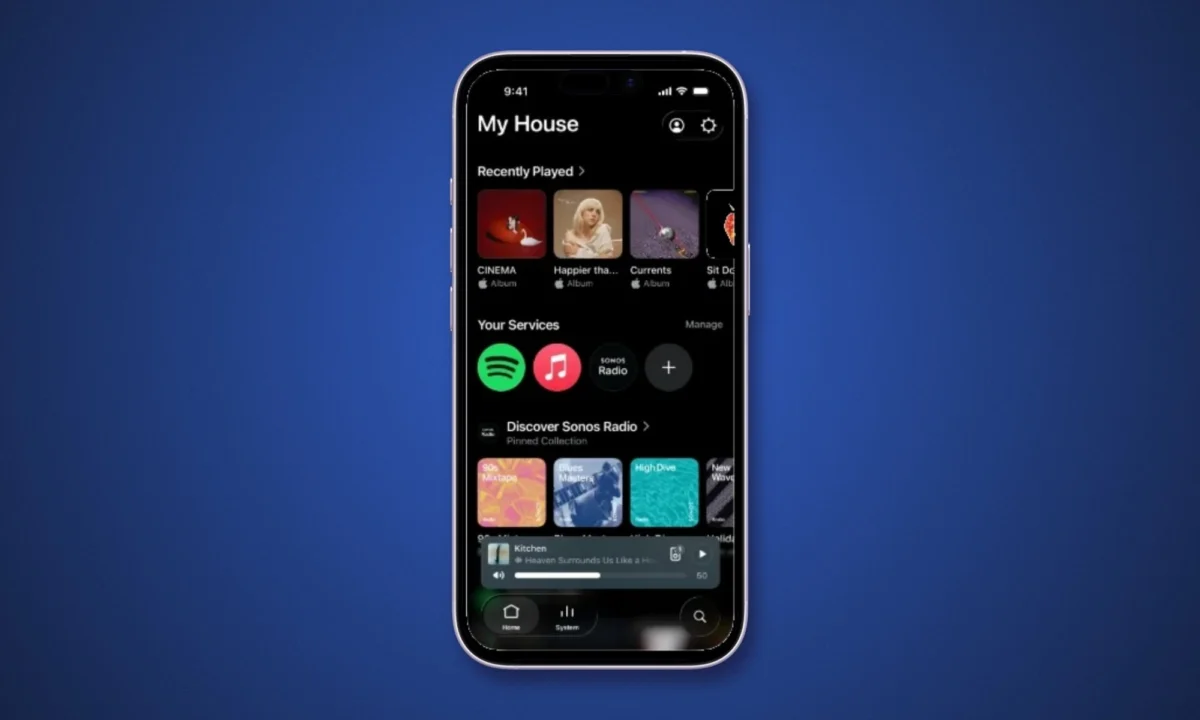
The much-anticipated overhaul of the Sonos app, designed to significantly improve user experience, is gradually rolling out to users. This substantial usability overhaul introduces familiar bottom tab navigation, customizable speaker sorting, and enhanced iOS volume controls. However, the rollout is not instantaneous for all users, and the new features must be manually enabled within the app’s settings once they become available. This phased approach, coupled with the requirement for user activation, means that while a less frustrating app experience is on the horizon, it will require patience and a proactive step from Sonos owners.
A Shift Towards Intuitive Navigation and Control
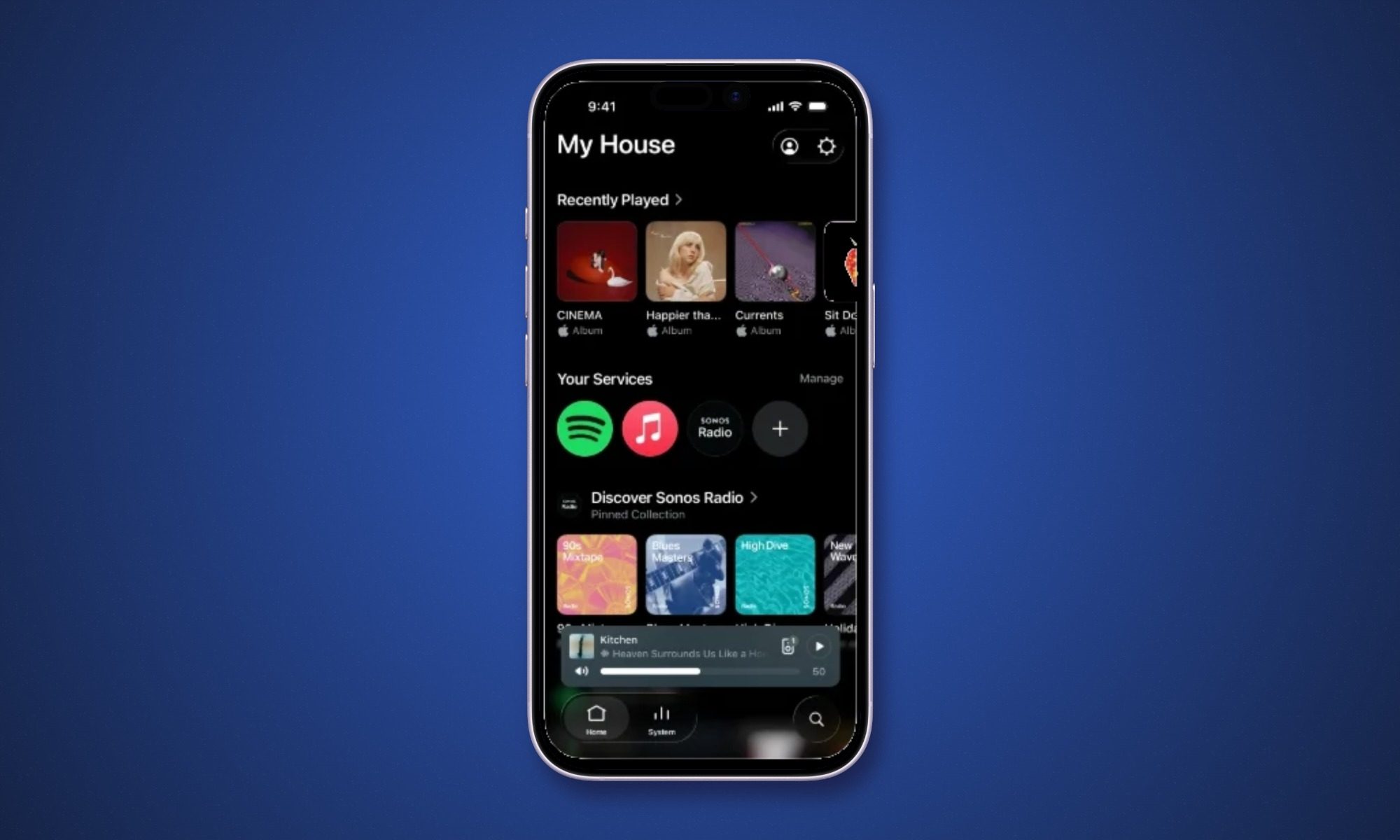
For years, Sonos users have navigated their multi-room audio systems through a series of slide-up panels and menus that, while functional, could often feel cumbersome. The latest update addresses this by adopting a more conventional mobile app paradigm: a bottom tab bar. This familiar structure, featuring distinct sections for "Home," "System," and "Search," aims to streamline the user journey, allowing individuals to move between key functionalities with greater ease and speed. This design choice aligns Sonos with established user interface conventions prevalent across the vast majority of modern mobile applications, a move likely to reduce the learning curve for new users and simplify operations for long-time enthusiasts.

The "Home" tab will likely serve as a central hub for music discovery, recently played content, and personalized recommendations. The "System" tab is crucial for managing the connected Sonos devices, allowing users to group speakers, adjust settings, and monitor the status of their audio ecosystem. The "Search" tab, a vital component for accessing vast music libraries, is also being repositioned for quicker access. This reorganization is expected to significantly reduce the time spent swiping and tapping through menus, a common point of friction reported by users in the past.
Customizable Speaker Sorting: Taming the Multiroom Beast
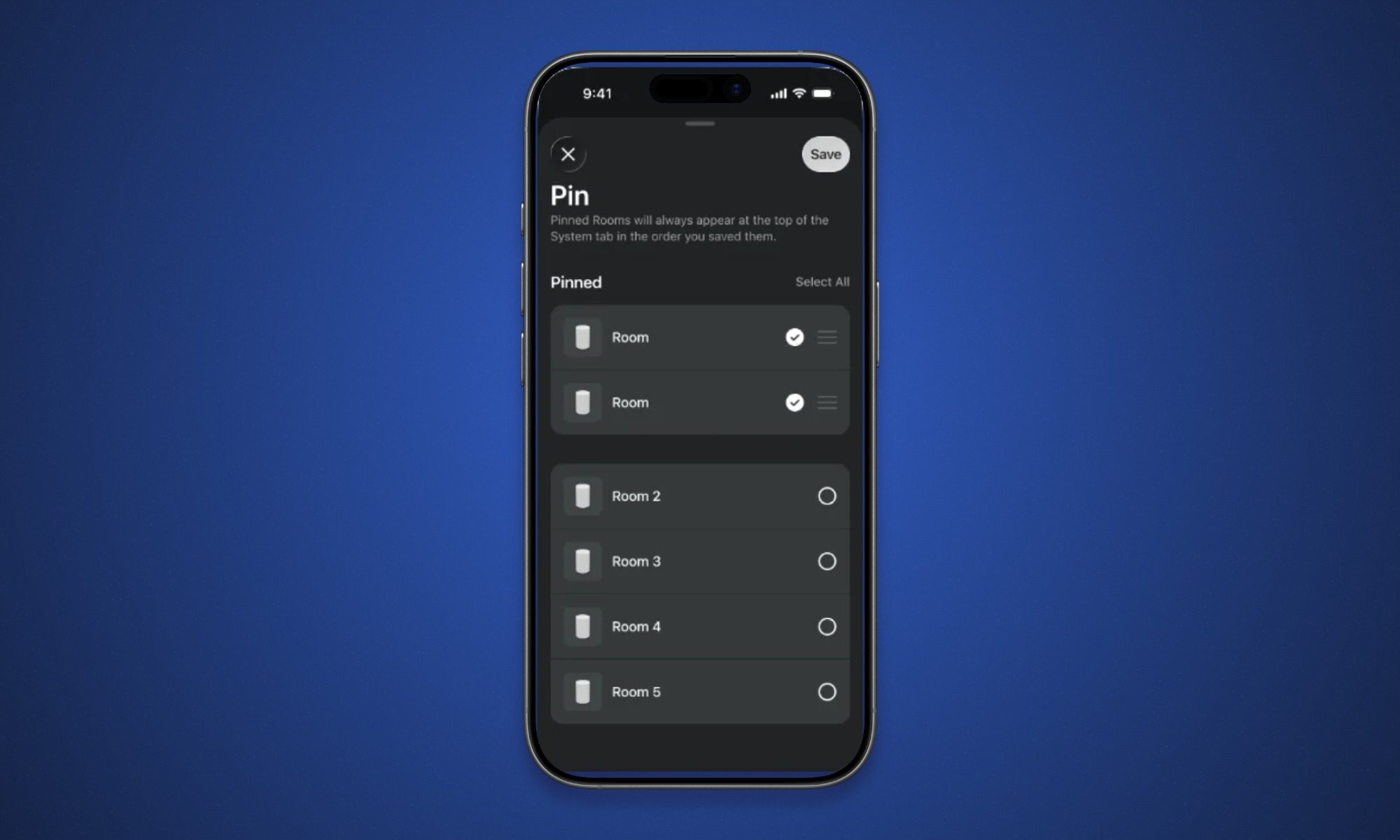
One of the most significant quality-of-life improvements introduced with this update is the ability to customize speaker and room ordering within the app. Previously, the order in which speakers appeared might have been determined by internal logic or the order of setup, which could become a point of annoyance as a Sonos system expanded to include multiple rooms. The new update offers users the flexibility to arrange their devices alphabetically, by frequency of use, or by what is currently playing. Furthermore, users can "pin" their preferred speakers or rooms to the top of the list, ensuring immediate access to their most frequently used audio zones.
This feature is particularly impactful for users managing extensive Sonos setups across different areas of their homes. The ability to quickly locate and control specific speakers or groups of speakers without scrolling through a lengthy, unorganized list can transform the daily interaction with the system. This level of personalization addresses a long-standing user request and demonstrates Sonos’s commitment to refining the experience of managing complex audio environments.
iOS Volume Controls Get an Upgrade
Beyond navigation and organization, the update also brings specific enhancements to the iOS app. The volume slider has been redesigned to be more intuitive and informative. When adjusted, the slider now expands to provide a clearer visual representation of the volume level, accompanied by a numerical readout. This offers users a more precise and immediate understanding of their audio output. Additionally, Sonos Favorites now support swipe-to-delete gestures, simplifying the management of saved playlists and radio stations. The "Now Playing" screen also receives a visual upgrade, with the ability to dynamically borrow background colors from the current album artwork, creating a more immersive and aesthetically pleasing listening experience.
A Phased Rollout and the "Enable Improved Navigation" Catch
The rollout of these significant app improvements is being managed in phases, a common strategy for large-scale software updates to mitigate potential issues and ensure stability. Sonos community manager ShaunFromSonos announced on Reddit that the update may take up to two weeks to reach all users. This means that even after receiving the app update, the new features will not be immediately visible or accessible.
The critical step for users to unlock these enhancements is to manually enable them within the app’s settings. Under the app’s settings menu, users will find an option labeled "Enable Improved Navigation." Toggling this switch is the key to activating the new tab bar, speaker sorting options, and other revamped functionalities. This "catch" – the requirement for manual activation – is a crucial detail for users to be aware of. Without this step, users may update their app and wonder why nothing has changed, leading to potential confusion and frustration.
Background and Context: A History of App Challenges
This update arrives at a critical juncture for Sonos. The company has faced considerable user criticism and scrutiny over its app’s usability in the past. A significant controversy erupted in early 2023 when a forced app update, intended to introduce new features, inadvertently removed functionality and caused widespread dissatisfaction among loyal customers. This led to a public apology from Sonos CEO Patrick Spence, who acknowledged the company’s missteps and committed to rebuilding user trust through a more user-centric development approach.
The current update can be seen as a direct response to that feedback. The focus on intuitive navigation, user customization, and a more refined interface signals a clear effort by Sonos to rectify past issues and deliver an app experience that aligns with user expectations and the premium nature of their hardware. The gradual rollout and manual enablement, while potentially inconvenient for some, could also be a strategy to allow Sonos to monitor feedback and address any emergent issues before a full, universal deployment.

Technical Details of the Update
The updated application is designated as version 87.00.36 for iOS and 87.00.35 for Android. The update is designed to install automatically once the phased release reaches an individual device. For iPhone users eager to expedite the process, refreshing the updates page in the App Store may allow them to check for and initiate the download earlier. However, for those who update and still do not see the "Enable Improved Navigation" option, Sonos advises patience, suggesting a waiting period of up to two weeks before seeking further troubleshooting.
Analysis of Implications: Rebuilding Trust and Future-Proofing
The implications of this app update extend beyond mere functional improvements. For Sonos, it represents a significant opportunity to rebuild user trust and solidify its position in the competitive smart home audio market. A seamless and intuitive app experience is paramount for customer satisfaction, particularly for a brand that emphasizes sound quality and a sophisticated, interconnected ecosystem.

The adoption of standard UI practices, such as the bottom tab bar, is a strategic move that lowers the barrier to entry for new users and simplifies operation for existing ones. The customizable speaker sorting addresses a key pain point for those with growing multiroom setups, enhancing the perceived value and flexibility of the Sonos platform.
The phased rollout and manual activation, while potentially causing initial confusion, could also be a pragmatic approach to managing the complexities of a global software deployment. It allows Sonos to gather real-world data and user feedback, making iterative improvements before a universal release. This measured approach is a departure from the more aggressive, and ultimately problematic, rollout strategies of the past.
However, the success of this update hinges on its continued refinement and the responsiveness of Sonos to user feedback. While the initial improvements are substantial, the long-term perception of the app will depend on ongoing development and the company’s ability to maintain a consistent and positive user experience. The inclusion of new iOS-specific features, such as the enhanced volume slider and swipe-to-delete gestures, also highlights a commitment to platform-specific optimizations, which is crucial in the diverse mobile ecosystem.
Looking Ahead: The Evolving Sonos Ecosystem
The Sonos app is not just a control interface; it is the gateway to the entire Sonos experience. As the company continues to innovate with new hardware and expand its software capabilities, the app must evolve in tandem. This latest update, while addressing critical usability issues, also lays a foundation for future enhancements. The introduction of more sophisticated AI-driven features, deeper integration with streaming services, and expanded smart home capabilities will all rely on a robust and user-friendly application.
The journey to a truly frictionless app experience for Sonos users has been a winding one, marked by both triumphs and stumbles. This latest iteration, with its significant improvements and careful rollout strategy, represents a significant step in the right direction. By prioritizing user feedback and adopting a more iterative development process, Sonos is demonstrating a renewed commitment to its customer base, aiming to ensure that the control of their premium audio systems is as enjoyable and effortless as the sound itself. The coming weeks, as more users gain access and enable the new features, will be a crucial period for assessing the true impact of this much-needed app overhaul.