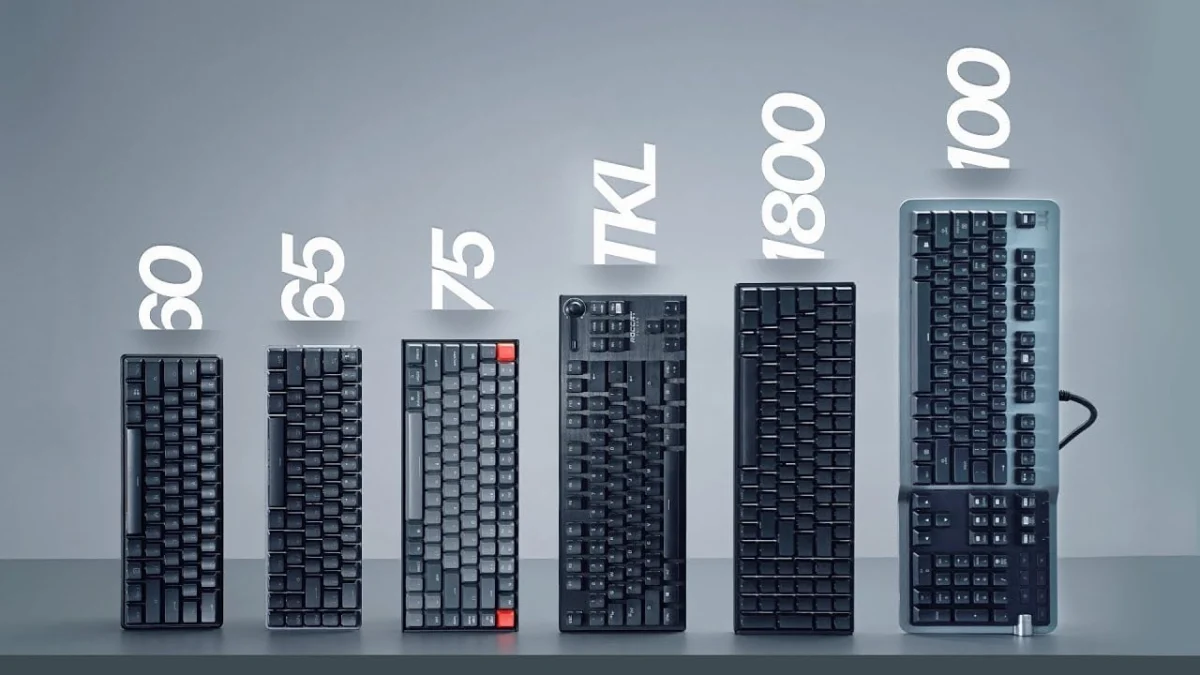
The modern peripheral market offers a vast array of mechanical keyboard layouts, evolving far beyond the traditional, standardized office typing tools of the late 20th century. As the enthusiast community and competitive gaming industries have expanded over the past decade, manufacturers have diversified physical form factors to optimize ergonomics, desk space, and user efficiency. Selecting the correct keyboard size requires a careful assessment of individual use cases, balancing the utility of dedicated physical keys against the ergonomic benefits of a compact footprint.
The evolution of computer input devices traces back to the standard 101-key IBM Model M introduced in the 1980s, which established the baseline full-size layout. For decades, this expansive format remained the undisputed industry standard, bundled uniformly with desktop computers. However, the rise of esports in the early 2010s fundamentally shifted consumer priorities. Competitive gamers demanded greater desk clearance to accommodate sweeping mouse movements at low DPI settings, prompting manufacturers to re-evaluate the necessity of every key. This shift catalyzed the proliferation of TenKeyLess (TKL) models, and eventually, the highly specialized 60% and 65% layouts popularized by custom mechanical keyboard communities.
Market data from hardware analysts indicates that while full-size (100%) keyboards still maintain a dominant market share due to their widespread adoption in corporate and data-entry environments, compact layouts—particularly TKL and 75% configurations—now dominate the enthusiast and gaming segments. Industry surveys suggest that over 65% of custom mechanical keyboard hobbyists prefer layouts smaller than a standard full-size board, driven by the desire for improved desktop ergonomics and aesthetic customization.
The Full-Size (100%) Layout
The full-size keyboard, commonly designated as the 100% layout, remains the traditional baseline for desktop computing. This comprehensive unit features the complete alphanumeric typing matrix, a dedicated function (F) row, a home/navigation cluster, arrow keys, and a full numeric keypad (numpad).
The primary advantage of the 100% layout lies in its uncompromising functionality and widespread market availability. Data-entry professionals, accountants, and financial analysts rely heavily on the dedicated numpad for rapid numerical input. Furthermore, because full-size chassis do not prioritize space conservation, manufacturers frequently utilize the extra physical estate to integrate premium features. These often include dedicated media controls, macro columns, high-polling-rate processors, USB and audio passthrough ports, and integrated wrist rests.
Ergonomically, however, the full-size keyboard presents notable drawbacks. The breadth of the unit forces the computer mouse further away from the user’s centerline, creating an unnatural shoulder angle during extended gaming or typing sessions. Consequently, users who do not regularly utilize the numeric keypad often transition to more compact formats to alleviate musculoskeletal strain in the shoulders and wrists.
The 1800-Compact Layout
As a bridge between full-size utility and space-saving design, the 1800-compact layout reorganizes the traditional 100% architecture. By eliminating the dividing spaces between the alphanumeric block, navigation cluster, and numeric keypad, this form factor compresses the overall footprint of the device while retaining every individual key.
Variants of the 1800-compact typically feature either a tightly clustered arrangement where keys share boundaries or a slightly offset lower arrow and numpad section. While this design preserves the full functional capability of a 100% keyboard within a noticeably smaller desk footprint, it often introduces compatibility challenges for aftermarket keycap replacement, as the layout relies on non-standard bottom-row and modifier key dimensions.
TenKeyLess (TKL / 80%) Layouts
The TenKeyLess, or TKL layout, represents one of the most successful compromises in the history of peripheral design. By physically severing the numeric keypad from the right side of the board, the TKL configuration reduces the width of the keyboard by approximately twenty percent while preserving the dedicated function row, navigation cluster, and arrow keys.
Industry experts and competitive gaming organizations frequently endorse TKL keyboards as the optimal balance for general-purpose users. By removing the numpad, the TKL layout significantly reduces the distance between the user’s hands and the mouse, resulting in a more neutral typing posture and expanded clearance for low-sensitivity gaming maneuvers.
Despite these ergonomic advantages, TKL keyboards can occasionally command higher retail prices than their full-size counterparts due to lower mass-production volumes in certain enthusiast brackets. Additionally, full-scale custom keycap sets often contain surplus keys that go unused on a TKL matrix, though standard alphanumeric and modifier compatibility remains high.
75% and 80% Hybrid Layouts
The 75% layout condenses the TKL architecture even further by eliminating the dead space between physical clusters. In a typical 75% board, the function row, navigation column, and arrow keys are tightly integrated into a compact, rectangular block.
Popularized heavily by custom enthusiast releases such as the Glorious GMMK Pro, the 75% layout offers the complete functional toolset of a TKL board within a significantly reduced length. However, this density requires non-standard keycap sizing for the right-side modifier and shift keys, making custom keycap procurement more complex.
A closely related variation, sometimes marketed as an 80% hybrid layout, maintains the compressed key spacing of the 75% format but visually separates the function row from the alphanumeric section. This design provides a distinct aesthetic profile favored by desktop productivity users seeking an alternative to conventional mainstream designs.
65% Layouts
Scaling down further, the 65% layout retains the directional arrow keys and a single vertical column of navigation keys (typically including Delete, Page Up, and Page Down) while omitting the dedicated physical function row. Secondary functions, such as the F-keys and tilde, are accessed by combining the primary number keys with a designated Function (FN) modifier.
Ergonomic and space-saving evaluations consistently highlight the 65% format as an ideal companion for laptop users and minimalist desk setups. It provides the essential directional controls required for navigation without sacrificing significant mouse clearance. The primary operational trade-off involves a mandatory adjustment period for users who rely heavily on direct, single-key actuation of function commands. Furthermore, non-standard bottom-row layouts on many 65% models require careful verification when purchasing aftermarket keycap sets.
60% Layouts
The 60% layout is one of the most widely adopted minimalist form factors in both gaming and enthusiast communities. By stripping away the dedicated arrow keys, navigation cluster, and function row entirely, the 60% keyboard distills the input device down to the core alphanumeric matrix.
All missing inputs—including arrows, home/end commands, and F-keys—are mapped to secondary layers accessible via key combinations. Because 60% layouts feature highly standardized keycap dimensions, the market for custom, interchangeable keycap sets is exceptionally robust.
From an ergonomic and gaming perspective, the ultra-compact footprint maximizes desk real estate, allowing for extreme mouse movement angles favored by first-person shooter (FPS) competitors. Nevertheless, usability analyses indicate that the 60% format presents steep productivity hurdles. Word processors, programmers, and administrative professionals frequently report efficiency losses due to the necessity of constant modifier-key actuation for routine editing commands like Delete and navigation.
Ultra-Compact Alternatives: 40% Layouts and Gaming Keypads
At the extreme end of the size spectrum lie 40% keyboards. These highly specialized, niche devices eliminate numbers, function rows, and arrow keys entirely, retaining only the central alphabet and essential modifiers. Operating a 40% keyboard requires navigating multiple programmed software layers to access standard punctuation and numbers. Consequently, industry analysts view these devices not as mainstream productivity tools, but as specialized proof-of-concept hardware for programming enthusiasts and keyboard collectors.
Similarly, specialized single-handed gaming keypads—manufactured by companies such as Razer and Logitech—target a hyper-specific demographic of competitive PC gamers. While offering ergonomic palm rests and fully programmable macro keys, their lack of general typing capability limits their utility as standalone computer peripherals.
Broader Market Implications and Industry Outlook
The diversification of keyboard sizes reflects a broader consumer trend toward customization, workspace optimization, and ergonomic wellness. Ergonomics researchers emphasize that reducing reaching distances for computer peripherals directly correlates with lower incidences of repetitive strain injuries (RSI) and carpal tunnel syndrome among desk workers.
As manufacturers continue to refine wireless connectivity, hot-swappable switch sockets, and programmable firmware, the boundary between consumer electronics and enthusiast-grade hardware will likely continue to blur. Consumer preference data suggests that while the full-size keyboard will retain a secure foothold in enterprise environments, the future of the retail gaming and productivity market belongs firmly to modular, space-efficient layouts such as the TKL and 65% formats. Users navigating this expansive market are advised to evaluate their daily workflows, workspace dimensions, and physical comfort requirements before committing to a specific hardware footprint.