Following the recent integration of enhanced Live search and real-time chat functionalities, Google has continued its iterative improvement of the Gmail mobile experience by introducing a dedicated "Copy code" feature. This update, currently rolling out to both Android and iOS platforms, targets one of the most persistent friction points in mobile digital security: the manual extraction of temporary verification codes from incoming emails.
The Mechanics of the Update
For years, the process of authenticating an account via email-based two-factor authentication (2FA) has followed a tedious, multi-step sequence. Users would receive a notification, unlock their device, open the Gmail application, tap into the specific email, manually highlight the alphanumeric or numeric code, copy it to the system clipboard, return to the original application, and finally paste the code to verify their identity.
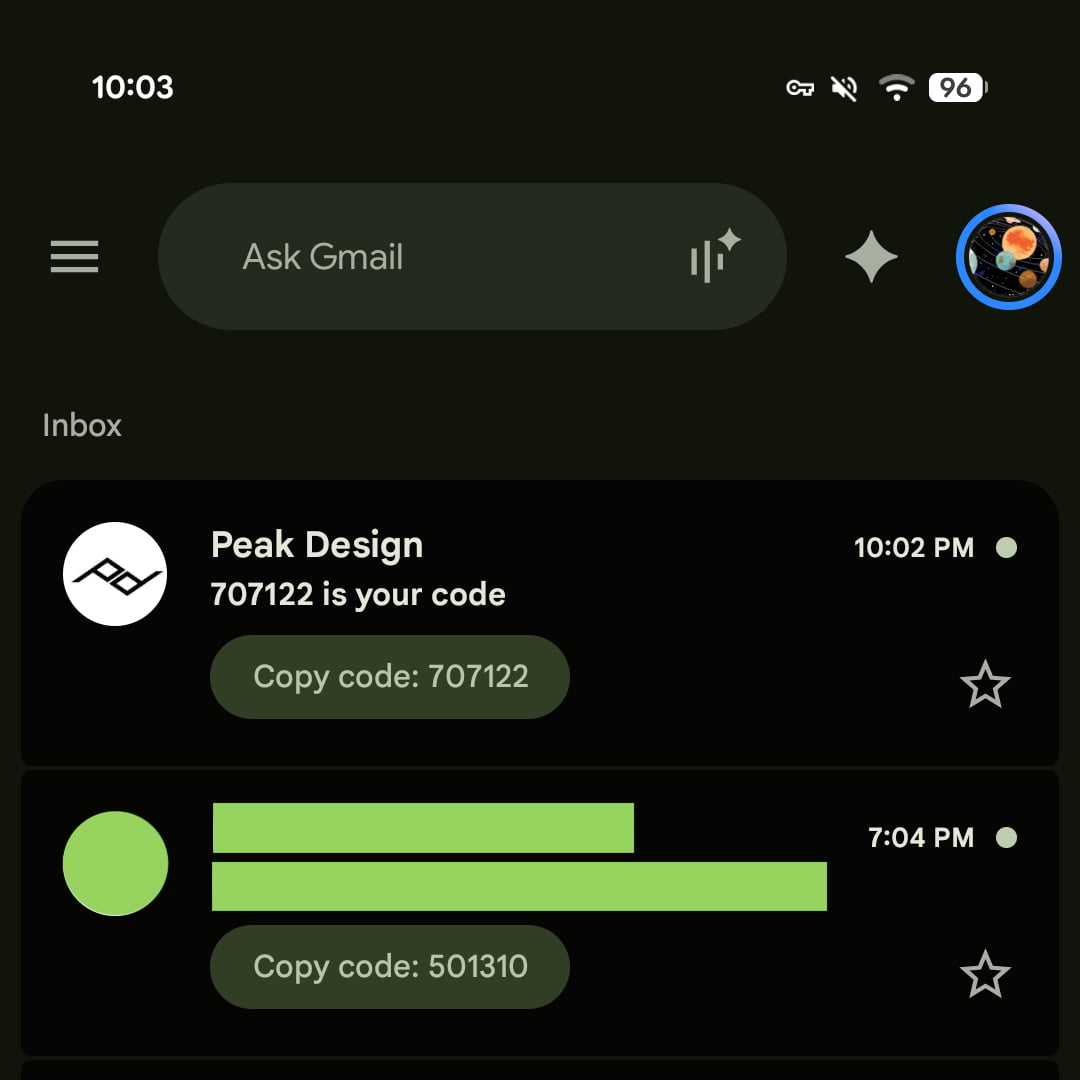
The new "Copy code" feature fundamentally shortens this process. By utilizing intelligent parsing, Gmail now detects when an incoming email contains a time-sensitive authentication token. Instead of forcing the user to open the message, the application displays a pill-shaped button directly in the inbox view, positioned neatly below the email’s subject line. This interface element mirrors the existing preview chips used for attachments, documents, and calendar invites.
When a user taps the "Copy code [000000]" button, the application automatically extracts the numerical sequence and copies it to the device’s clipboard. This functionality is currently live in Gmail for Android (version 2026.09.07.x) and Gmail for iOS (version 6.0.260907). While initial testing indicates success across various banking and e-commerce platforms, the feature has not yet been extended to the web-based version of Gmail, nor has it been integrated into push notifications.
A Chronology of Gmail’s Security Enhancements
This update is part of a broader, long-term strategy by Google to move away from legacy email management toward a more proactive, intelligent communication suite. Over the past several years, the evolution of Gmail has been defined by a transition from a static repository of text-based messages to an active assistant that anticipates user needs.
In late 2024, Google introduced advanced AI-driven categorization, which allowed the platform to better distinguish between marketing newsletters and critical system notifications. This provided the technical foundation for the current update; the system must accurately identify a "security code" vs. a "promotional discount code" to avoid cluttering the inbox with unnecessary buttons.
Earlier this month, Google pushed an update that brought "Live search" to the mobile interface, allowing users to query their mailbox with greater speed. The introduction of the "Copy code" button follows this trend of prioritizing speed. By focusing on 2FA—a critical security layer—Google is positioning Gmail not just as a mailbox, but as an essential utility for modern digital identity management.
The Broader Context of 2FA
Two-factor authentication remains the gold standard for securing online accounts against unauthorized access. According to cybersecurity research firm Cybersecurity Ventures, the average user now manages over 100 different passwords, with a significant majority of platforms requiring at least one form of secondary verification.
The reliance on email-based 2FA, while often criticized by high-level security experts in favor of hardware security keys or authenticator applications, remains the most ubiquitous form of verification for the general public. Because millions of users rely on email to receive these temporary codes, the "Copy code" button addresses a massive, albeit granular, usability issue.
Industry analysts note that reducing the "time-to-verify" is crucial for user retention. If a user finds the 2FA process cumbersome—especially when faced with session timeouts—they are statistically more likely to disable security features or utilize weaker, non-rotating passwords. By smoothing the friction associated with 2FA, Google is effectively encouraging better security hygiene among its user base.
Strategic Implications for Google and the Ecosystem
The deployment of this feature highlights a significant shift in how operating systems and applications handle metadata. The "Copy code" button is a form of contextual intelligence; the application is effectively "reading" the contents of the email before the user does to offer a relevant action.
From a development perspective, this indicates that Google’s machine learning models for natural language processing (NLP) have reached a level of reliability sufficient for automated tasks. If the model incorrectly identifies a string of numbers—for example, mistaking a tracking number for a verification code—it could cause user frustration. The fact that Google has pushed this to the stable release channel suggests that the error rate for this identification is statistically negligible.
Furthermore, the absence of this feature on the web interface suggests that the development teams for mobile and desktop are operating on different development cadences. On desktop, users have the advantage of multi-window support and physical keyboards, which makes copying text significantly faster than on a mobile device. Google likely prioritized mobile because the user pain point is significantly higher on small-screen devices where text selection can be finicky.
Reactions and Future Outlook
While Google has not released an official statement regarding the feature’s deployment, the user reception in early feedback circles has been largely positive. Cybersecurity advocates have noted that while this is a "quality-of-life" improvement, it is a welcome one that does not compromise the security of the account itself.
There is, however, anticipation regarding the potential expansion of this feature. Many users have expressed on public forums that the next logical step would be the inclusion of the "Copy code" button within the notification shade. If a user could tap "Copy" directly from the drop-down notification banner on Android without even unlocking the app, it would shave several more seconds off the authentication process.
Additionally, industry experts are curious to see if Google will open this API to third-party developers, allowing other email clients or messaging apps to implement similar "smart chips" for authentication codes. If standardizing how 2FA codes are formatted in email headers becomes a wider industry practice, it could lead to a universal standard for "security-aware" communication.
Analysis of Security Risks
While the "Copy code" feature is inherently convenient, security researchers are often cautious about any feature that parses data automatically. The risk of "phishing" remains a concern; if an attacker were to craft a malicious email that mimics a legitimate 2FA request, the Gmail interface might display a "Copy code" button that leads to a fraudulent site.

However, Google’s existing "Safe Browsing" and "Verified Sender" (BIMI/DMARC) protocols are designed to mitigate this. The "Copy code" button likely only triggers on emails that pass strict authentication checks, ensuring that the feature is only active for known, verified sources. By layering this convenience on top of existing security protocols, Google is attempting to balance usability with the strict requirements of modern authentication.
Conclusion
The introduction of the "Copy code" button is a clear indication of Google’s commitment to refining the mobile experience through small but high-impact utility. By automating the extraction of 2FA codes, the company is reducing the cognitive load on users and making it easier to maintain robust security practices.
As the digital landscape becomes increasingly complex, the role of an email provider has shifted from simple message delivery to a hub for identity verification. Whether this feature will eventually migrate to the web version of Gmail or be integrated into the Android notification system remains to be seen. For now, mobile users on both Android and iOS can expect a significantly faster and more intuitive experience when managing their two-factor authentication tokens.
This update, while minor in isolation, is a testament to the ongoing optimization of the Google ecosystem. It reinforces the company’s position at the intersection of productivity and security, ensuring that as long as users rely on email for verification, the process remains as seamless as possible. As the rollout continues across global regions, users should ensure their Gmail applications are updated to the latest versions to access the functionality immediately upon receipt of qualifying security emails.